Manual for C-211 ZOOM

Manual for C-211 ZOOM

Brand: OLYMPUS

Category: Digital Camera

Document Type:

Language: EN
Uploaded: Aug. 9, 2025, 11:45 p.m.

Warranty Information

For warranty information, refer to the operating instructions or contact customer support.

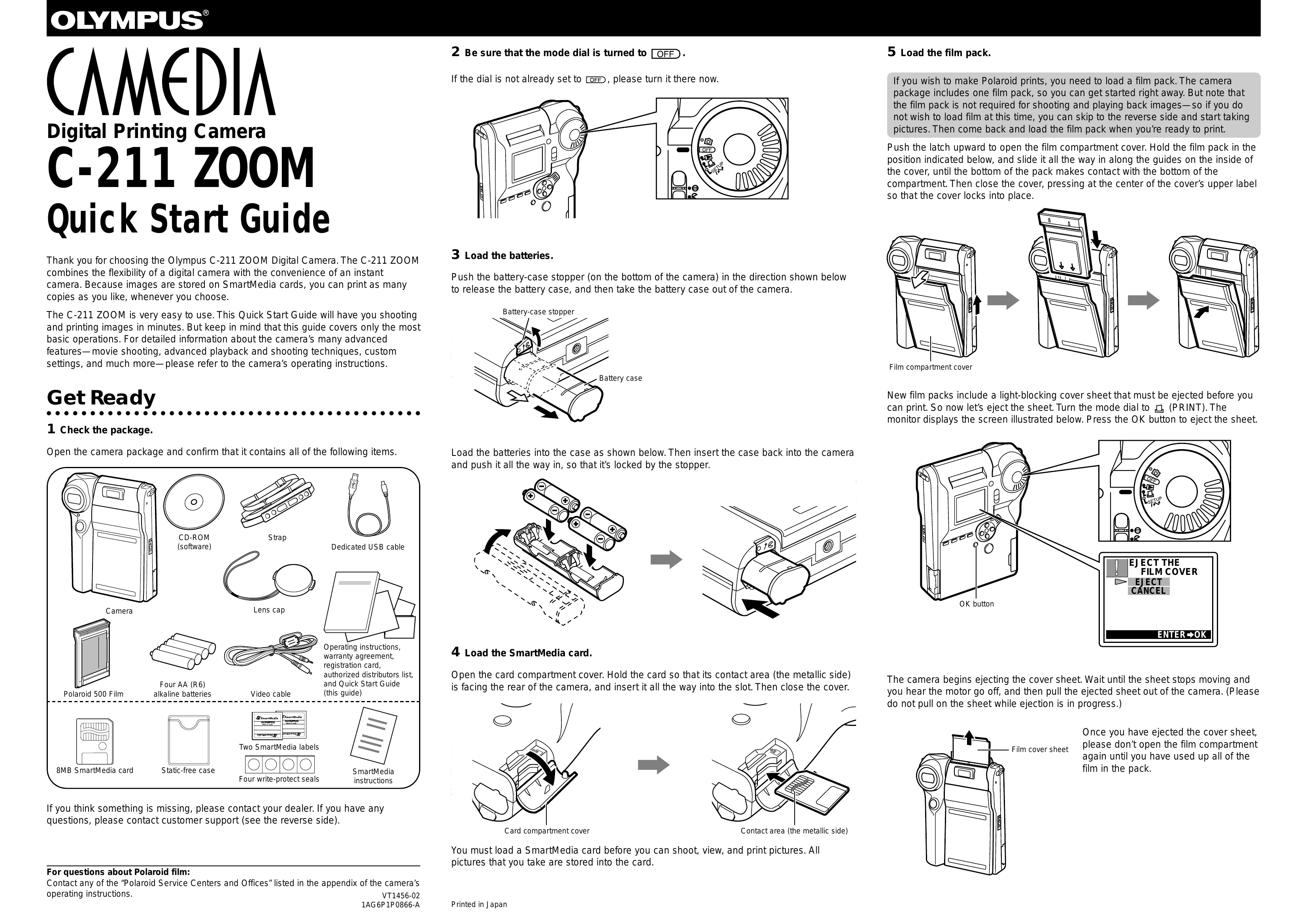
Get Ready

  1. Check the package contents.
  2. Ensure the mode dial is set to OFF.
  3. Load batteries into the camera.
  4. Insert a SmartMedia card.
  5. Load a Polaroid film pack.

Take Some Pictures

  1. Turn the mode dial to RECORD.
  2. Point the camera at the subject and use the zoom lever.
  3. Half-press the shutter button to focus.
  4. Full-press the shutter button to take the picture.

Make a Polaroid Print

  1. Turn the mode dial to PRINT.
  2. Select the desired image using the arrow pad.
  3. Press the PRINT button twice to start printing.
  4. Gently remove the film when ejected.

Turn the Camera Off

  1. Turn the mode dial to OFF.
Privacy Policy