Brand: OLYMPUS
Category: Digital Camera
Document Type:
Language: EN
Brand: OLYMPUS
Category: Digital Camera
Document Type:
Language: EN
Uploaded: Aug. 9, 2025, 11:44 p.m.
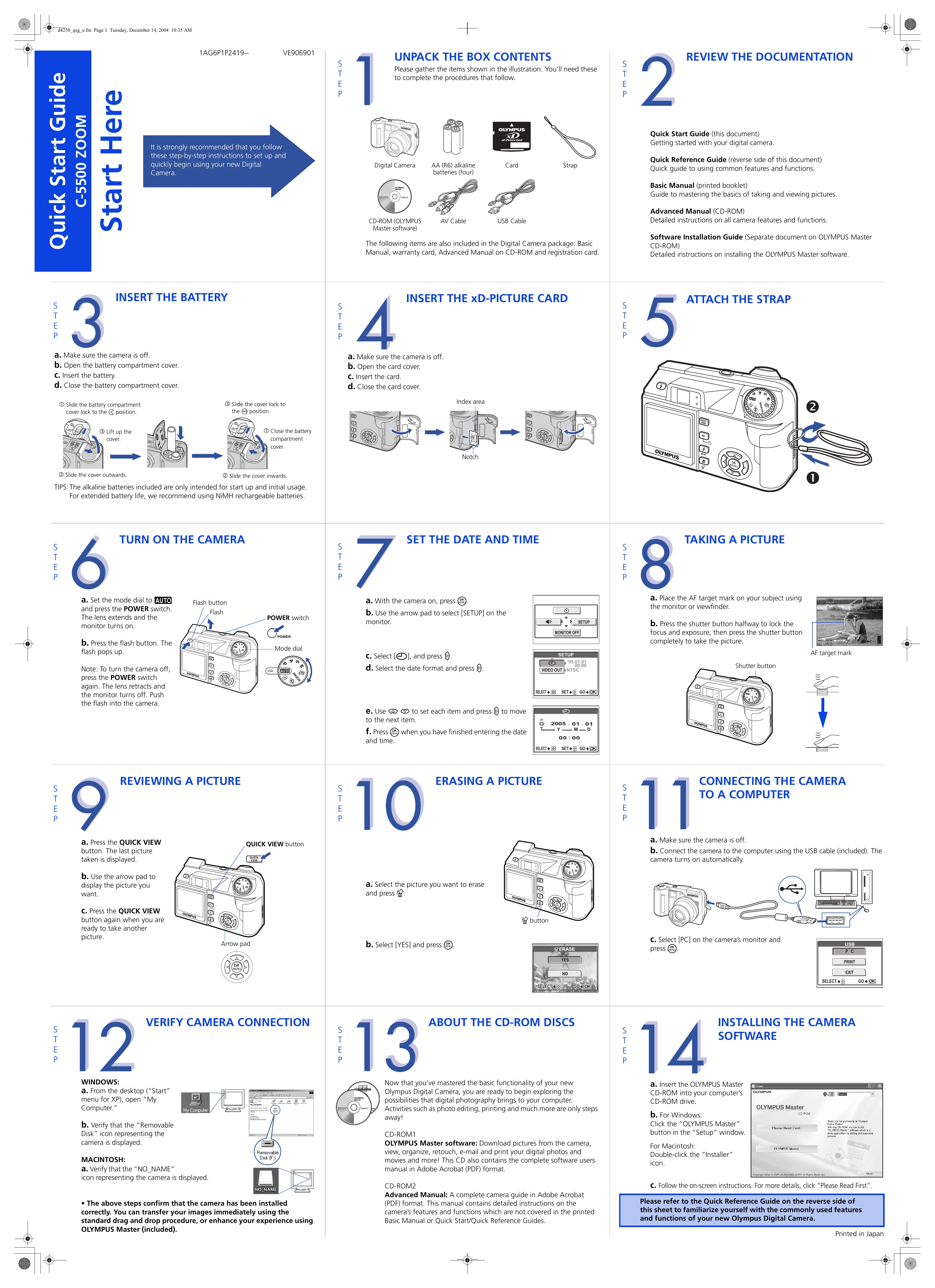
1. Unpack the Box Contents: Gather all included items like the digital camera, batteries, memory card, strap, cables, and software CD-ROM.
2. Review the Documentation: Familiarize yourself with the Quick Start Guide, Quick Reference Guide, Basic Manual, and Advanced Manual.
3. Insert the Battery: Ensure the camera is off, open the battery compartment, insert the battery, and close the cover.
4. Insert the xD-Picture Card: With the camera off, open the card cover, insert the card, and close the cover.
5. Attach the Strap: Thread the strap through the camera's strap eyelet.
6. Turn on the Camera: Set the mode dial to AUTO, press the POWER switch. Press the flash button to pop up the flash.
7. Set the Date and Time: With the camera on, navigate to SETUP using the arrow pad, select date/time settings, and input the correct date and time.
8. Taking a Picture: Frame your subject, press the shutter button halfway to lock focus/exposure, then press fully to capture the image.
9. Reviewing a Picture: Press the QUICK VIEW button to see the last taken picture. Use the arrow pad to browse.
10. Erasing a Picture: Select the picture to erase, press the ERASE button, and confirm by selecting [YES].
11. Connecting the Camera to a Computer: Connect the camera to your computer using the USB cable. Turn on the camera or let it power on automatically. Select [PC] on the camera's monitor.
12. Verify Camera Connection: On Windows, check "My Computer" for the "Removable Disk" icon. On Macintosh, check for the "NO_NAME" icon.
13. About the CD-ROM Discs: Explore OLYMPUS Master software for editing and organization, and the Advanced Manual for detailed camera functions.
14. Installing the Camera Software: Insert the OLYMPUS Master CD-ROM and follow the on-screen instructions to install the software.
| Header 1 | Header 2 | Header 3 | Header 4 |
|---|---|---|---|
| Row 1, Cell 1 | Row 1, Cell 2 | Row 1, Cell 3 | Row 1, Cell 4 |
| Row 2, Cell 1 | Row 2, Cell 2 | Row 2, Cell 3 | Row 2, Cell 4 |
| Row 3, Cell 1 | Row 3, Cell 2 | Row 3, Cell 3 | Row 3, Cell 4 |