Manual for C-765 Ultra Zoom

Manual for C-765 Ultra Zoom

Brand: OLYMPUS

Category: Digital Camera

Document Type:

Language: EN
Uploaded: Aug. 9, 2025, 11:44 p.m.

Warranty Information

Refer to the warranty card and registration card for details.

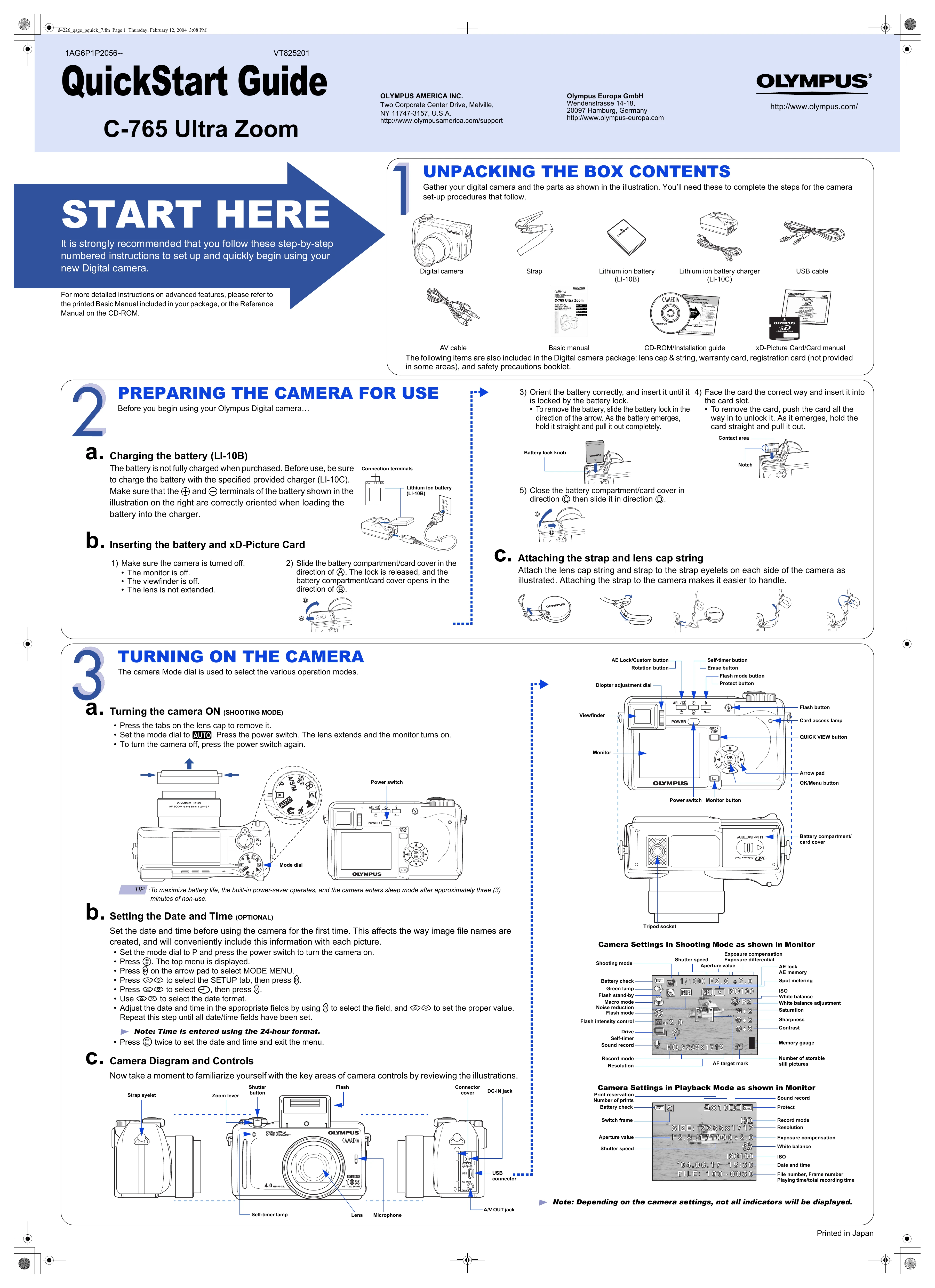
  1. START HERE: Follow numbered instructions to set up and use the camera. Refer to the Basic Manual or CD-ROM Reference Manual for advanced features.
  2. UNPACKING THE BOX CONTENTS: Gather camera and parts for setup.
  3. PREPARING THE CAMERA FOR USE: Charge the battery, insert the battery and xD-Picture Card, and attach the strap and lens cap string.
  4. TURNING ON THE CAMERA: Set Mode dial to AUTO, press power switch. Lens extends, monitor turns on.
  5. Setting the Date and Time (OPTIONAL): Set date and time for file naming and convenience.
  6. Camera Diagram and Controls: Familiarize yourself with camera controls.
  7. TAKING PICTURES: Compose using viewfinder or monitor. Press shutter button halfway to focus/meter, then fully to take picture. Use zoom lever for framing. Explore flash modes.
  8. VIEWING AND ERASING PICTURES: Access Playback mode via Mode dial or QUICK VIEW button. Scroll using buttons. Erase unwanted pictures using Single-Frame or All-Frame Erase.
  9. CONNECTING THE CAMERA TO A COMPUTER: Turn camera off. Connect via USB cable. Turn camera on, select PC mode. Ensure drivers are installed for Windows 98.
  10. INSTALLING THE CAMERA SOFTWARE: Install CAMEDIA Master software from CD-ROM for photo editing, organizing, printing, etc. Follow installation guide.

Troubleshooting and error codes

Header 1 Header 2 Header 3 Header 4
Row 1, Cell 1 Row 1, Cell 2 Row 1, Cell 3 Row 1, Cell 4
Row 2, Cell 1 Row 2, Cell 2 Row 2, Cell 3 Row 2, Cell 4
Row 3, Cell 1 Row 3, Cell 2 Row 3, Cell 3 Row 3, Cell 4
Privacy Policy