Installation Guide for CS/CU-EU12AKY series

Installation Guide for CS/CU-EU12AKY series

Brand: Panasonic

Category: Air Conditioner

Document Type: Installation Guide

Language: EN
Uploaded: Nov. 21, 2025, 6:46 p.m.

Warranty Information

Offers a 1-year comprehensive warranty on the air conditioner, with extended warranties for specific compressor types.

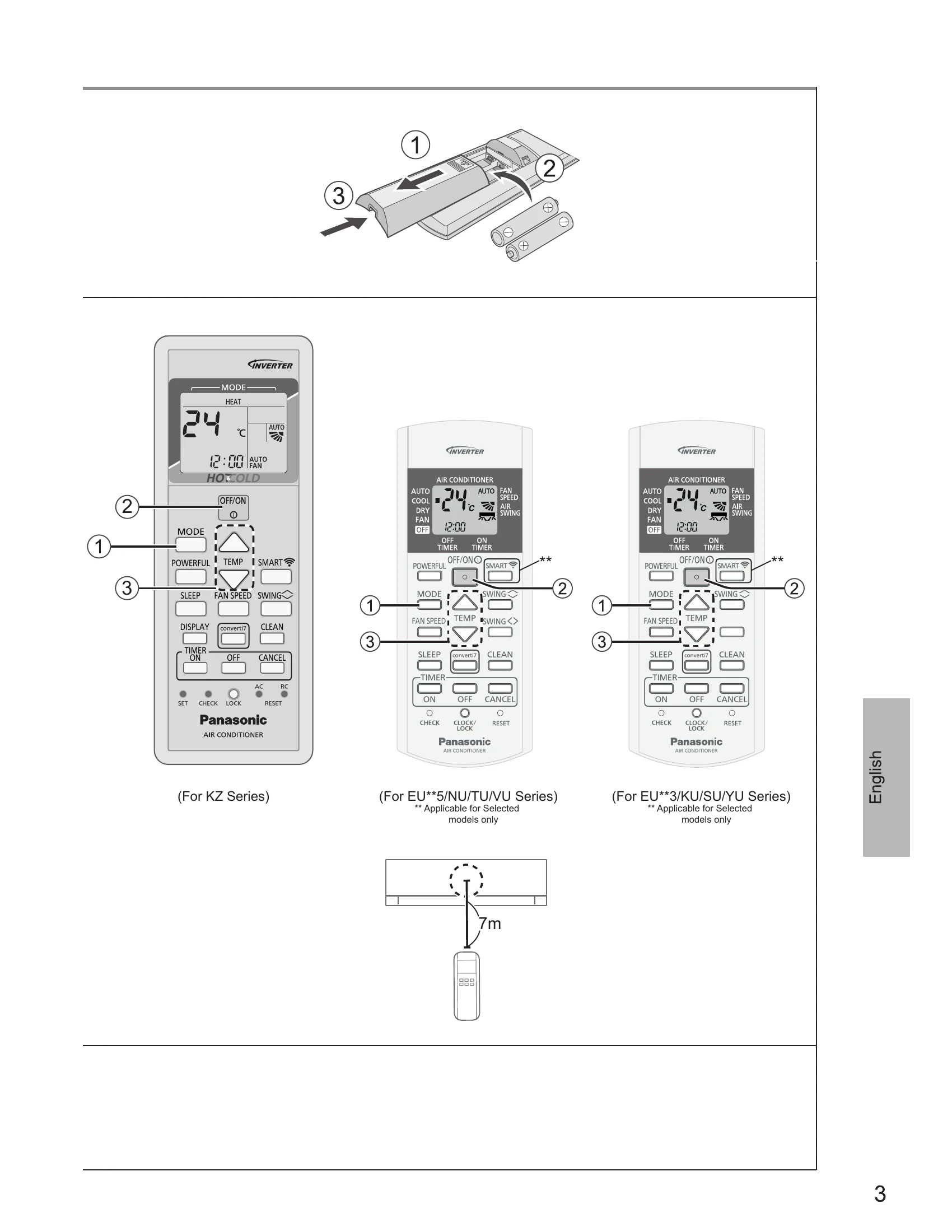
To select operation mode

  • AUTO: For your convenience, unit runs with optimized settings. Temperature can be adjusted.
  • COOL: To enjoy cool air. Use curtains to screen off sunlight and outdoor heat to reduce power consumption.
  • DRY: To dehumidify the environment. Unit operates at low fan speed for gentle cooling.
  • FAN: Operates air-con in "Fan Only" mode. Only indoor fan operates, outdoor is OFF. Provides air circulation.

To select fan speed

  • AUTO: Indoor fan speed is automatically adjusted according to the operation mode.
  • Manual selection: Quiet, Low, Medium, High.

To adjust airflow direction

  • AUTO AIR SWING: Flaps swing left/right and up/down automatically.
  • Manual adjustment: Horizontal and vertical flaps can be fixed at a predetermined position.

To clean dust on Evap. Coil

  • 'CL' displayed on unit/remote. Other functions disabled except ON/OFF. (10-15 mins). Only usable in OFF condition.

To reach temperature quickly

  • POWERFUL mode: Achieves faster cooling for 1 hour in COOL mode only.

To maximise comfort while sleeping

  • SLEEP mode: Gradually increases temperature by 1°C every 3 hours. Unit turns off automatically after 8 hours. 'SL' displayed. Can be cancelled.

To turn ON/OFF Wi-Fi function

  • Press SMART button to switch ON Wi-Fi.
  • Press & hold SMART for 5 secs to enter setup mode.
  • Press SMART + CANCEL to turn OFF Wi-Fi for 4 hours.
  • Press & hold CANCEL for 10 secs to check Wi-Fi connection.

To set the timer

  • Select ON or OFF timer.
  • Set time by pressing the button to increase timer in 10-min steps. Confirm by waiting 3 seconds.
  • Cancel timer by pressing CANCEL. Restore timer after power failure by pressing the button.

Auto Restart Control

  • Operation resumes after power failure with previous settings. SLEEP, TIMER functions do not resume.

Troubleshooting and error codes

Symptom Cause
Mist emerges from indoor unit. Condensation effect due to cooling process.
Water flowing sound during operation. Refrigerant flow inside the unit.
The room has a peculiar odour. This may be due to damp smell emitted by the wall, carpet, furniture or clothing.
Indoor fan stops occasionally during automatic fan speed setting. This helps to remove the surrounding odour.
Operation is delayed a few minutes after restarting. Condensation or evaporation occurs on pipes. The delay is a protection to the unit's compressor.
Outdoor unit emits water/steam. Condensation or evaporation occurs on pipes.
TIMER indicator is always on. The timer setting repeats daily once set.
Cracking sound during operation. Changes of temperature caused the expansion/contraction of the unit.
Discoloration of some plastic parts. Discoloration is subject to material types used in plastic parts, accelerated when exposed to heat, sun light, UV light, or environmental factor.
Wi-Fi LED stays ON during unit turn OFF. Unit's Wi-Fi connection with the router is activated.
Wi-Fi LED continuously blinking. Check unit's Wi-Fi connection with router.
Symptom Check
Operation in COOL mode is not working efficiently.
  • Set the temperature correctly.
  • Close all doors and windows.
  • Clean or replace the filters.
  • Clear any obstruction at the air inlet and air outlet vents.
Noisy during operation.
  • Check if the unit has been installed at an incline.
  • Close the front panel properly.
Remote control does not work. (Display is dim or transmission signal is weak.)
  • Insert the batteries correctly.
  • Replace weak batteries.
The unit does not work.
  • Check if the circuit breaker is tripped.
  • Check if timers have been set.
The unit does not receive the signal from the remote control.
  • Make sure the receiver is not obstructed.
  • Certain fluorescent lights may interfere with signal transmitter. Please consult authorised dealer.
Privacy Policy