Manual for CQ-C3300N

Manual for CQ-C3300N

Brand: Panasonic

Category: Automotive Electronics

Document Type: Manual

Language: EN
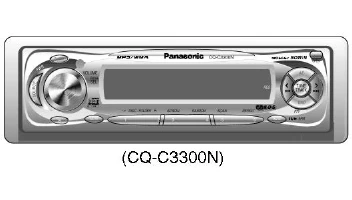
Uploaded: Nov. 21, 2025, 7:37 p.m.

Basic Operation

  • Power/Source: Press PWR to turn the unit on. Press SOURCE to cycle through audio sources (Tuner, CD, AUX, etc.).
  • Volume: Rotate the VOLUME knob to adjust the sound level. Press VOLUME to toggle between volume and bass/treble/balance/fader adjustments.
  • Tuner: Press BAND to cycle through FM/AM bands. Use TUNE/TRACK buttons to seek stations or manually tune.
  • CD Player: Press DISC/FOLDER to browse discs/folders. Use TRACK buttons to skip tracks. Use SCAN to preview tracks. Use RANDOM to play tracks in random order. Use REPEAT to repeat the current track or disc.
  • Settings: Access settings through the menu options displayed on the screen.

Advanced Features

  • MP3/WMA playback supported.
  • CD Text display compatible.
  • CD Changer Control (may vary by model).
  • Subwoofer output (may vary by model).

Troubleshooting and error codes

Symptom Possible Cause Remedy
No power Fuse is blown. Replace the fuse.
No sound Mute is on. Turn off Mute.
Volume is set to minimum. Increase the volume.
CD does not play CD is dirty or damaged. Clean or replace the CD.
CD is inserted incorrectly. Reinsert the CD correctly.
Poor radio reception Antenna is not connected properly. Check antenna connection.
Antenna is not extended. Extend the antenna.
Privacy Policy