| Power supply: There's no power. |
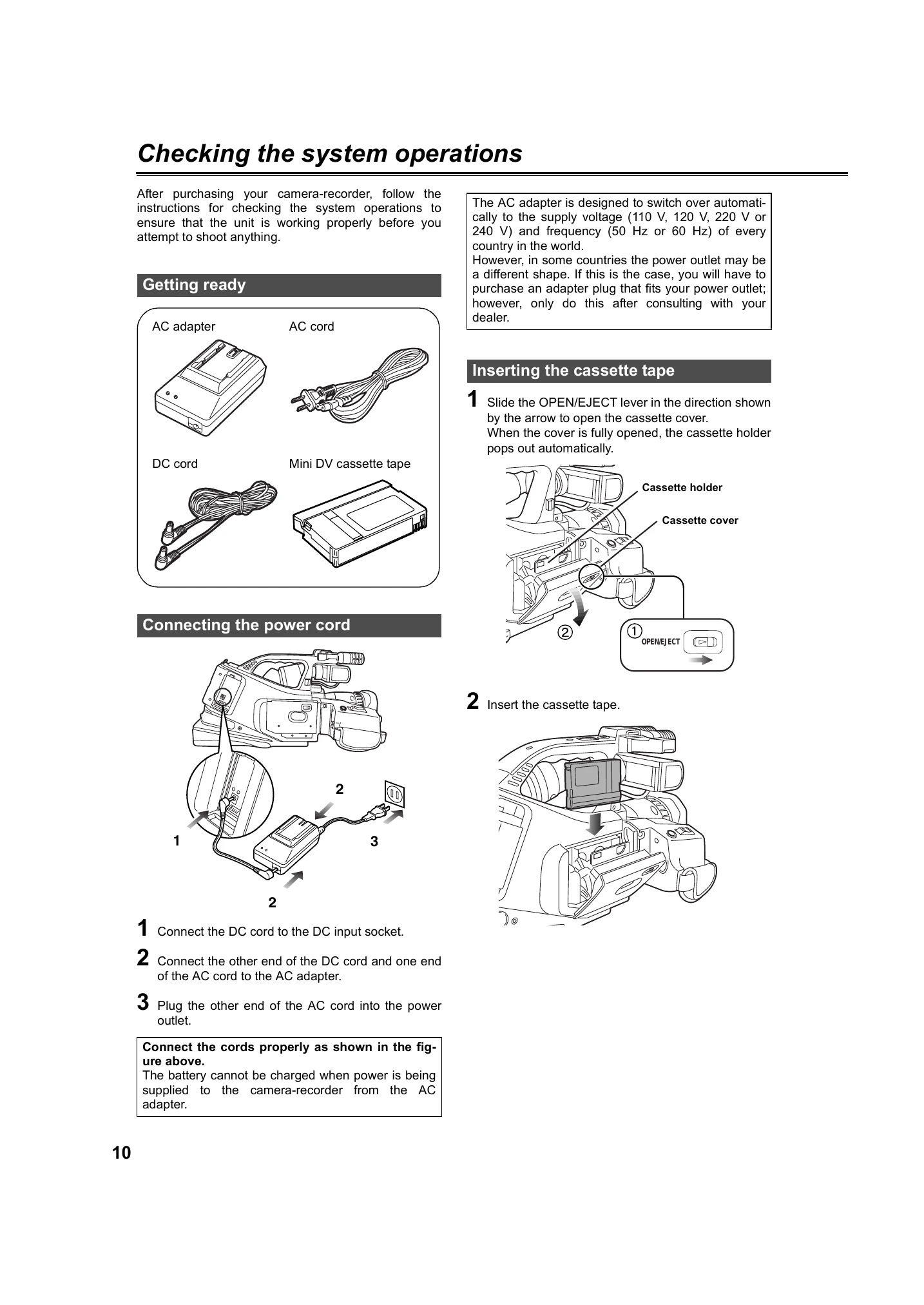
- Have the battery and AC adapter been connected properly? Check the connections again.
|
P10, 21 |
| Power supply: Power shuts off for no apparent reason. |
- To prevent the battery from running down needlessly and to safeguard the tape from wear, the camera-recorder's power is automatically turned off when the camera-recorder has been left in the shooting pause mode for more than 5 minutes. Check the setting you have selected for the TAPE PROTECT item on the OTHER FUNCTIONS screen.
|
P73 |
| Power supply: Power goes off as soon as it is turned on. |
- Has the battery run out? If the remaining battery charge display is blinking or the □ display appears, it means that the battery has run out. Either recharge the battery or replace the discharged battery with a fully charged one.
- Has any condensation formed? At times when, for instance, the camera-recorder is taken from a cold place to a heated room, condensation may form inside. If this happens, the power is automatically turned off and the only operation that you will be able to perform is to remove the cassette. Wait until the condensation has dried out.
|
P20 |
| Battery: The battery runs down quickly. |
- Has the battery been fully charged? Keep charging it until the AC adapter's CHARGE lamp goes off.
- Are you using the battery in a cold place? The battery is affected by the ambient temperature. Its operating time is reduced in low-temperature locations.
- Has the battery reached the end of its service life? The battery has a fixed service life which differs depending on how the battery is used. If the battery operates only for a short period even when it is charged adequately, it means that it has reached the end of its service life.
|
P20 |
| Battery: The battery cannot be charged. |
- Is the DC cord connected to the AC adapter? You cannot charge the battery if this cord is connected.
|
P20 |
| Normal video recording: I can't record even though I've inserted the cassette tape properly. |
- Is the tab on the cassette tape used to prevent accidental erasure at the open (SAVE) position? You cannot record if this tab is open.
- Has the cassette tape come to the very end? If so, replace it with another one.
- Is the POWER lever at the ON position?
- Is the VCR lamp lighted? You cannot shoot in the VCR mode.
- Has condensation formed? If it has formed, the only operation you can perform is to remove the cassette tape. Wait until the condensation has dried out.
- Has the AUTO OFF or T REEL LOCK warning display appeared? Check the tape as it may have snapped.
- Is the external unit disconnected from the DV connector while you are trying to perform backup recording with "EXT" selected as the DV CONTROL item setting on the OTHER FUNCTIONS screen?
|
P15 |
| Other types of video recording: The subject is not brought into focus automatically. |
- Is the manual focus mode established? You can focus automatically only when the auto focus mode is established.
- Are you shooting a scene where it's hard to bring the subject into focus in the auto focus mode? Some subjects are hard to bring into focus in the auto focus mode. If this is the case, bring the subject into focus in the manual focus mode. It may be hard to bring the subject into focus when: 1. both close and distant objects are to be shot 2. shooting through dirty windows or other glass 3. shooting in dark places 4. there are sparkling or shiny objects around the subject 5. subjects are moving fast 6. shooting scenes with minimal contrast 7. shooting at a low shutter speed
|
P30, 37 |
| Editing: I can't perform audio dubbing. |
- Is the tab on the cassette tape used to prevent accidental erasure at the open (SAVE) position? You cannot edit if this tab is open.
- Are you trying to edit a part that was shot in the LP mode? You cannot perform audio dubbing on tapes recorded in the LP mode because the tracks on the tape in this mode are narrower than the head width.
|
P15 |
| Displays: There's something wrong with the time code display. |
- If a tape is played in the reverse slow mode, the time code display may not register a regular count, but this is not a sign of malfunctioning.
|
|
| Displays: The remaining tape display differs from the actual amount of tape remaining. |
- The remaining tape is not displayed accurately if you shoot continuously for periods of less than 30 seconds. The display may show 2 to 3 minutes less remaining tape than the time actually remaining on the tape.
|
|
| Playback (images): I can't play back a tape even when I press the play button. |
- Is the VCR lamp lighted? No kind of playback operation can be performed unless this lamp is lighted.
|
P43 |
| Playback (images): Mosaic-like noise appears when I cue or review a tape. |
- This noise is inherent to digital video technology. It is not a sign of malfunctioning.
|
|
| Playback (images): Playback images do not appear on the TV screen even though I have connected the camera-recorder to the TV set properly. |
- Is the TV input selector set to "video input?" Read the TV set's instruction manual carefully, and select the video input connector you should use to connect your camera-recorder.
|
|
| Playback (images): The playback images are not displayed clearly. |
- Are the camera-recorder's heads dirty? The playback images will not be displayed clearly if these heads are dirty.
|
|
| Playback (sound): I can't hear any sound from the camera-recorder's speaker. |
- Have you turned down the camera-recorder's volume control too far? In the VCR mode, adjust the volume level using the multi dial.
|
P44 |
| Playback (sound): I can hear two sets of sound. |
- Have you selected "MIX" as the 32K (12bit) AUDIO item setting on the PLAYBACK FUNCTION screen?
- If you perform audio dubbing on a tape that was recorded with "32K (12bit)" selected as the AUDIO REC item setting on the RECORDING SETUP screen, you will hear the sound heard during recording and that of the audio dubbing.
|
P67 |
| Playback (sound): When I performed audio dubbing on an existing recording, the original sound was erased. |
- If you perform audio dubbing on a tape that was recorded with "48K (16bit)" selected as the AUDIO REC item setting on the RECORDING SETUP screen, you will erase the original sound on the tape. To leave the original sound intact, make sure that "32K (12bit)" is selected as the item setting when you shoot the original recording.
|
P69 |
| Other: I can't remove the cassette tape. |
- Is power still being supplied to the camera-recorder? (Is the power from the AC adapter and battery supplied properly?) So long as the power is supplied, you can remove the cassette even if the POWER lever is at the OFF position.
- Has condensation formed? If it forms, the only operation you can perform is to remove the cassette. Wait until the condensation has dried out.
- If the cassette cover is closed immediately after sliding the EJECT switch to open the cassette cover, you may no longer be able to perform any operations other than eject. If you did this, slide the EJECT switch again to open the cassette cover, check that the cassette mechanism has finished ejecting the cassette, and then close the cassette cover.
|
P77 |
| Other: I can remove the cassette but I can't perform any other operations. |
- If the cassette cover is closed immediately after sliding the EJECT switch to open the cassette cover, you may no longer be able to perform any operations other than eject. If you did this, slide the EJECT switch again to open the cassette cover, check that the cassette mechanism has finished ejecting the cassette, and then close the cassette cover.
|
|
| Other: The remote control unit does not work. |
- Has the button battery in the remote control unit run out? If the remote control fails to work even when it is operated near the camera-recorder's remote control sensor, it means that the button battery has run out. Replace it with a new one.
- Is the remote control setting the same for the remote control unit and the camera-recorder? If the REMOTE item setting does not correspond between the two units, the remote control unit will not work.
|
P19, 72 |
| Other: I hear a rattling sound when I tilt the camera-recorder back and forth. |
- There are some parts in the structure of the camera unit that make a rattling sound in the VCR mode or when the POWER lever is at the OFF position. This is not a sign that something is broken.
|
|