Manual for AJ-HPX2000P

Manual for AJ-HPX2000P

Brand: Panasonic

Category: Camcorder

Document Type: Manual

Language: EN

Uploaded: Aug. 10, 2025, 12:42 a.m.

Warranty Information

None

Starting Up the Camera-Recorder

  1. Ensure the battery pack is securely attached to the battery mount.
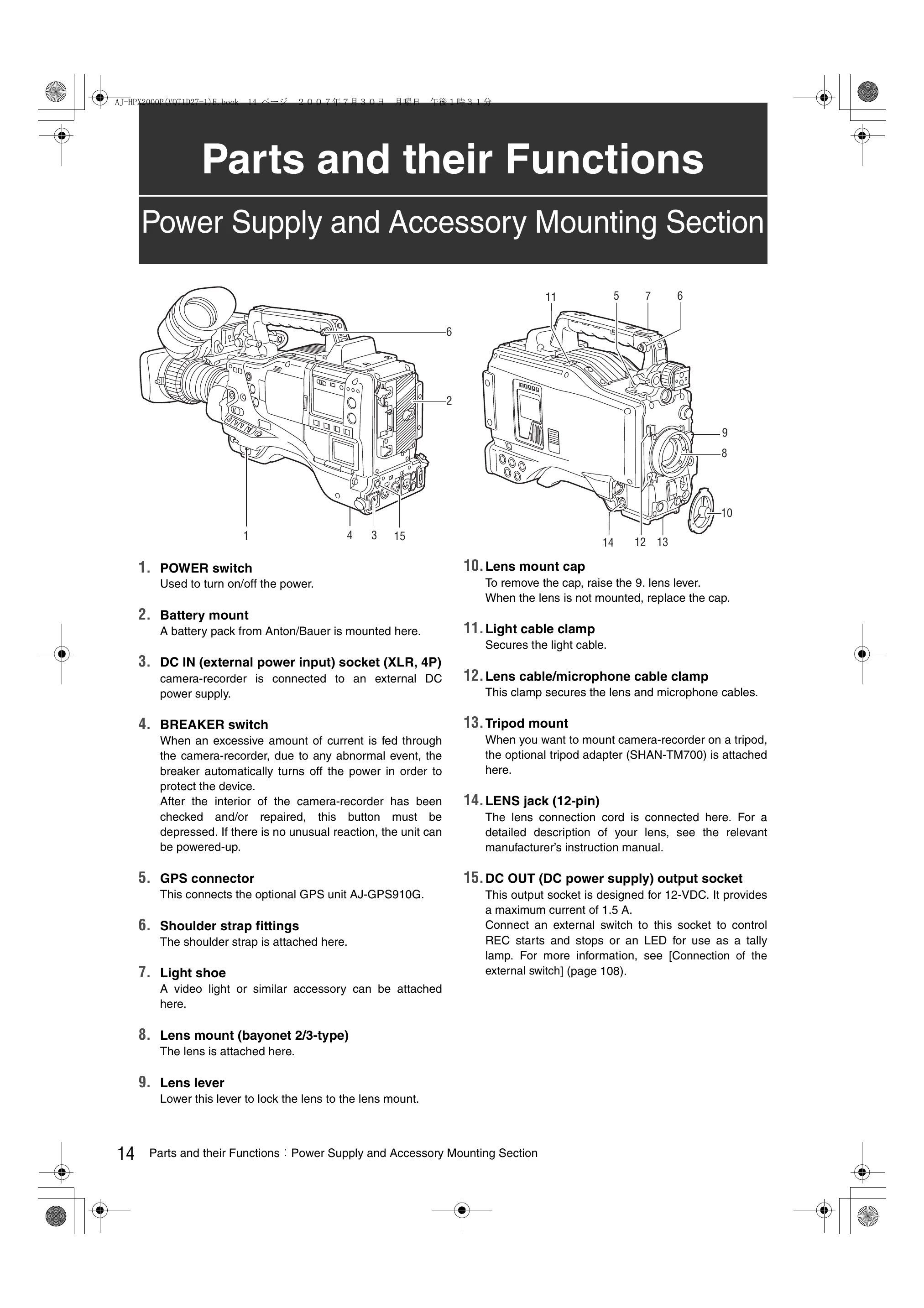
  2. Connect the external DC power supply to the DC IN socket if necessary.
  3. Press the POWER switch to turn the unit on.
  4. Adjust the black-balance setting via the menu for optimal picture quality, especially when using the unit for the first time.
  5. Configure viewfinder settings by selecting the appropriate on the screen within the page, based on your viewfinder.

Basic Recording Procedures

  1. Insert a P2 card into the appropriate slot.
  2. Set the recording mode and format as required.
  3. Aim the lens at the subject and focus.
  4. Press the REC START/STOP button to begin recording. Press it again to stop.
Privacy Policy