Brand: Panasonic
Category: Camcorder
Document Type: Manual
Language: EN
Brand: Panasonic
Category: Camcorder
Document Type: Manual
Language: EN
Uploaded: Aug. 10, 2025, 12:42 a.m.
Preparation:
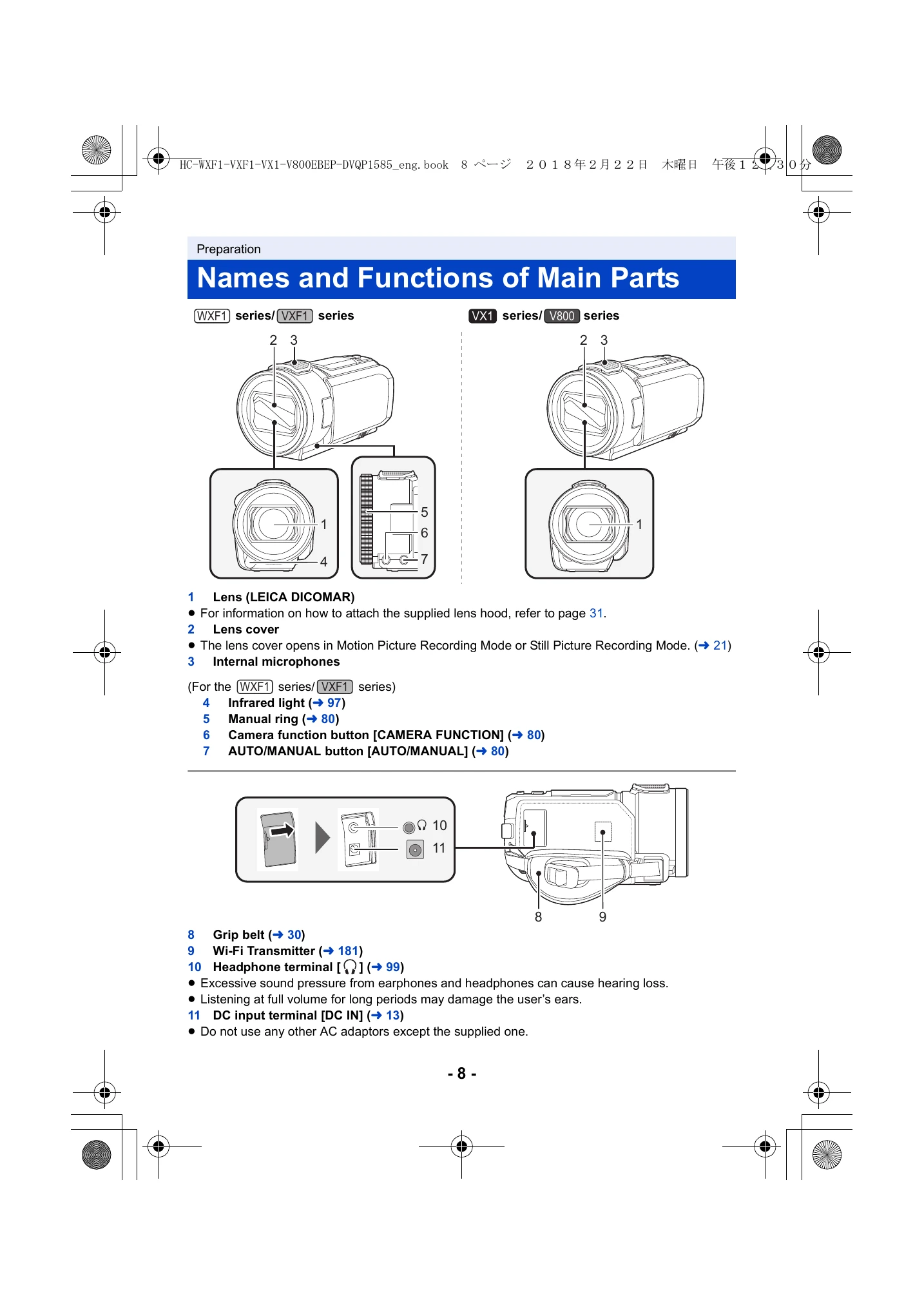
Familiarize yourself with the parts of the camera (Pages 8-11). Charge the battery fully (Page 12) before first use. Select a recording media, either the built-in memory (WXF1M only) or an SD card (Page 17). Turn the unit on/off using the power button or LCD monitor (Pages 19-20). Select the recording mode (Motion Picture, Still Picture, or Playback) using the recording/playback button or mode selector (Page 21, 22).
Recording:
Record motion pictures (Page 33) or still pictures (Page 35). Explore various recording formats like AVCHD, 4K MP4, MP4, and 24p (Page 2). Advanced recording options include HDR Movie Mode, Sub Camera recording, and manual controls like White Balance and shutter speed (Pages 52-86).
Playback:
Play back recorded motion pictures and still pictures (Page 38). Utilize various playback functions such as Time Frame Index, Repeat Playback, and Highlight Playback (Pages 120-148). Copying and dubbing options are available (Pages 166-174), along with Wi-Fi functions for sharing and remote control (Pages 180-220).
| Troubleshooting | Possible Cause | Solution |
|---|---|---|
| No power | The battery is not loaded. | Load the battery. |
| The battery is discharged. | Charge the battery. | |
| The AC adaptor is not connected. | Connect the AC adaptor. | |
| The unit does not operate correctly. | The unit is not turned on. | Turn the unit on. |
| The unit has malfunctioned. | Turn the unit off and then on again. | |
| The LCD monitor is blank. | The LCD monitor is closed. | Open the LCD monitor. |
| The unit is turned off. | Turn the unit on. | |
| The screen is dark. | The brightness of the LCD monitor is set low. | Adjust the brightness. |
| The temperature is very low. | Wait for the internal temperature to rise. | |
| The touch screen does not operate. | The LCD monitor is dirty. | Wipe the LCD monitor with a soft cloth. |
| The unit is not turned on. | Turn the unit on. | |
| A message appears. | Internal error or malfunction. | Turn the unit off and then on again. If the problem persists, contact customer support. |
| The recording time is shorter than expected. | The battery is not fully charged. | Charge the battery fully. |
| The recording format or scene is demanding on the battery. | Select a power-saving recording format or mode. | |
| The image quality is poor. | The lens is dirty. | Clean the lens. |
| The recording environment is not ideal (e.g., low light, subject too far). | Adjust camera settings or move closer to the subject. |