Brand: Panasonic
Category: Cordless Phone
Document Type: Manual
Language: EN
Brand: Panasonic
Category: Cordless Phone
Document Type: Manual
Language: EN
Uploaded: Nov. 21, 2025, 6:09 p.m.
Manual Publish Date: 2015-12-04
This Panasonic product is covered by a limited one-year warranty against defects in material and workmanship.
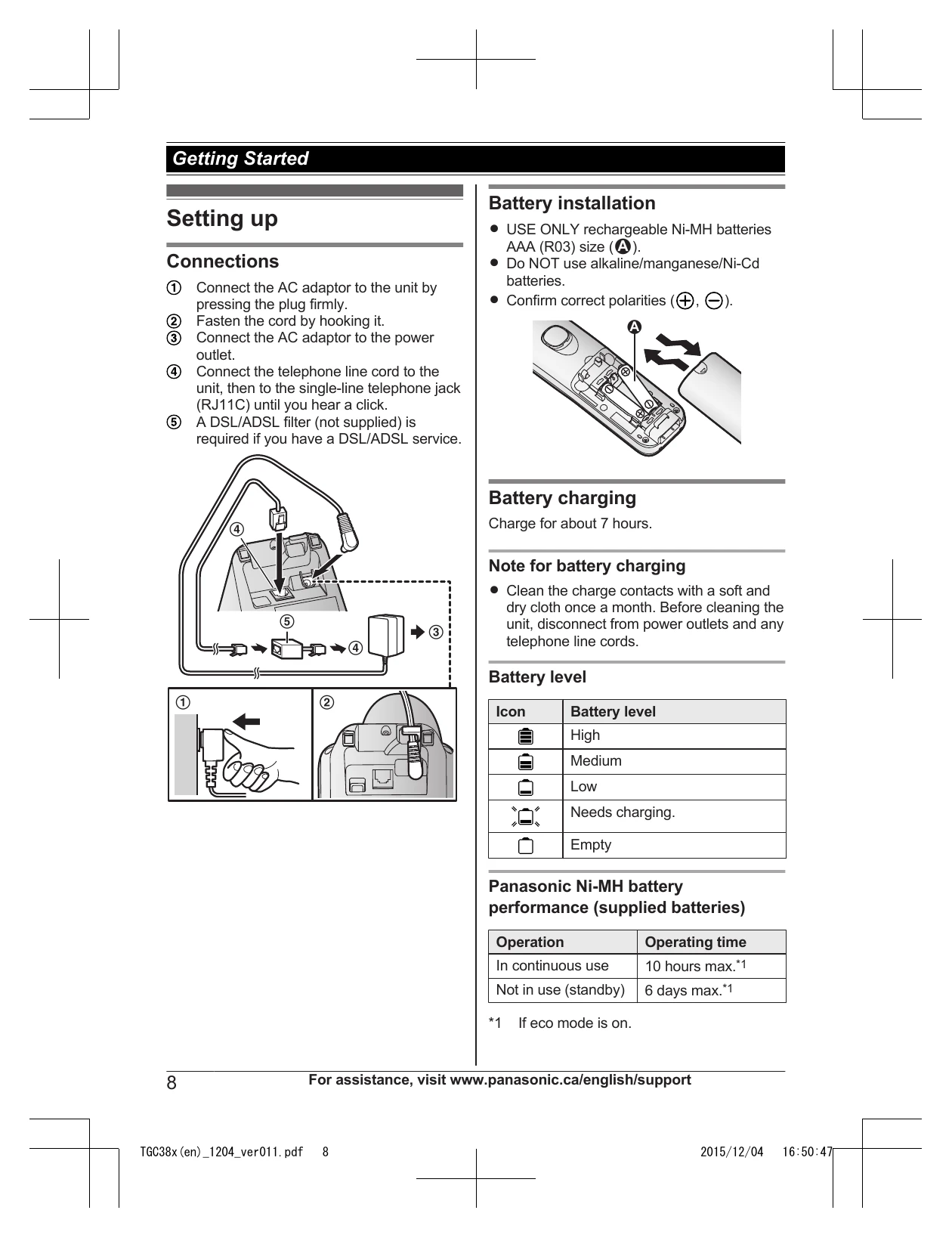
Connect the AC adaptor to the unit and power outlet. Connect the telephone line cord to the unit and telephone jack. If you have DSL/ADSL service, a filter is required.
Use only rechargeable Ni-MH AAA batteries. Do not use alkaline/manganese/Ni-Cd batteries. Confirm correct polarities. Charge the batteries for about 7 hours.
Familiarize yourself with the TALK, SP-PHONE, MENU, dial keypad, OFF, FLASH, INTERCOM, and navigation keys.
Locate charge contacts and the LOCATOR button.
Understand the various icons on the handset display, such as range indicators, call status, eco mode, speakerphone, ringer volume, night mode, privacy mode, alarm, blocked calls, and clarity booster.
Enter the current month, date, year, hour, and minute. Select AM/PM. A 12-hour or 24-hour format may be used.
Select between Tone and Pulse dialing.
Choose the desired display language.
| Problem | Cause/solution |
|---|---|
| Access # to VM service is not stored | You have not stored the voicemail access number. Store the number (page 23). |
| Base no power or No link. Re-connect base AC adaptor. | The handset has lost communication with the base unit. Move closer to the base unit and try again. Unplug the base unit's AC adaptor to reset the unit. Reconnect the adaptor and try again. The handset's registration may have been cancelled. Re-register the handset (page 20). |
| Busy | Other units are in use and the system is busy. Try again later. |
| Check tel line | The supplied telephone line cord has not been connected yet or not connected properly. Check the connections (page 8). |
| Invalid | There is no handset registered to the base unit matching the handset number you entered. The handset is not registered to the base unit. Register the handset (page 20). |
| Use rechargeable battery. | A wrong type of battery such as alkaline or manganese was inserted. Use only the rechargeable Ni-MH batteries noted on page 4, 6. |
| I cannot hear a dial tone. | The base unit's AC adaptor or telephone line cord is not connected. Check the connections. |
| Time on the unit has shifted. | Incorrect time information from incoming Caller ID changes the time. Set the time adjustment to "Manual" (off) (page 17). |
| I fully charged the batteries, but flashes, is displayed, or the operating time seems to be shorter. | Clean the battery ends () and the charge contacts with a dry cloth and charge again. It is time to replace the batteries (page 8). |
| is displayed. | The handset is too far from the base unit. Move closer. The base unit's AC adaptor is not properly connected. Reconnect AC adaptor to the base unit. The handset is not registered to the base unit. Register it (page 20). |
| Noise is heard, sound cuts in and out. | You are using the handset or base unit in an area with high electrical interference. Re-position the base unit and use the handset away from sources of interference. Move closer to the base unit. If you use a DSL/ADSL service, we recommend connecting a DSL/ADSL filter between the base unit and the telephone line jack. Contact your DSL/ADSL provider for details. |
| The handset does not ring. | The ringer volume is turned off. Adjust the ringer volume (page 11, 17). Night mode is turned on. Turn it off (page 19). |
| I cannot make a call. | The dialing mode may be set incorrectly. Change the setting (page 10). |
| Caller information is not displayed. | You must subscribe to Caller ID service. Contact your phone service provider for details. If your unit is connected to any additional telephone equipment such as a Caller ID box or cordless telephone line jack, plug the unit directly into the wall jack. If you use a DSL/ADSL service, we recommend connecting a DSL/ADSL filter between the base unit and the telephone line jack. Contact your DSL/ADSL provider for details. The name display service may not be available in some areas. Contact your phone service provider for details. |
| Caller information is displayed late. | Depending on your phone service provider, the unit may display the caller's information at the 2nd ring or later. |
| "New Voice Mail" is shown on the handset display. How do I remove this message from the display? | Listen your new voicemail messages (page 23). Depending on your voicemail service provider, you may need to erase all messages in your voice mailbox in order to remove this message. You can remove this message manually by pressing and holding # until the unit beeps. |
| Liquid or other form of moisture has entered the handset/base unit. | Disconnect the AC adaptor and telephone line cord from the base unit. Remove the batteries from the handset and leave to dry for at least 3 days. After the handset/base unit are completely dry, reconnect the AC adaptor and telephone line cord. Insert the batteries and charge fully before use. If the unit does not work properly, contact an authorized service centre. |