Brand: Panasonic
Category: Cordless Phone
Document Type: Manual
Language: EN
Brand: Panasonic
Category: Cordless Phone
Document Type: Manual
Language: EN
Uploaded: Nov. 21, 2025, 7:19 p.m.
Manual Publish Date: 2016-01-25
This product comes with a one-year limited warranty covering defects in material and workmanship.
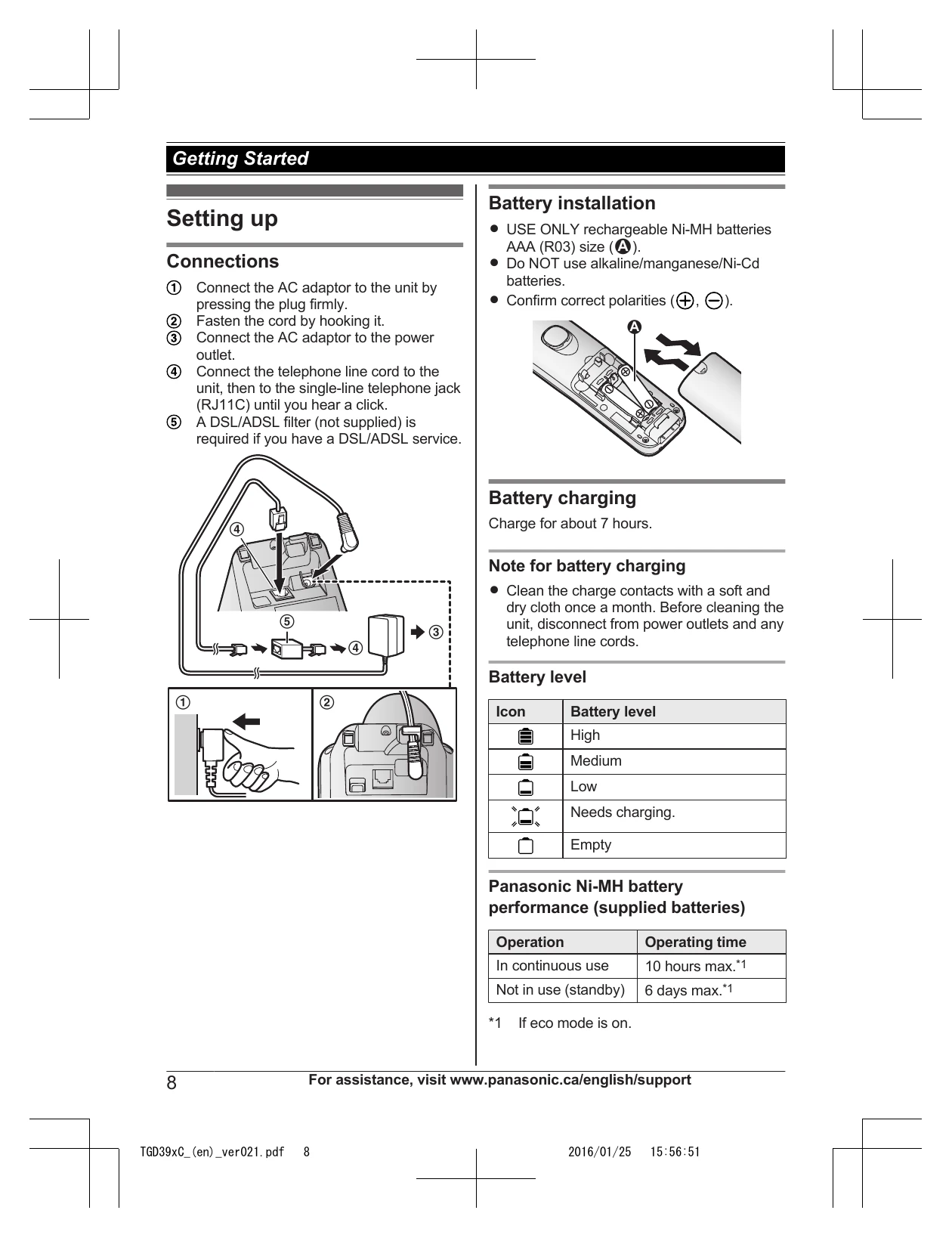
Setting up: Connect the AC adaptor and telephone line cord. Install batteries and charge them. Set date and time.
Making/Answering Calls: Lift the handset to dial or answer. Use redial list, pause function for PBX, and features like hold, mute, and flash during calls.
Phonebook: Add up to 100 names and numbers. Store redial list entries and caller information. Assign entries to groups.
Answering System: Turn on/off, record greeting message, listen to messages, set recording time, and use remote operation.
| Problem | Cause/solution |
|---|---|
| Access # to VM service is not stored | You have not stored the voicemail access number. Store the number (page 28). |
| Base no power or No link. Re-connect base AC adaptor. | The handset has lost communication with the base unit. Move closer to the base unit and try again. Unplug the base unit's AC adaptor to reset the unit. Reconnect the adaptor and try again. The handset's registration may have been cancelled. Re-register the handset (page 22). |
| Busy | Other units are in use and the system is busy. Try again later. |
| Check tel line | The supplied telephone line cord has not been connected yet or not connected properly. Check the connections (page 8). |
| Error!! | Recording was too short. Try again. |
| Invalid | There is no handset registered to the base unit matching the handset number you entered. The handset is not registered to the base unit. Register the handset (page 22). |
| Use rechargeable battery. | A wrong type of battery such as alkaline or manganese was inserted. Use only the rechargeable Ni-MH batteries noted on page 4, 6. |
| The handset does not turn on even after installing charged batteries. | Place the handset on the base unit or charger to turn on the handset. |
| The unit does not work. | Make sure the batteries are installed correctly (page 8). Fully charge the batteries (page 8). Check the connections (page 8). Unplug the base unit's AC adaptor to reset the unit. Reconnect the adaptor and try again. The handset has not been registered to the base unit. Register it (page 22). |
| I cannot hear a dial tone. | The base unit's AC adaptor or telephone line cord is not connected. Check the connections. |
| Time on the unit has shifted. | Incorrect time information from incoming Caller ID changes the time. Set the time adjustment to "Manual" (off) (page 18). |
| I fully charged the batteries, but still flashes, is displayed, or the operating time seems to be shorter. | Clean the battery ends (⊕, ⊖) and the charge contacts with a dry cloth and charge again. It is time to replace the batteries (page 8). |
| is displayed. | The handset is too far from the base unit. Move closer. The base unit's AC adaptor is not properly connected. Reconnect AC adaptor to the base unit. The handset is not registered to the base unit. Register it (page 22). |
| Noise is heard, sound cuts in and out. | You are using the handset or base unit in an area with high electrical interference. Re-position the base unit and use the handset away from sources of interference. Move closer to the base unit. If you use a DSL/ADSL service, we recommend connecting a DSL/ADSL filter between the base unit and the telephone line jack. Contact your DSL/ADSL provider for details. |
| The handset does not ring. | The ringer volume is turned off. Adjust the ringer volume (page 12, 18). Night mode is turned on. Turn it off (page 20). |
| I cannot make a call. | The dialing mode may be set incorrectly. Change the setting (page 10). |
| Caller information is not displayed. | You must subscribe to Caller ID service. Contact your phone service provider for details. If your unit is connected to any additional telephone equipment such as a Caller ID box or cordless telephone line jack, plug the unit directly into the wall jack. If you use a DSL/ADSL service, we recommend connecting a DSL/ADSL filter between the base unit and the telephone line jack. Contact your DSL/ADSL provider for details. |
| Caller information is displayed or announced late. | The name display service may not be available in some areas. Contact your phone service provider for details. Depending on your phone service provider, the unit may display or announce the caller's information at the 2nd ring or later. |
| Caller information is not announced. | The handset or base unit's ringer volume is turned off. Adjust it (page 12, 18). The Talking Caller ID feature is turned off. Turn it on (page 18). The number of rings for the answering system is set to "2 rings" or "Toll saver". Select a different setting (page 27). If the base unit and another handset are having an intercom call, your handset does not announce caller information. |
| The unit does not record new messages. | The answering system is turned off. Turn it on (page 25). The message memory is full. Erase unnecessary messages (page 25). The recording time is set to "Greeting only". Change the setting (page 27). Your phone service provider's voicemail service may be answering your calls before the unit's answering system can answer your calls. Change the unit's number of rings setting (page 27) to a lower value, or contact your phone service provider. |