Manual for DC-FZ80

Manual for DC-FZ80

Brand: Panasonic

Category: Digital Camera

Document Type:

Language: EN
Uploaded: Aug. 9, 2025, 11:35 p.m.

Warranty Information

Warranty information not explicitly stated in the provided text.

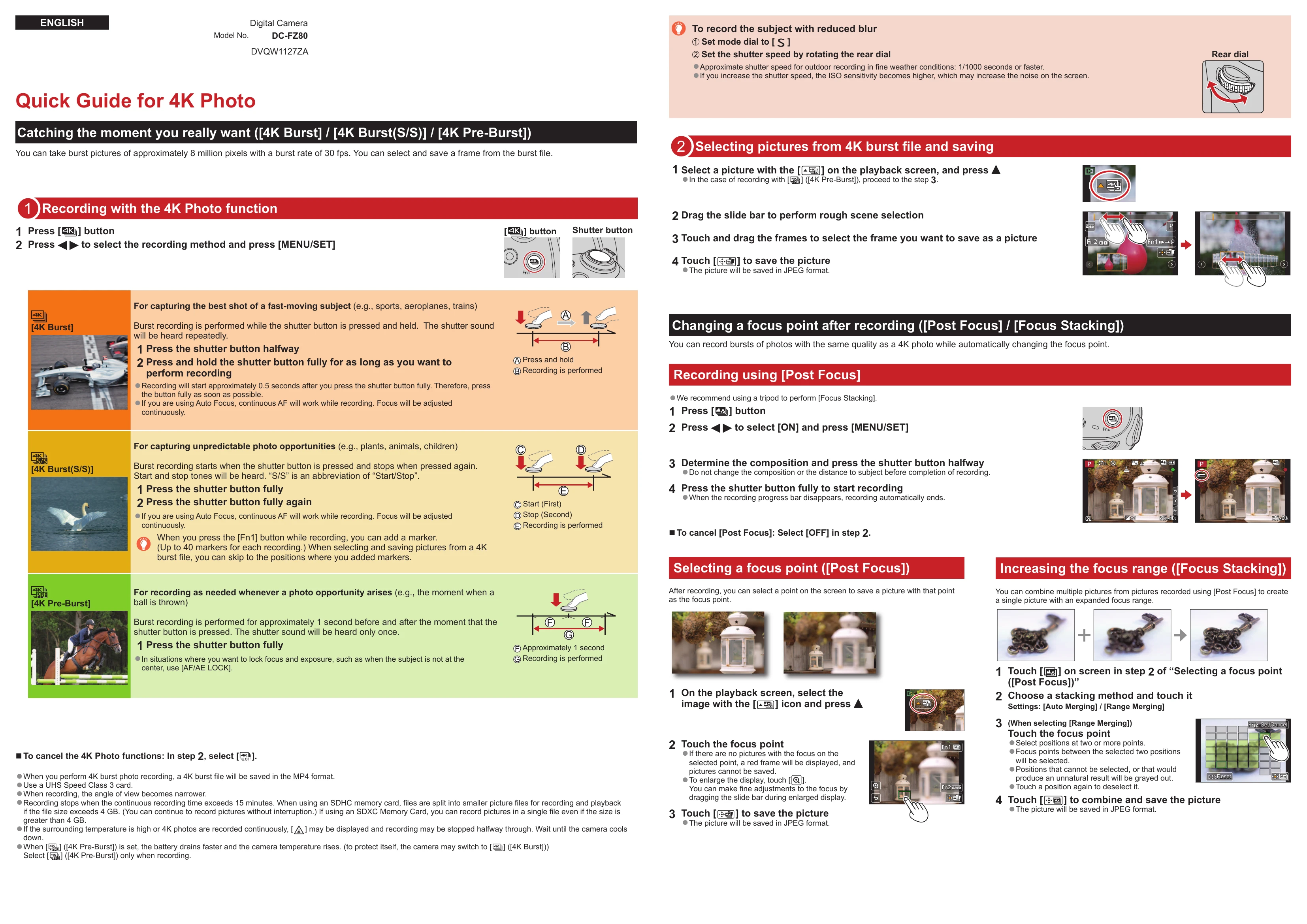
4K Photo Quick Guide

Catching the moment you really want ([4K Burst] / [4K Burst(S/S)] / [4K Pre-Burst])

This function allows you to capture burst pictures of approximately 8 million pixels at 30 fps, enabling you to select and save a desired frame from the burst file.

Recording with the 4K Photo function

  1. Press the [4K] button.
  2. Press [ ] to select the recording method and press [MENU/SET].

Selecting pictures from 4K burst file and saving

  1. Select a picture with the [ ] on the playback screen, and press [ ].
  2. Drag the slide bar to perform rough scene selection.
  3. Touch and drag the frames to select the frame you want to save as a picture.
  4. Touch [ ] to save the picture (saved in JPEG format).

Changing a focus point after recording ([Post Focus] / [Focus Stacking])

This feature allows you to record bursts of photos while automatically changing the focus point, similar to 4K photo quality.

Recording using [Post Focus]

  1. Press the [ ] button.
  2. Press [ ] to select [ON] and press [MENU/SET].
  3. Determine composition and press the shutter button halfway.
  4. Press the shutter button fully to start recording.

Selecting a focus point ([Post Focus])

After recording, you can select a point on the screen to save a picture with that point as the focus point.

Increasing the focus range ([Focus Stacking])

Combine multiple pictures from [Post Focus] recordings to create a single image with an expanded focus range.

Privacy Policy