Brand: Panasonic
Category: Digital Camera
Document Type: Manual
Language: EN
Brand: Panasonic
Category: Digital Camera
Document Type: Manual
Language: EN
Uploaded: Nov. 21, 2025, 6:20 p.m.
Manual Publish Date: null
None
This document, “Operating Instructions / Owner's Manual <Complete Guide>", includes detailed explanations of all the functions and operations of the camera.
Black icons show conditions in which functions can be used, and gray icons show conditions in which functions cannot be used.
Example:
Pictures/Videos
Recording mode
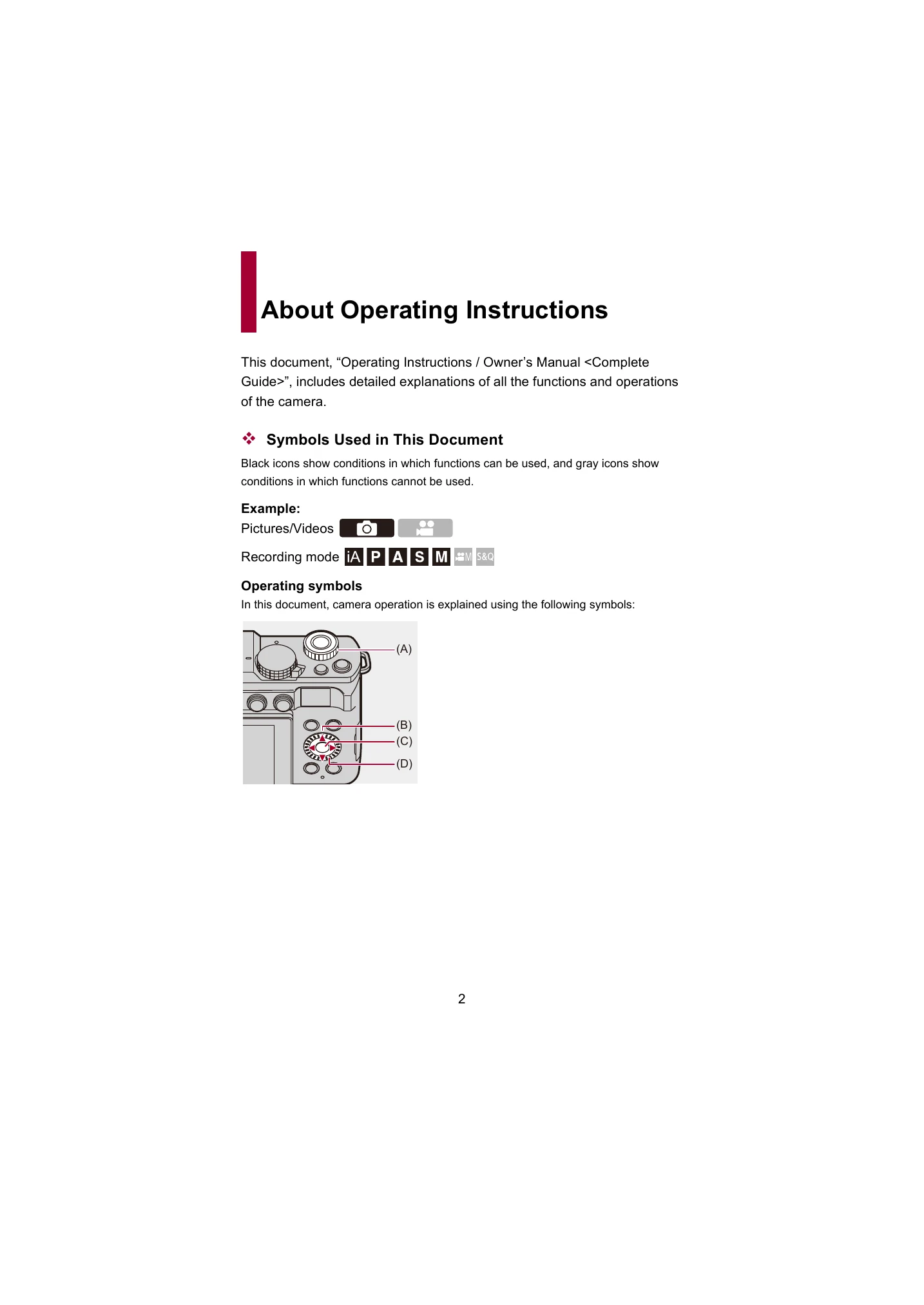
In this document, camera operation is explained using the following symbols:
(A) : Front dial
(B) : Cursor button up/down/left/right
(C) : [MENU/SET] button
(D) : Control dial
• Other symbols, such as icons shown on the camera screen, are also used in explanations.
• This document describes the procedure for selecting menu items as follows:
Example) Set [Picture Quality] of the [Photo] ([Image Quality]) menu to [STD.].
[Photo] [Picture Quality] Select [STD.]
| No power |
• The battery is not inserted correctly. • The battery is not charged. • The battery is exhausted. |
| The camera does not turn on |
• The battery is not inserted correctly. • The battery is not charged. • The battery is exhausted. • The AC adapter is not connected correctly (if applicable). |
| The monitor is black |
• The camera may be in sleep mode. Press any button to wake it up. • The monitor may be turned off. Press the DISP. button to turn it on. |
| Blurry images |
• The subject is out of focus. • The camera was shaken during shooting. • The aperture is too wide for the depth of field required. |
| Underexposed or overexposed images |
• The exposure settings are incorrect. • The scene is too dark or too bright for the selected settings. • The metering mode is not appropriate for the scene. |
| Cannot record images/videos |
• The memory card is full. • The memory card is not inserted correctly. • The memory card is write-protected. • The battery is exhausted. |
| Images/videos are corrupted |
• The memory card may be faulty. • The camera may have been turned off during recording or formatting. • Remove and reinsert the memory card. Try formatting the card in the camera (this will erase all data). |
| Wi-Fi connection fails |
• Ensure Wi-Fi is enabled on both the camera and the connecting device. • Check that the network name (SSID) and password are correct. • Move the camera and connecting device closer to the router. • Restart both the camera and the connecting device. |