Manual for DC-ZS200

Manual for DC-ZS200

Brand: Panasonic

Category: Digital Camera

Document Type:

Language: EN
Uploaded: Aug. 9, 2025, 11:35 p.m.

Warranty Information

24 months warranty for the digital camera.

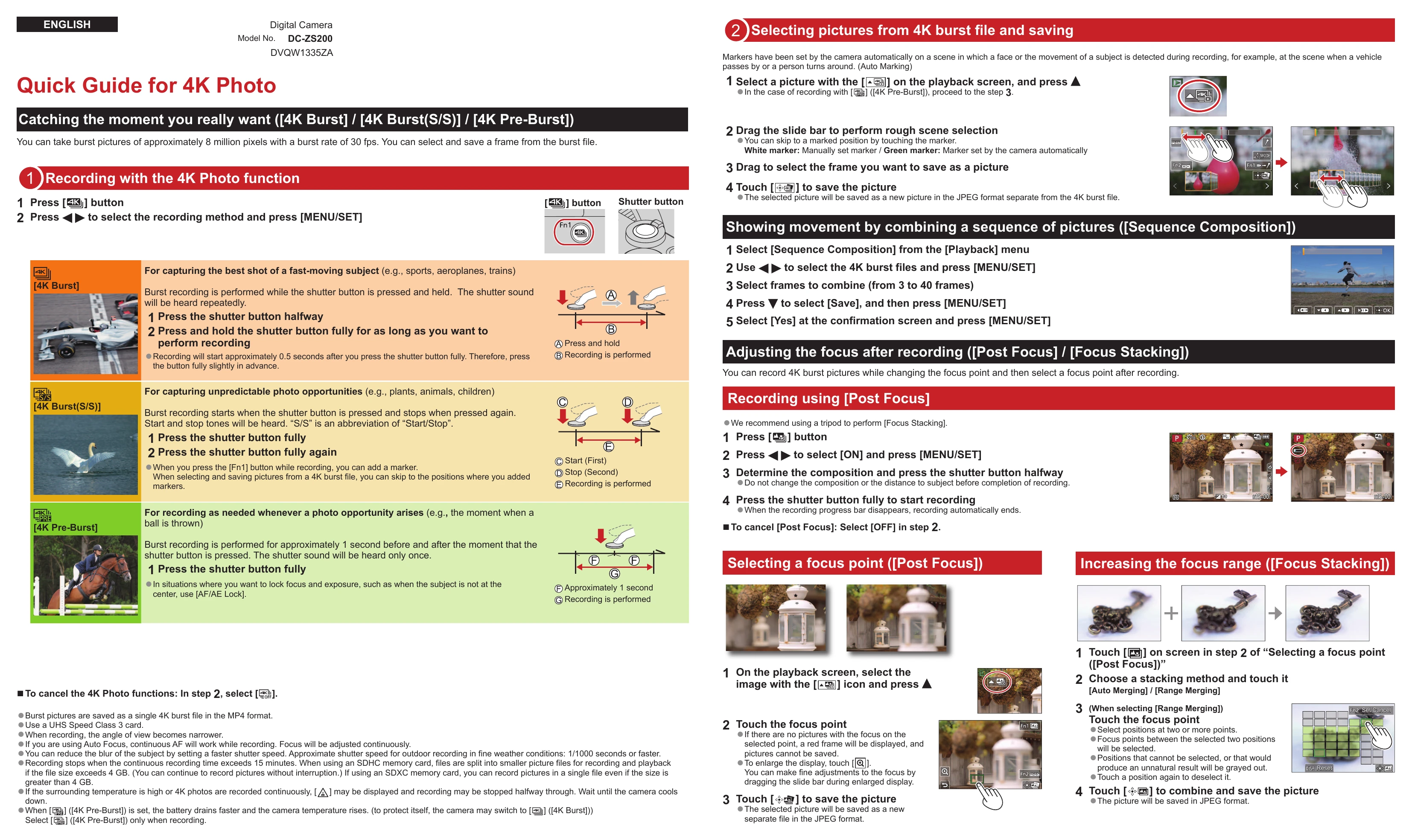
Quick Guide for 4K Photo

Catching the moment you really want ([4K Burst] / [4K Burst(S/S)] / [4K Pre-Burst])

Take burst pictures of approximately 8 million pixels at 30 fps. Select and save a frame from the burst file.

Recording with the 4K Photo function

  1. Press the [4K] button.
  2. Press to select the recording method and press [MENU/SET].

Selecting pictures from 4K burst file and saving

  1. Select a picture with the [] on the playback screen, and press .
  2. Drag the slide bar for rough scene selection.
  3. Drag to select the frame you want to save.
  4. Touch [] to save the picture.

Showing movement by combining a sequence of pictures ([Sequence Composition])

  1. Select [Sequence Composition] from the [Playback] menu.
  2. Use to select the 4K burst files and press [MENU/SET].
  3. Select frames to combine (3 to 40 frames).
  4. Press to select [Save], and then press [MENU/SET].
  5. Select [Yes] at the confirmation screen and press [MENU/SET].

Adjusting the focus after recording ([Post Focus] / [Focus Stacking])

Record 4K burst pictures while changing focus and select focus point after recording.

Recording using [Post Focus]

  1. Press [] button.
  2. Press to select [ON] and press [MENU/SET].
  3. Determine composition and press the shutter button halfway.
  4. Press the shutter button fully to start recording.

Selecting a focus point ([Post Focus])

  1. On the playback screen, select the image with the [] icon and press .
  2. Touch the focus point.
  3. Touch [] to save the picture.

Increasing the focus range ([Focus Stacking])

  1. Touch [] on screen in step 2 of "Selecting a focus point ([Post Focus])".
  2. Choose a stacking method and touch it ([Auto Merging] / [Range Merging]).
  3. (When selecting [Range Merging]) Touch the focus point.
  4. Touch [] to combine and save the picture.
Privacy Policy