Brand: Panasonic
Category: Home Theater System
Document Type: Manual
Language: EN
Brand: Panasonic
Category: Home Theater System
Document Type: Manual
Language: EN
Uploaded: Nov. 21, 2025, 7:46 p.m.
This manual does not contain specific warranty period information.
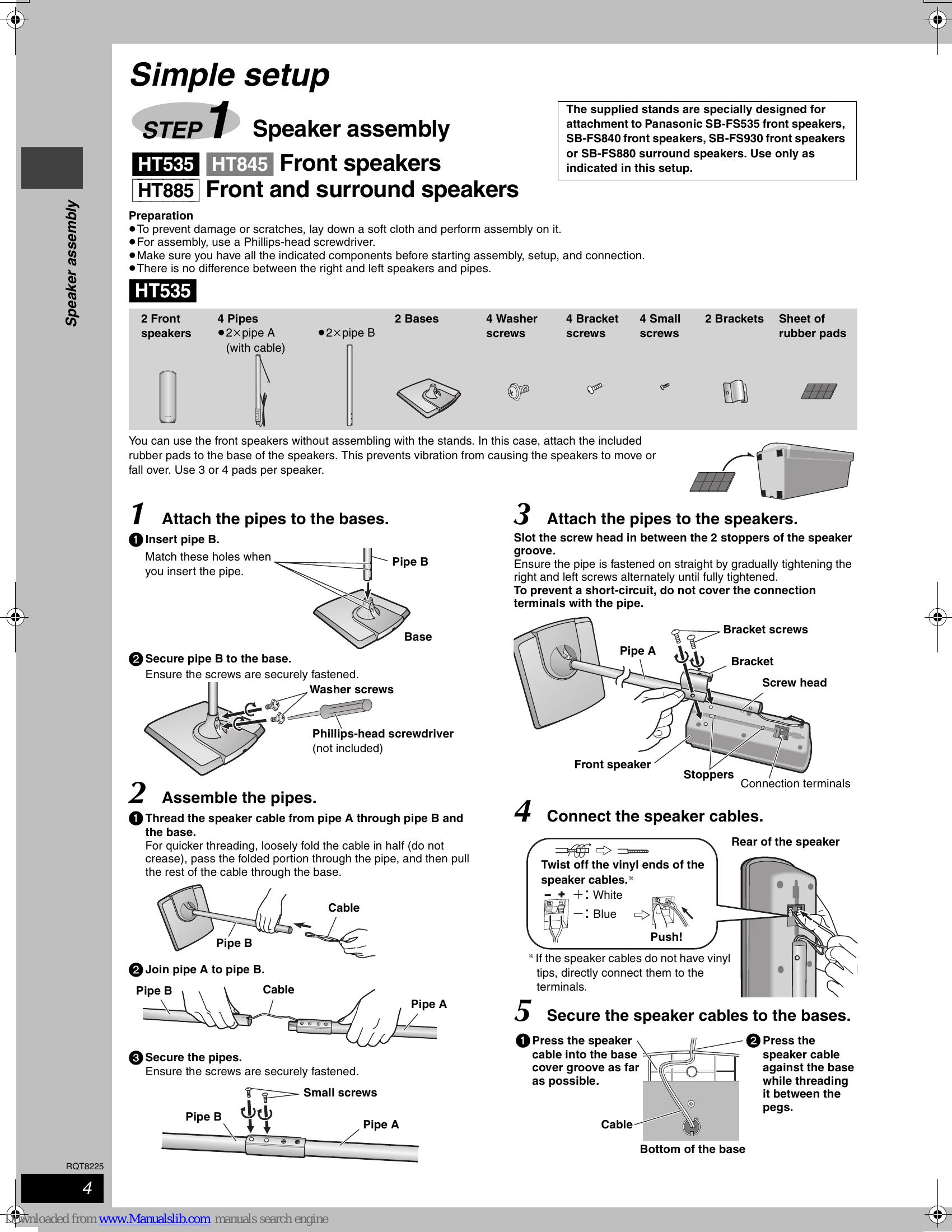
Follow the "Simple Setup" steps to assemble and connect your speakers, then connect the video and audio cables to your TV and other devices. Use the "QUICK SETUP" screen to make initial settings for your system. Ensure the AC mains lead is connected last.
Turn on the unit, select "DVD/CD" input, open the disc tray, load a disc, and press play. Adjust the volume as needed.
Explore features like QUICK OSD for playback information, skip/search functions, changing soundtracks/subtitles, and advanced play modes like program and random play.
Navigate through data discs by selecting "TOP MENU" or "MENU". Search for content by title and play items in order or from a selected track.
Access the "Main menu" to select various options like Program, Title, Chapter, Playlist, or Content. Adjust settings like Video Output Mode, Audio, and Picture settings.
Customize settings through the "Setup" menu. Change audio language, subtitles, menu language, ratings, TV aspect, and time delay for optimal viewing and listening experience.
Select FM or AM, then use numbered buttons or auto-tuning to find stations. Preset your favorite channels for easy access.
Enhance your audio experience with features like Center Focus, Dolby Pro Logic II, Sound Field Control, Super Surround, and Subwoofer level adjustments. Speaker level adjustments ensure optimal surround sound.
Connect and operate your TV, video cassette recorder, or tape deck using the provided connections and remote control.
Utilize the headphone jack for private listening and set the Sleep timer for automatic shut-off. The Muting function allows for quick volume control.
Consult the troubleshooting guide for solutions to common problems such as power issues, unresponsive functions, playback errors, and sound/picture disturbances.
| Problem | Solution | Page |
|---|---|---|
| Power | ||
| No power. | • Insert the AC mains lead and system cable securely. | 9 |
| The unit is automatically switched to the standby mode. | • The Sleep timer was working and had reached the set time limit. | 28 |
| Unresponsive or inoperable function | ||
| No response when any buttons are pressed. | • This unit cannot play discs other than the ones listed in these operating instructions. • The unit may not be operating properly due to lightning, static electricity or some other external factor. Turn the unit off and then back to ON. Alternatively, turn the unit off, disconnect the AC mains lead, and then reconnect it. • Condensation has formed: Wait 1 to 2 hours for it to evaporate. | 11 |
| No response when remote control buttons are pressed. | • Check that the batteries are installed correctly. • The batteries are depleted. Replace them with new ones. • Aim the remote control at the remote control signal sensor and operate. | 9, 10 |
| No picture or sound. | • Check the video or audio connection. | 4, 5, 7, 8, 26 |
| You have forgotten your ratings password. | • While stopped and "DVD/CD" is the source, press and hold [■] on the main unit and [≥10] on the remote control until "Initialised" disappears from the television. Turn the unit off and on again. All settings will return to the default values. | |
| Reset all the settings to Factory Preset. | ||
| Specific operation undesirable or unexpected | ||
| It takes time before play starts. | • Play may take time to begin when an MP3 track has still picture data. Even after the track starts, the correct play time will not be displayed. This is normal. • This is normal on DivX video. | |
| Folders deeper than the eighth layer on a data disc are not displayed correctly. WMA MP3 JPEG MPEG4 DivX | • Folders deeper than the eighth layer are displayed as the eighth layer. | — |
| A menu screen appears during skip or search. VCD | • This is normal for Video CD's. | — |
| Playback control menu doesn't appear. VCD with playback control | • Press [] twice and then press [▷] (play). | |
| The program and random play functions do not work. DVD-V Programmed items are not played. DVD-V | • These functions do not work with some DVD-Videos. • Some items cannot be played even if you have programmed them. | |
| The on-screen menu shows "2" as a soundtrack option when [AUDIO] is pressed, but the audio does not change. DVD-A | • Even if a second soundtrack isn't recorded, two numbers will normally be shown. | — |
| Play doesn't start. | • This unit may not play WMA and MPEG4 that contains still picture data. • If playing DivX VOD content, refer to the homepage where you purchased the DivX VOD content. (Example: www.divx.com/vod) DivX • If a disc contains CD-DA and other formats, proper playback may not be possible. • This is normal on DVD-Audio. | |
| Play restarts from the beginning of the track when soundtrack is changed. DVD-A | • If you change the volume or sound field/quality setting during ADVANCED DISC REVIEW, the function continues without the on-screen display. Press [ADVANCED DISC REVIEW] again to cancel the function. | 14 |
| Scenes are skipped intermittently. RAM DVD-RW (VR) DVD-V | — | |
| Subtitle | ||
| Subtitle position is wrong. | • Adjust the position. ("Subtitle Position" in Display Menu) | 19 |
| No subtitles. | • Display the subtitles. • Subtitles may not be displayed depending on the disc. DivX | 15 |
| Marker | ||
| Cannot add markers. | • You cannot add markers. RAM DVD-RW (VR) • If the disc's elapsed play time doesn't appear on the unit's display, you cannot add markers. | — |
| A-B Repeat | ||
| Point B is automatically set. | •The end of an item becomes point B when it is reached. | — |
| A-B Repeat is automatically canceled. | •A-B Repeat is canceled when you press [QUICK REPLAY]. | — |
| Sound abnormal or improper | ||
| Sound distorted. | • Noise may occur when playing WMA. • Some audio effects do not work or have less effect with some discs. • Multi Re-master (HT845 HT885) and Dolby Pro Logic II do not work if you have changed the play speed. • An AC mains lead or fluorescent light is near the subwoofer. Keep other appliances and cables away from the subwoofer. | |
| Effects do not work. | ||
| Humming is heard during play. | • There may be a pause in sound when you change the play speed. | |
| No sound | • Audio may not be output due to how files were created. DivX | 17 |
| Sound mixed. | • If you are using the SCART (AV) terminal and the audio input terminals (TV AUDIO IN) at the same time, turn off the connected equipment at one or the other terminals. | |
| Menus | ||
| The Setup menu cannot be accessed. | • Select "DVD/CD" as the source. • Cancel all group, program and random play. | 15 |