Brand: Panasonic
Category: Office Equipment
Document Type: Manual
Language: EN
Brand: Panasonic
Category: Office Equipment
Document Type: Manual
Language: EN
Uploaded: Nov. 21, 2025, 6:30 p.m.
Manual Publish Date: 2006-09-01
No specific warranty period is mentioned in the provided pages.
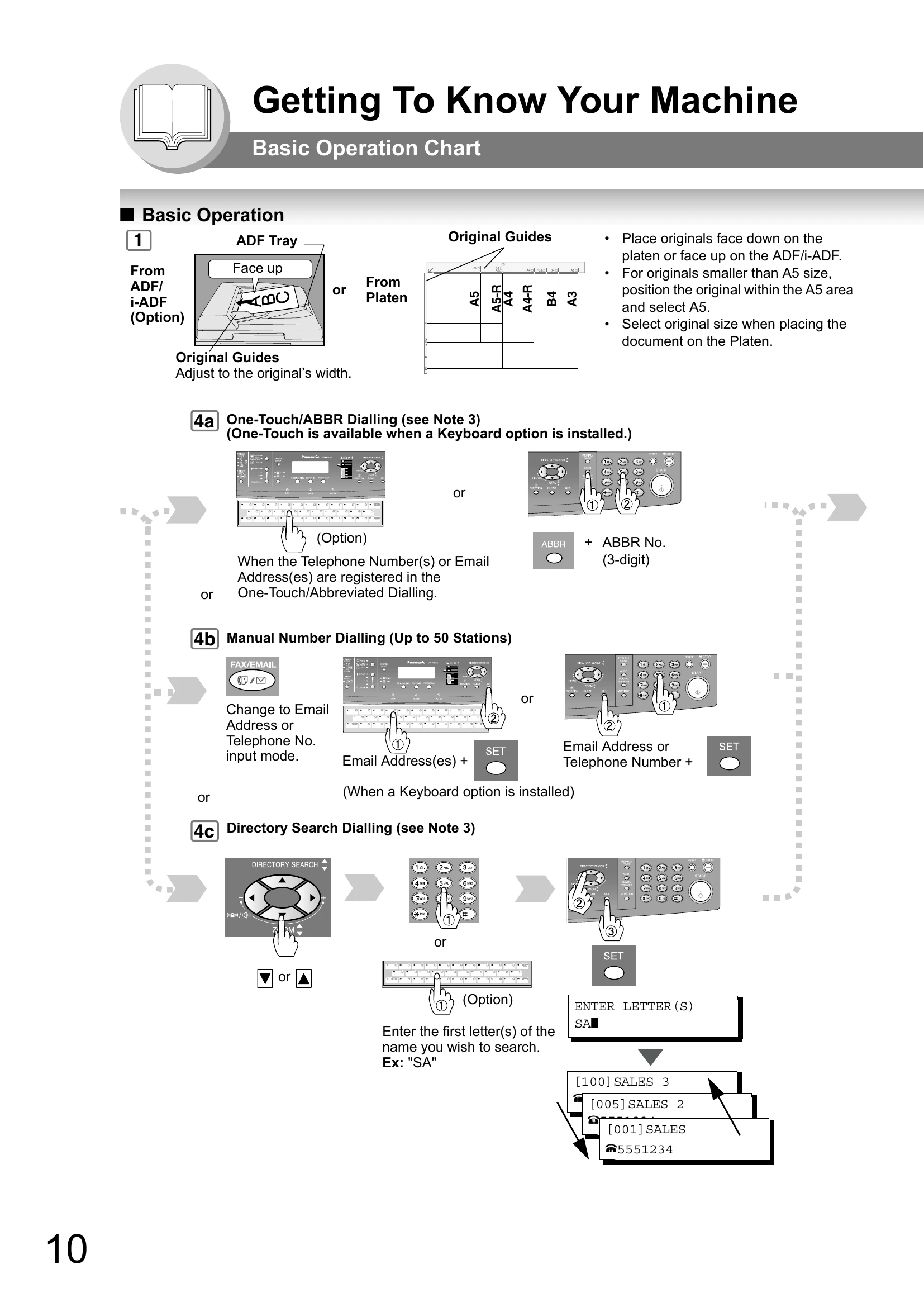
Placing Originals: Place originals face down on the platen or face up on the ADF/i-ADF.
Adjusting Guides: Adjust original guides to the original's width.
Original Size: Select original size when placing the document on the platen.
One-Touch/ABBR Dialling: For registered telephone numbers or email addresses.
Manual Number Dialling: For up to 50 stations.
Directory Search Dialling: Search for station names to dial.
Select desired transmission settings like FINE, S-FINE, PHOTO, TEXT/PHOTO, or TEXT.
The machine may not send the portion of the document exceeding the standard size.
Press the STOP key to cease the operation.
| Error Code | Description |
|---|---|
| Information Code | A code that is internally generated by your Fax stating a specific operational error or machine failure. |
| Email ABBR Programming Errors | Error Messages Sent to the Sender |
| Email ABBR Programming Errors | Internet Fax Return Receipt Error Messages |