Brand: Panasonic
Category: Portable Electronics
Document Type: Manual
Language: EN
Brand: Panasonic
Category: Portable Electronics
Document Type: Manual
Language: EN
Uploaded: Nov. 21, 2025, 7:10 p.m.
One-year limited warranty covering defects in materials and workmanship for parts and labor.
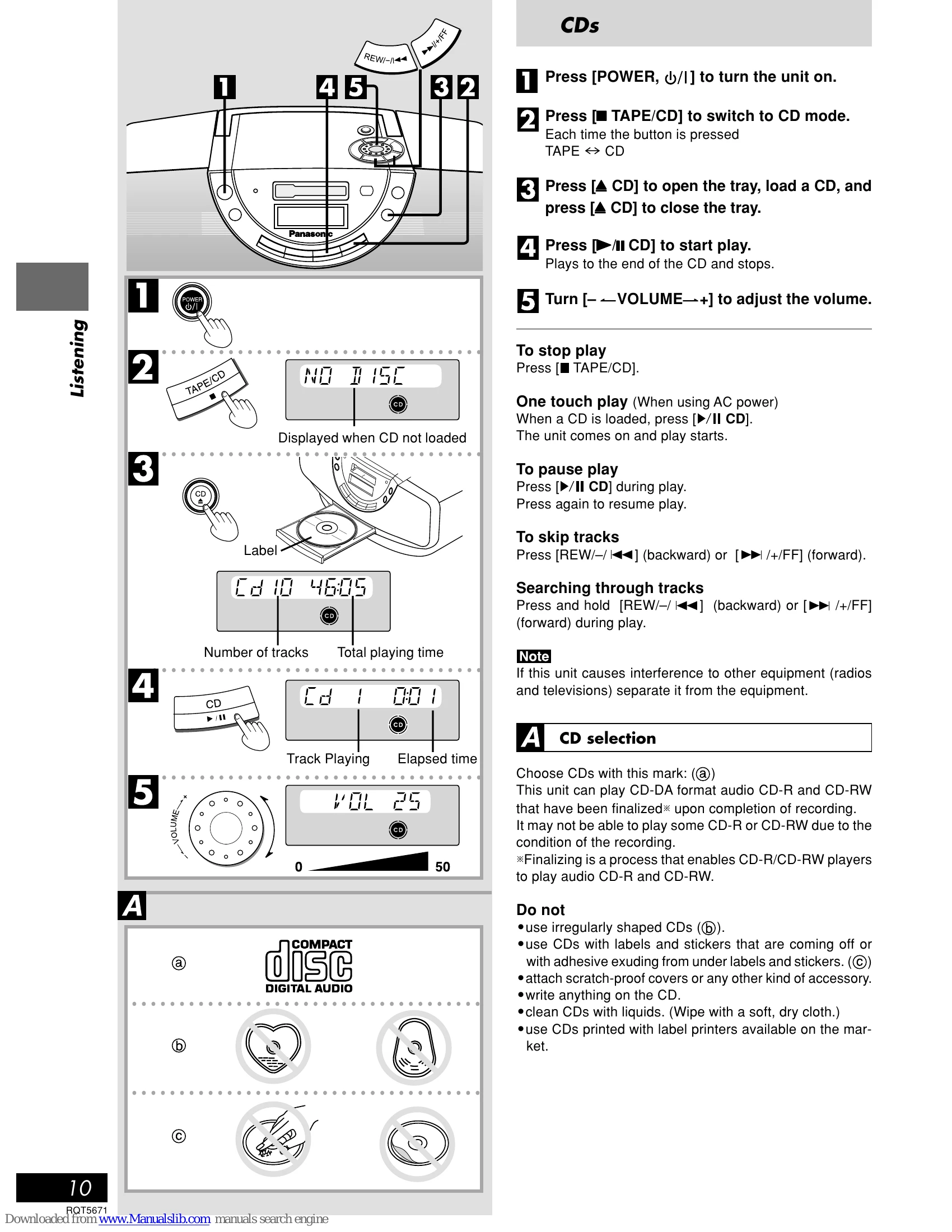
CDs: Press POWER to turn on, TAPE/CD to select CD mode. Open tray with ▲ CD, load CD, close tray. Press ►/II CD to play. Stop with TAPE/CD. Pause with ►/II CD. Skip tracks with REW/◄◄ or ►►/FF. Search by pressing and holding REW/◄◄ or ►►/FF.
Radio: Press POWER to turn on, TUNER BAND to select FM/AM. Use TUNE MODE for manual tuning. Press REW/◄◄ or ►►/FF to select stations. Turn VOLUME to adjust.
Cassettes: Press POWER to turn on. Insert cassette, play starts from top. Press ► TAPE to play. Stop with TAPE/CD. Eject with ▲ TAPE. Rewind/Fast-forward with REW/◄◄ or ►►/FF.
CD to Tape: Select CD mode. Insert cassette. Press ►/II to start recording. Stops when CD finishes. Pause with ►/II. Can continue from another CD or record selected tracks.
Radio to Tape: Insert cassette. Tune to station. Press ►/II to start recording. Stop with TAPE/CD. Pause with ►/II.
Set play or record timers using CLOCK/TIMER, REW/◄◄, ►►/FF, and PLAY/REC buttons. Sleep timer sets playback duration. Timer Fader adjusts volume gradually.
| Common problems | Indicates | Action |
|---|---|---|
| "E" is displayed | Incorrect operation | Read instructions. |
| "UO1" is displayed | Replace batteries or use AC power. | 6 |
| "UO2" is displayed | Batteries not inserted. | Insert batteries or use AC power. (Appears if memory batteries inserted) 6 |
| CD won't play or CD display is incorrect | Clean CD 10. Wait for condensation to clear. Ensure label is facing up 10. Replace damaged/warped CD 10. | |
| Recording not possible (Cassette deck) | Have cassette's tabs been removed? Cover holes with tape. 10 | |
| Poor sound quality (Cassette deck) | Clean the heads. 9 | |
| A lot of noise or difficult to tune (Radio) | Interference from other equipment | Turn off other equipment or separate units. |
| Remote control doesn't work | Check batteries. Replace if worn. 8 | |
| Unit can't be turned on from remote control | Use power button on main unit if using batteries. 6 8 |