Manual for SL-J900

Manual for SL-J900

Brand: Panasonic

Category: Portable Electronics

Document Type: Manual

Language: EN
Uploaded: Nov. 21, 2025, 6:53 p.m.

Warranty Information

The warranty covers defects in materials or workmanship for one year for parts and labor.

Playing MP3: Insert a CD, then press PLAY. MP3 files may take longer to read; 'MP3' will light up. Adjust volume. Pause/Resume: Press PAUSE to stop playback temporarily; press PLAY to resume. Search: Press and hold SKIP/SEARCH to find tracks. For MP3, search is limited to the current track in certain modes. Skip: Press SKIP to go to the next track. Press twice to go to the beginning of the previous track. Stop: Press STOP. Press and hold to turn the unit off. Listening through Speakers: Connect the unit to the speaker stand, ensuring external batteries are disconnected. Use the remote control or unit buttons to operate.

Troubleshooting and error codes

Trouble Possible Cause/Remedy
No play
  • The HOLD function is on.
  • The disc isn't correctly set.
  • The disc is scratched or dirty.
  • There is moisture on the lens. Wait for about an hour.
  • The lens is dirty: clean with a blower or cotton swab.
  • Unit may not read MP3 correctly if shaken.
  • May not read multi-session discs with no data between sessions.
No sound or there is a lot of noise.
  • Ensure plugs are inserted firmly and clean them.
  • Separate from mobile telephones.
  • Noise may occur with poor MP3 recording quality.
  • Bumps can interrupt sound.
  • No sound from earphones if unit is in speaker stand.
  • Connect the AC adaptor; speakers don't work with batteries only.
  • Make sure the plug is fully inserted.
No sound from the speakers.
  • Connect the AC adaptor; speakers don't work with batteries only.
Play doesn't resume from the track where play stopped at.
  • This doesn't work if you change discs.
  • This doesn't work during random play.
  • May not work correctly under some conditions.
  • Random play modes may be on.
Play doesn't start from the first track.
  • Play resumes from the track where you last stopped play. Use skip to return to the first track.
The unit stops working.
  • Disconnect then reconnect all power sources (batteries and AC adaptor).
Cannot search through tracks.
  • You cannot search through MP3 files.
Cannot skip albums.
  • You cannot skip between the first and last albums during play.
Cannot hear the remote control's operation tone.
  • The operation tone may be off.
  • The tone doesn't sound while the unit is in the speaker stand.
The remote control malfunctions.
  • Use only the included remote control.
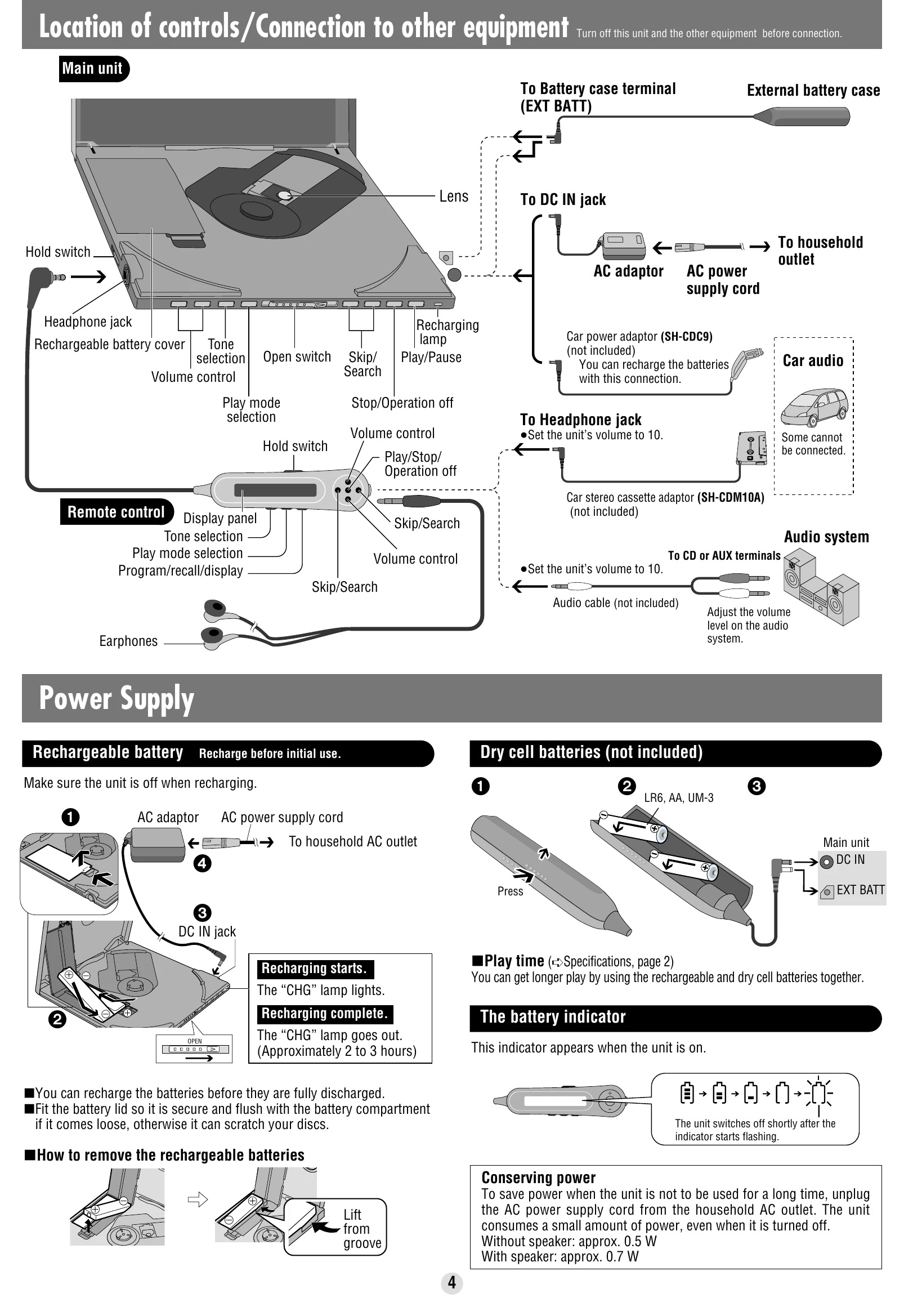
Cannot recharge.
  • The HOLD function is on.
  • You aren't using special rechargeable batteries.
  • Must insert two batteries to recharge.
  • Unit must be off before recharging.
The AC adaptor becomes warm during recharging. This is normal.
The batteries are taking a long time to recharge.
  • Batteries may take up to 6 hours to recharge.
  • Batteries have reached the end of their service life (approx. 300 recharges).
Play time is very short even after recharging.
  • May occur after first recharge or long disuse; should restore after a few recharges.
  • Batteries can go flat if AC adaptor remains connected after recharging.
The battery indicator fails to appear or is incorrect.
  • Indicator doesn't appear when AC adaptor is connected.
  • Indicator may be incorrect under other conditions.
Display Meaning
HOLD The HOLD function is on.
NODISC
  • No disc inserted or incorrectly inserted.
  • Disc cannot be played.
OPEN The disc lid is open.
CHARGE Full: Program has 20 tracks.
Flashing: Batteries recharging. Disappears when complete.
(Blank/Flashing) Reading MP3 files.
Indicates an error.
Privacy Policy