Brand: Panasonic
Category: Television
Document Type: Manual
Language: EN
Brand: Panasonic
Category: Television
Document Type: Manual
Language: EN
Uploaded: Nov. 21, 2025, 7:57 p.m.
Refer to the warranty card supplied with your product for details.
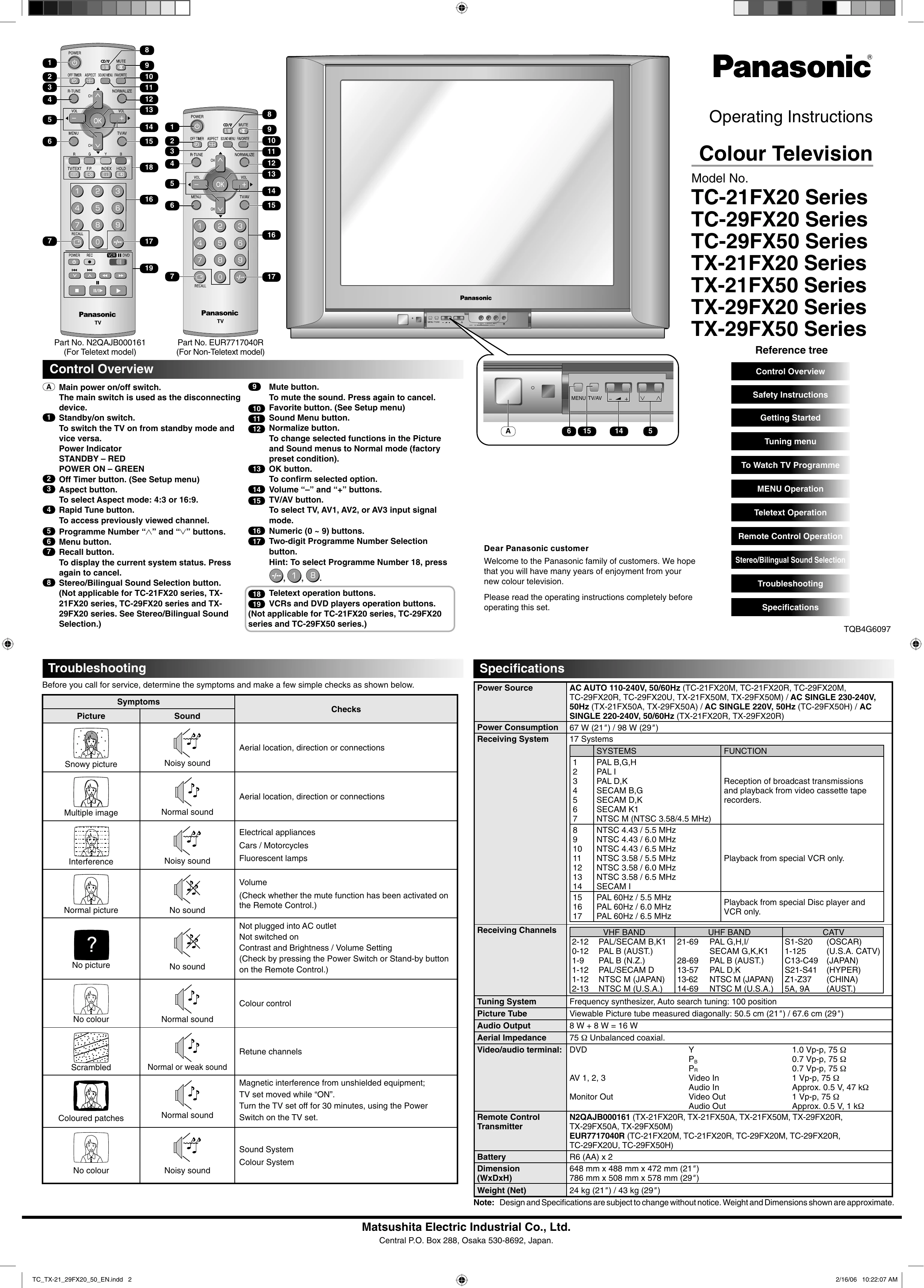
Turning the TV On/Off: Use the main power switch (A) to disconnect the TV from the power supply or the standby/on switch (1) to switch between standby and on modes. Use the POWER button on the remote to turn the TV off.
Channel Selection: Use the numeric buttons (16) or the two-digit programme number selection button (17) to select channels. The Rapid Tune button (4) accesses previously viewed channels.
Volume Control: Use the Volume "-" and "+" buttons (14) on the unit or remote.
Menu Navigation: Press the MENU button (5) to access various menus (Picture, Sound, Setup, Tuning). Use the arrow buttons and OK button (13) to navigate and confirm selections.
Input Selection: Use the TV/AV button (15) to select between TV, AV1, AV2, and AV3 input signals.
Teletext Operation: (For Teletext models) Use the TV/TEXT button to switch between TV and Teletext modes. Use coloured buttons and navigation buttons to select pages and access features like Reveal, Index, and Favourite Page.
VCR/DVD Control: Use the VCR II DVD button on the remote to select VCR or DVD mode, then use the corresponding buttons for playback, recording, and other functions.
| Symptoms | Picture | Sound | Checks |
|---|---|---|---|
| Snowy picture | Noisy sound | Aerial location, direction or connections | |
| Aerial location, direction or connections | |||
| Multiple image | Normal sound | Electrical appliances | |
| Interference | Noisy sound | Cars / Motorcycles Fluorescent lamps |
|
| (Check whether the mute function has been activated on the Remote Control.) | |||
| No sound | Normal picture | Not plugged into AC outlet | |
| Not switched on Contrast and Brightness / Volume Setting (Check by pressing the Power Switch or Stand-by button on the Remote Control.) |
|||
| No picture | No sound | ||
| No colour | Normal sound | Colour control | |
| Coloured patches | Normal or weak sound | Magnetic interference from unshielded equipment; TV set moved while "ON". Turn the TV set off for 30 minutes, using the Power Switch on the TV set. |
|
| No colour | Noisy sound | Sound System Colour System |