Manual for TC-21S3M/Z

Manual for TC-21S3M/Z

Brand: Panasonic

Category: Television

Document Type: Manual

Language: EN
Uploaded: Nov. 21, 2025, 7:16 p.m.

Warranty Information

Warranty information is not explicitly detailed in this section.

Installation and Set-up:

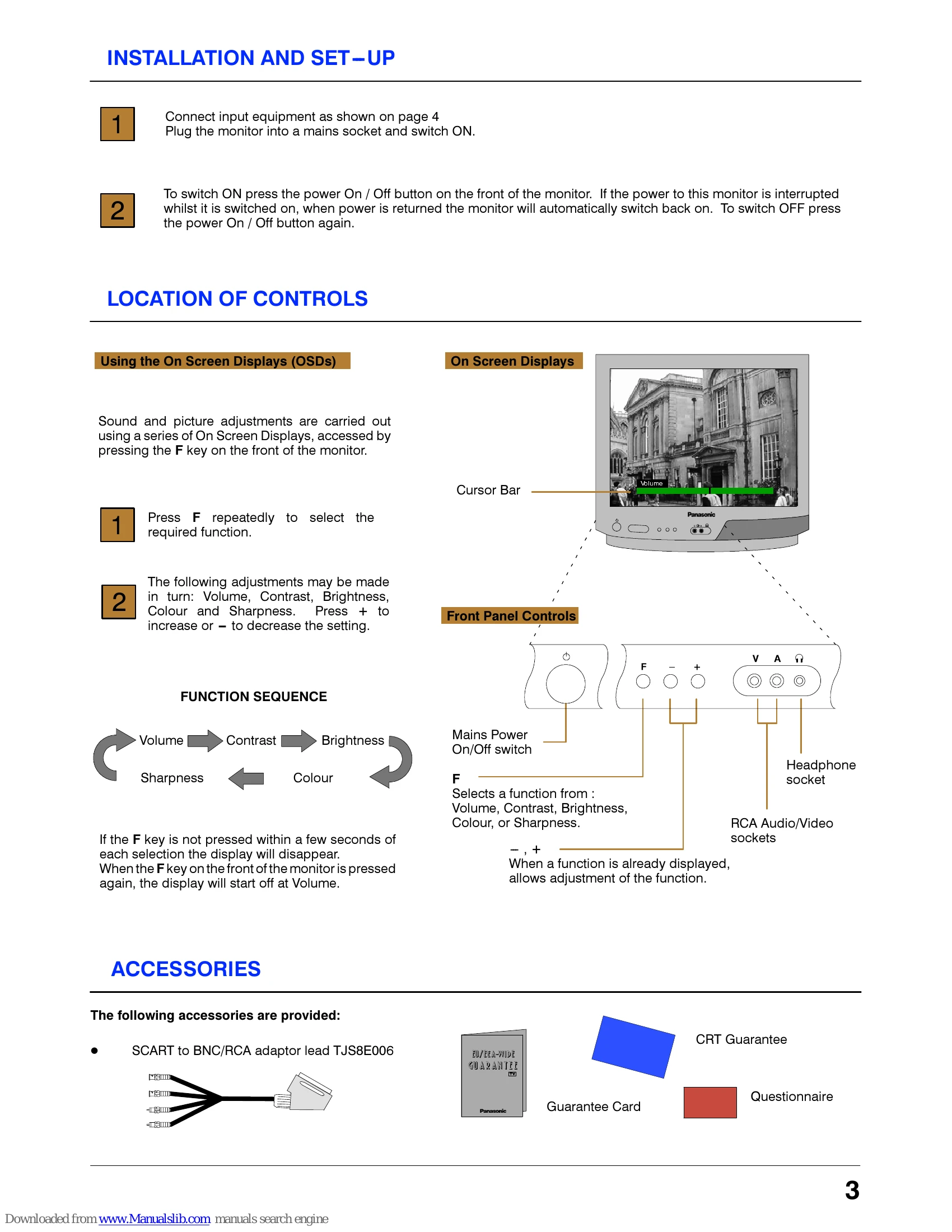
  1. Connect input equipment as shown on page 4.
  2. Plug the monitor into a mains socket and switch ON.

Operation:

  • To switch ON, press the power On / Off button on the front of the monitor.
  • If the power to the monitor is interrupted whilst switched on, it will automatically switch back on when power is returned.
  • To switch OFF, press the power On / Off button again.

Adjustments using On Screen Displays (OSDs):

  • Press the 'F' key on the front of the monitor to access adjustments.
  • Press 'F' repeatedly to select the desired function (Volume, Contrast, Brightness, Colour, Sharpness).
  • Use the '+' and '-' buttons to adjust the selected setting.
  • The display will disappear if no key is pressed within a few seconds.

Troubleshooting and error codes

Symptom Check
No picture, no sound Not plugged into A.C. outlet.
Not switched on.
Picture/sound controls set to minimum.
No colour Check colour level.
Normal picture, no sound Check volume level.
Privacy Policy