Manual for TC-21S3R/Z

Manual for TC-21S3R/Z

Brand: Panasonic

Category: Television

Document Type: Manual

Language: EN
Uploaded: Nov. 21, 2025, 9:14 p.m.

Warranty Information

No specific warranty period is mentioned in this manual.

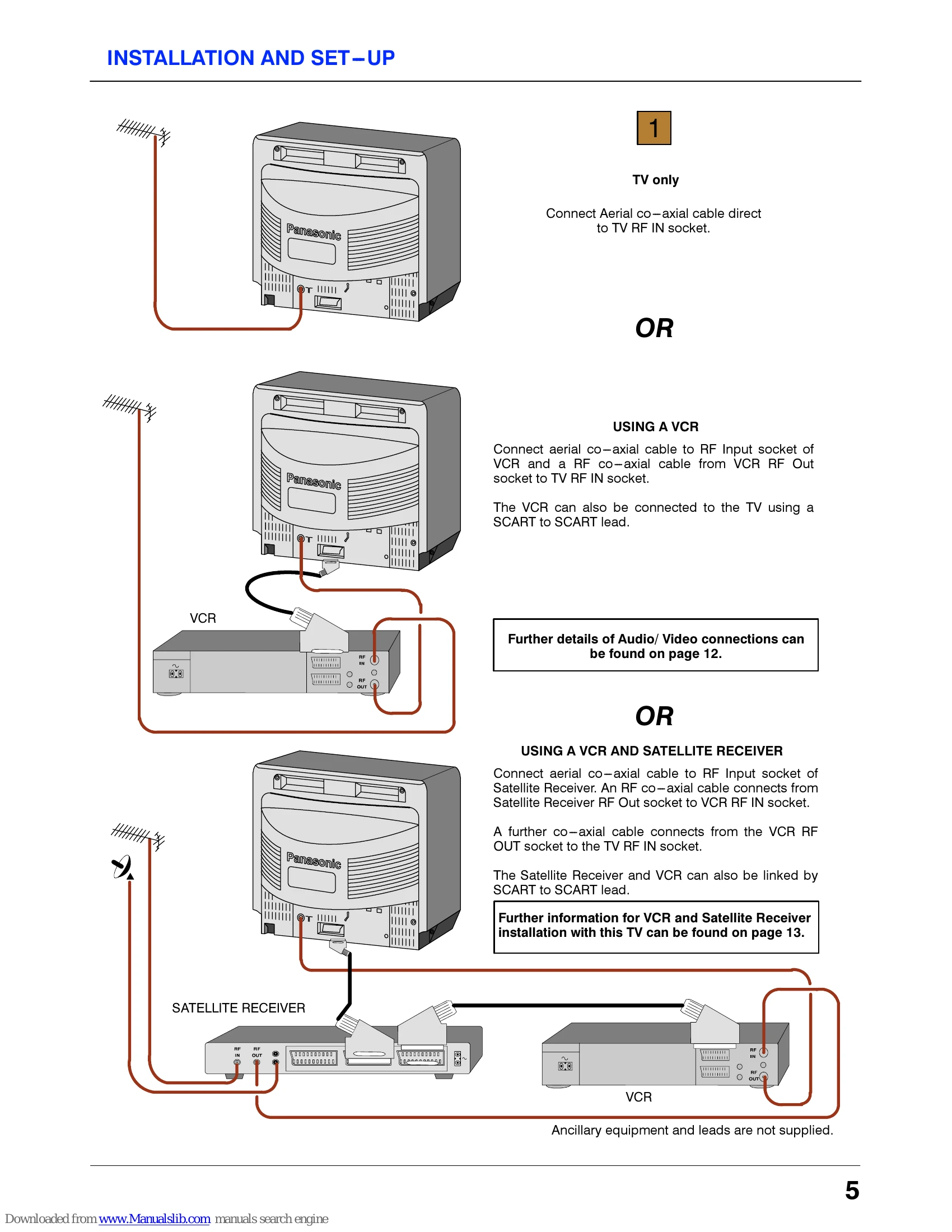
Installation and Setup: Connect aerial cable to TV or VCR/Satellite Receiver. Plug in and switch on. Auto-tuning will commence if not already programmed.
Basic Operation: Use the remote control or front panel buttons to change channels, adjust volume, and access menus. The 'F' button selects functions, and the 'V'/'A' buttons adjust them. 'N' exits menus.
Menu Navigation: Access menus using the 'F' button on the remote. Navigate with 'V'/'A' and select with 'TV/AV'. Functions include Contrast, Brightness, Colour, Sharpness, C-A-T-S, Tuning, and more.
Connections: Supports AV inputs (RCA and SCART) for VCRs, Satellite Receivers, and Camcorders. Headphones can be connected via the 3.5mm jack.
Troubleshooting: Check aerial connection, volume, power, and retune channels for common issues like snowy pictures, interference, or no sound/colour. Contact a dealer for further service.

Troubleshooting and error codes

Symptoms Checks
Picture Sound
Snowy Picture or Multiple Images Noisy Sound or Normal Sound Aerial location, direction or connection
Interference Noisy Sound Electrical appliances, vehicles, fluorescent lights
Normal Picture Noisy or No Sound Volume level or sound muted
No Picture No Sound Not plugged into A.C. outlet, not switched on picture / sound controls set at minimum levels
No Colour Normal Sound Colour controls set at minimum levels
Scrambled Normal or Weak Sound Retune channel(s)
Privacy Policy