Brand: Panasonic
Category: Video Camera
Document Type: Manual
Language: EN
Brand: Panasonic
Category: Video Camera
Document Type: Manual
Language: EN
Uploaded: Aug. 10, 2025, 12:41 a.m.
Manual Publish Date: 2024-08-01
1-year parts and labor warranty for the camera, 90 days for accessories, 10 days for non-rechargeable batteries.
Power Supply: Use the supplied battery pack (VW-VBT190/VW-VBT380) or AC adaptor. Ensure the battery is fully charged before first use. The unit can be powered by the AC adaptor while connected.
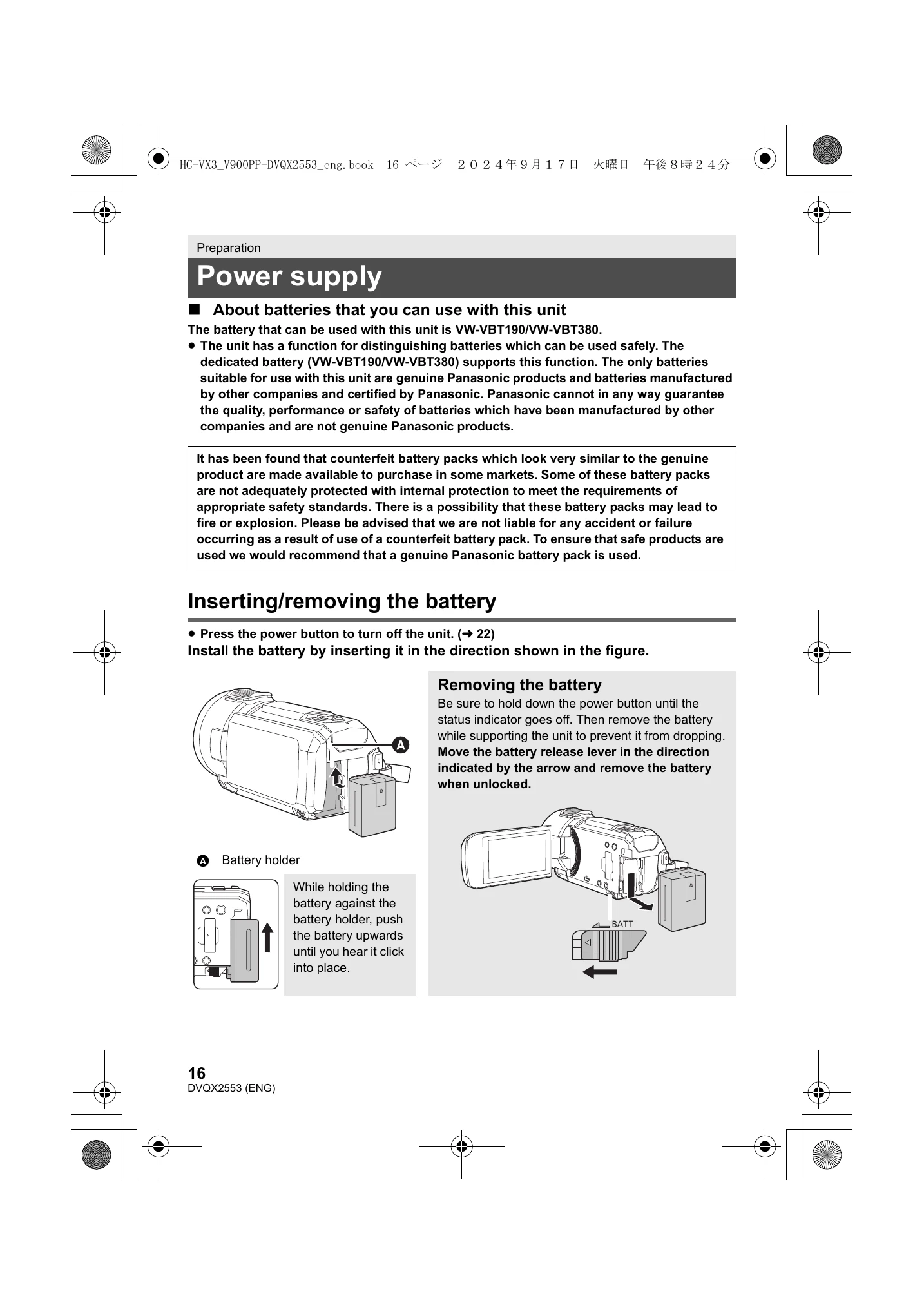
Inserting/Removing Battery: Turn off the unit, align the battery with the battery holder, and push upwards until it clicks. To remove, press the power button until the status indicator is off, then push the battery release lever and remove the battery.
Charging: Connect the USB cable to the AC adaptor and the unit's USB terminal. Plug the AC adaptor into an outlet. The status indicator will flash red while charging.
Recording to SD Card: Format the SD card before use. Insert the SD card into the slot with the label facing the correct direction. Close the SD card cover securely.
Turning On/Off: Open the LCD monitor and press the power button to turn on. Hold the power button until the status indicator goes off to turn off.
| Problem | Possible Cause | Solution |
|---|---|---|
| Unit does not operate. | The battery is not charged. | Charge the battery. |
| Screen is blank. | The unit is turned off. | Open the LCD monitor. |
| The battery is depleted. | Charge or replace the battery. | |
| Cannot record or play back. | SD card is not inserted correctly or is full. | Insert the SD card correctly or replace it with a new one. Delete unnecessary files. Format the SD card. |