Brand: Panasonic
Category: Video Camera
Document Type: Manual
Language: EN
Brand: Panasonic
Category: Video Camera
Document Type: Manual
Language: EN
Uploaded: Aug. 10, 2025, 12:40 a.m.
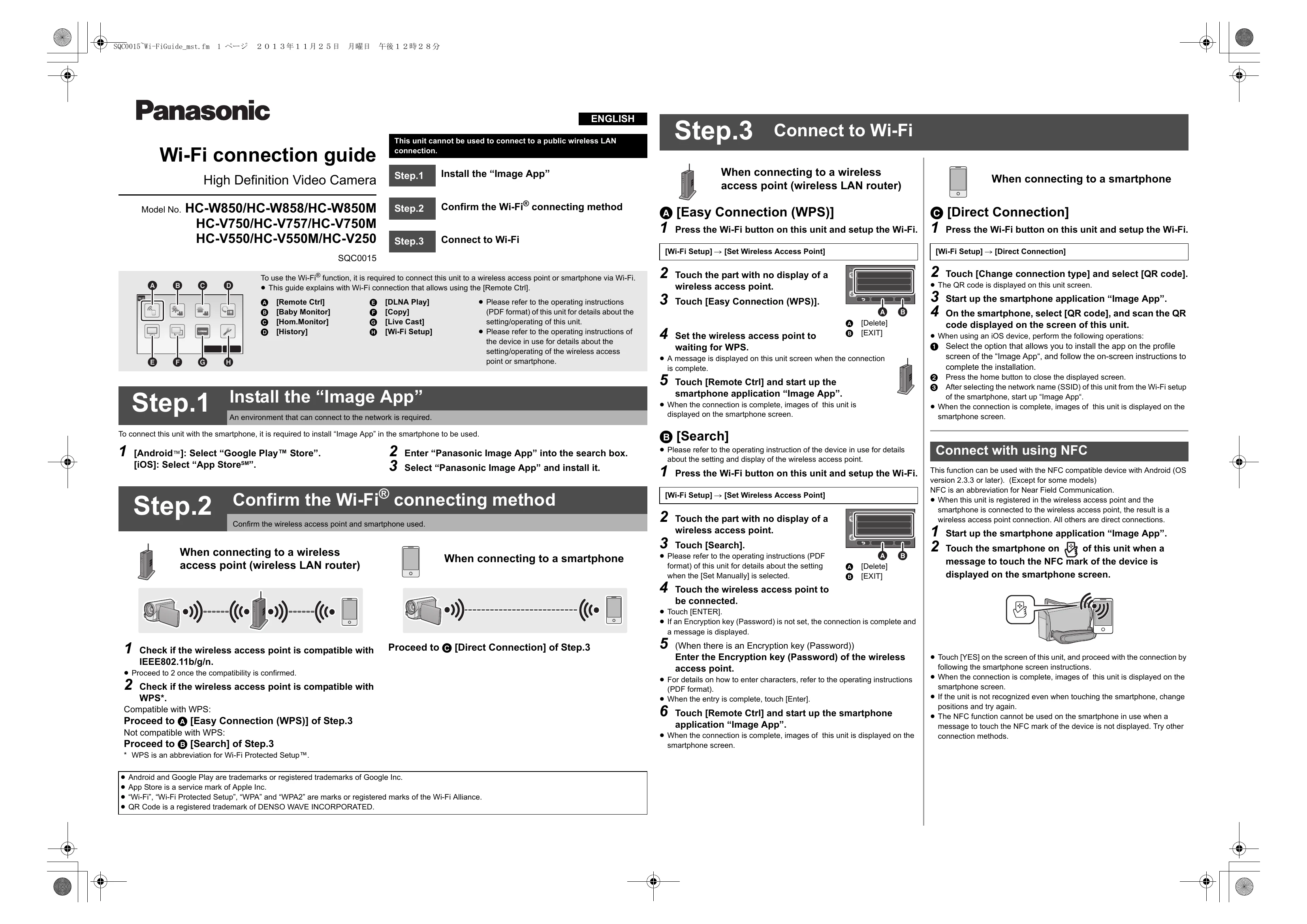
Step 1: Install the "Image App"
Download and install the "Image App" on your smartphone from Google Play Store (Android) or App Store (iOS).
Step 2: Confirm the Wi-Fi® connecting method
Check if your wireless access point is compatible with IEEE802.11b/g/n and WPS. If compatible with WPS, proceed to Easy Connection (WPS). If not, proceed to Search.
Step 3: Connect to Wi-Fi
When connecting to a wireless access point:
When connecting to a smartphone (Direct Connection):
Press the Wi-Fi button, select [Direct Connection]. Touch [Change connection type] and select [QR code]. Start the "Image App" on your smartphone, select [QR code], and scan the QR code displayed on the unit.
Connect with using NFC:
Start the "Image App" on your smartphone. Touch the smartphone to the NFC mark of the unit when prompted.