Manual for HX-A1M

Manual for HX-A1M

Brand: Panasonic

Category: Video Camera

Document Type: Manual

Language: EN
Uploaded: Aug. 10, 2025, 12:42 a.m.

Manual Publish Date: 2011-01-01

Warranty Information

Panasonic products are warranted for 12 months from the date of purchase, covering faults under normal domestic use.

Preparation

  • Waterproof/Dustproof/Anti-shock Performance: Unit complies with IP68 for underwater use up to 1.5m for 30 mins. It has passed MIL-STD 810F Method 516.5-Shock test.
  • Handling: Avoid impact, extreme temperatures, and contact with liquids other than fresh/sea water. Ensure terminal covers are properly sealed.
  • Condensation: Occurs with temperature/humidity changes. Turn off unit, remove covers, and allow to dry for 2 hours.
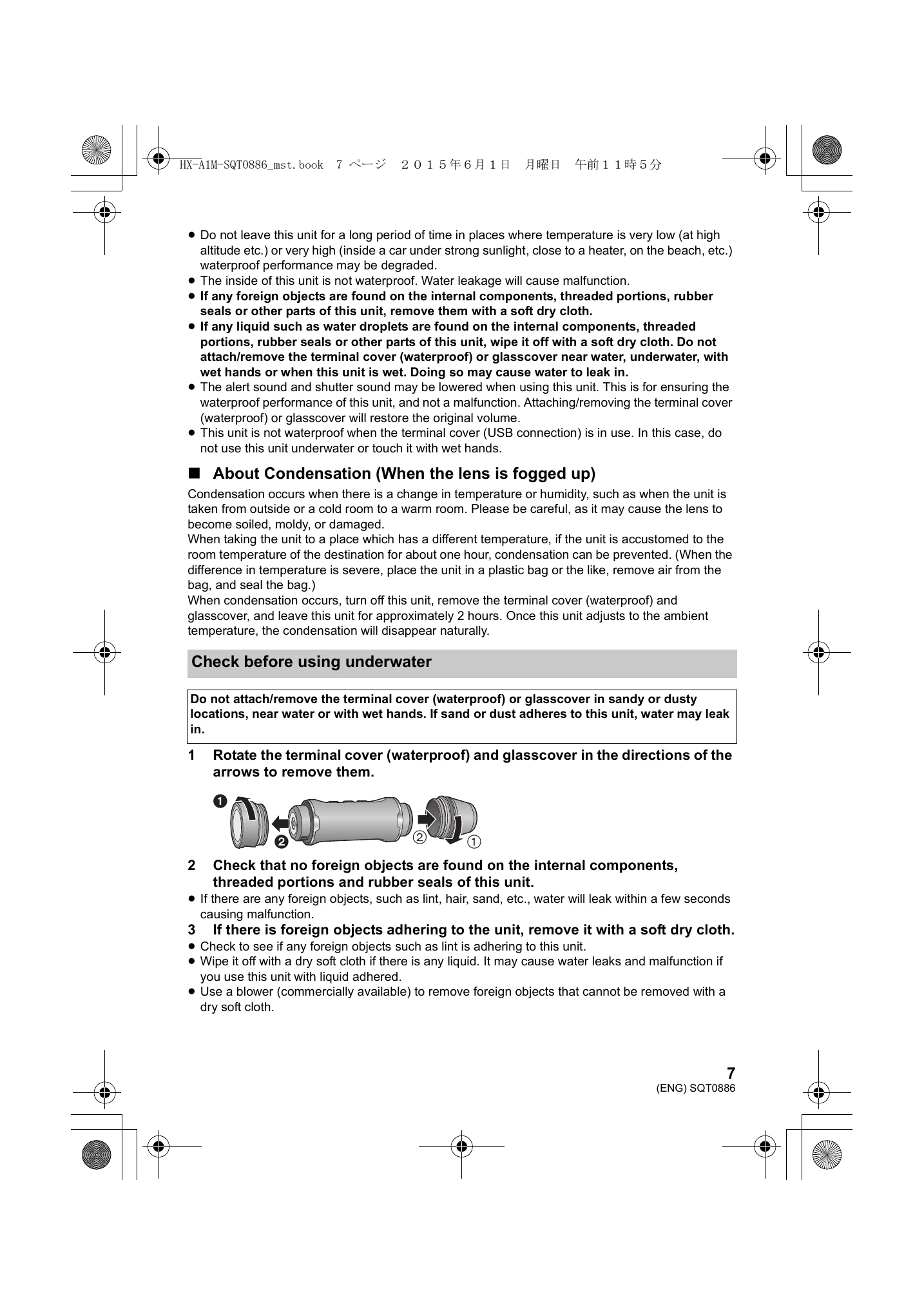
  • Check before using underwater: Ensure no foreign objects or damage to seals.
  • Using underwater: Depth up to 1.5m, temp 0°C-35°C, max 30 mins continuous. Unit will sink.
  • Caring after underwater use: Rinse with fresh water, drain, and dry thoroughly.
  • Cold climate use: Battery performance may decrease. Cannot recharge below 0°C.

Basic Operations

  • Recording: Connect to smartphone via 'Image App' to check live view. Test recording recommended. Use Wi-Fi function to connect to smartphone.
  • Turning On/Off: Press power button to turn on. Press and hold for ~1 sec to turn off.
  • Recording Modes: Switch between Motion Picture, Slow Motion, and Still Picture modes.
  • Playback: Play back via smartphone using 'Image App'.

Troubleshooting and error codes

ProblemCheck points
The lens fogs up.This is due to condensation. It is not a malfunction. Please refer to page 7.
This unit cannot be turned on.
  • Charge the battery again to ensure it is sufficiently charged. (→ 13)
  • In cold places, the battery using time becomes shorter.
  • If the operating time is very short even after the battery has been recharged sufficiently, the battery has worn out.
Colour balance of images is strange when recording in a place such as a gymnasium.In a place with multiple light sources, such as a gymnasium or a hall, set the [White Balance] setting to [Indoor 2]. If you cannot record clearly with the [Indoor 2], set it with [Custom].
Recorded motion pictures flicker. Horizontal lines appear in recorded images.If you record an image with [1280×720/60fps] or [848×480/120fps] in [Slow Motion], flickering or horizontal lines may appear under fluorescent lighting.
The Wi-Fi connection is not possible between this unit and a smartphone.
  • Make sure the smartphone is properly connected to this unit by checking the Wi-Fi settings of the smartphone.
  • Make sure the SSID and Password have been correctly input.
  • Make sure the smartphone is not connected to the wireless access point. If it is connected to the wireless access point, change the Wi-Fi access point using the smartphone's Wi-Fi set up.
The Wi-Fi connection is disconnected immediately.If there is a setting for avoiding unnecessary connections in the Wi-Fi setting menu of the Android device, turn it off.
Privacy Policy