Brand: PARKSIDE
Category: Home Appliances
Document Type: Manual
Language: EN
Brand: PARKSIDE
Category: Home Appliances
Document Type: Manual
Language: EN
Uploaded: Nov. 21, 2025, 6:38 p.m.
Manual Publish Date: 2014-01-01
This product comes with a 3-year guarantee from the date of purchase.
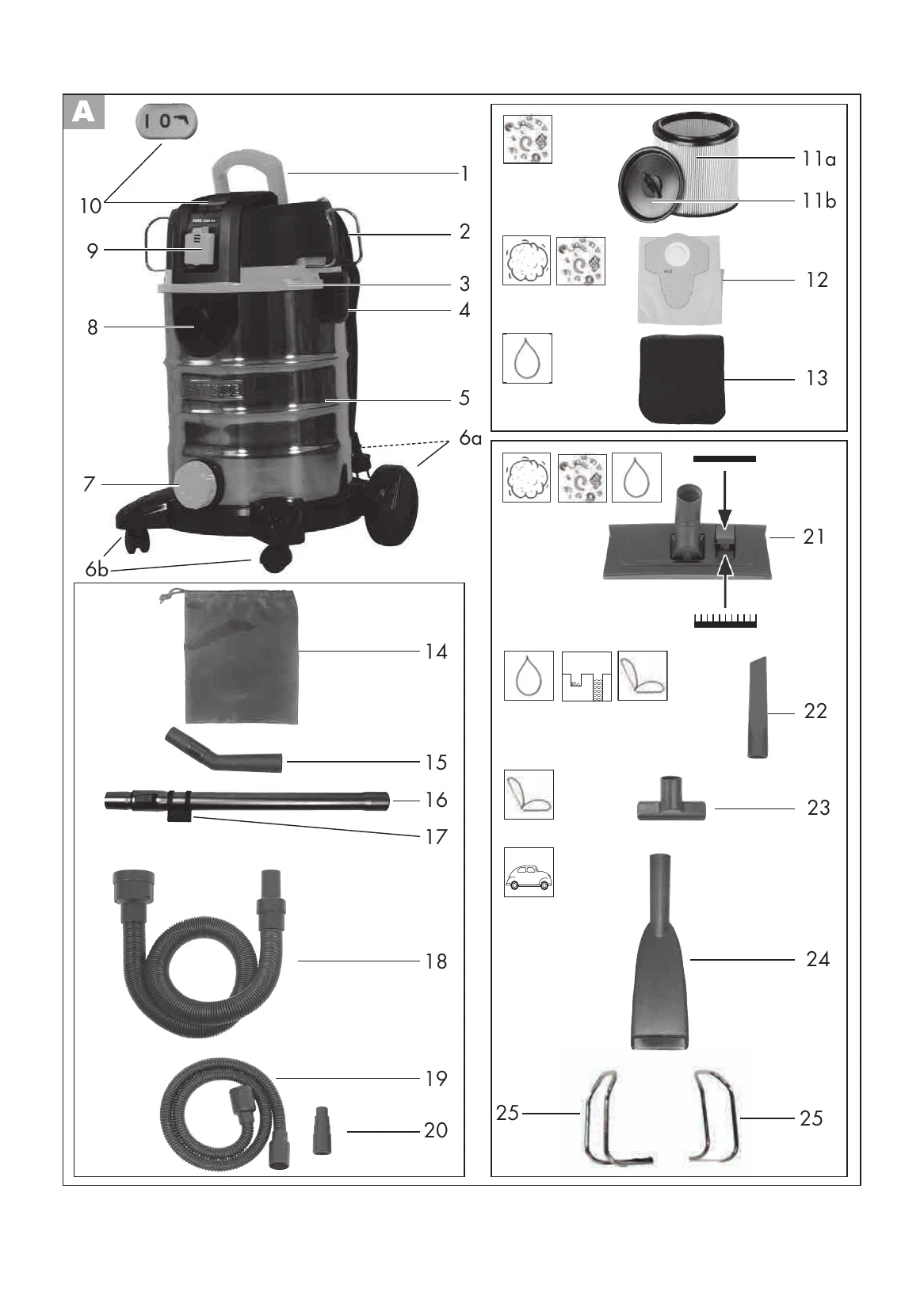
Switching on/off: Move the On/Off switch (A10) to the "I" position to switch on, and to the "0" position to switch off.
Switching on electrical appliance + vacuum cleaner: Move the On/Off switch (A10) to the "I" position, then switch on the electrical appliance. The vacuum cleaner switches on automatically and switches off with a time lapse after the appliance is switched off.
Work breaks: To store the suction set, push the telescopic suction tube together and insert the holder (17) into the motor head (3), or place the tube in the retaining bracket (25).
Dry vacuuming: Ensure the fluted filter (11) is fitted. For fine dust, use an additional paper filter bag (12).
Wet vacuuming: Place the foam filter (13) on the filter box. To drain water, use the suction hose (18) on the handle (15) and connect it to the water tank.
Blowing: Screw the vacuum hose (18) onto the nozzles on the engine housing (3) (operation without filters).
Powertool vacuuming: Use the Powertool hose (19) connected to the vacuum hose (18) and the reduction adaptor (20). This is for cleaning or dust extraction from powertools.
| Problem | Possible cause | Fault correction |
|---|---|---|
| Device does not start | Mains voltage is not present | Check plug socket, cable, line, plug and fuse, where appropriate, repair through electrical specialist |
| Defective on/off switch (A 10) | Repair through customer service | |
| Worn carbon brushes | Repair through customer service | |
| Defective motor | Repair through customer service | |
| Low or lack of suction | Hose system (A 18/19) or jets (A 21-24) blocked | Remove obstructions and blockages |
| Air control on the handle (A 15) open | Close the air control | |
| Collector (A 5) open | Close collector | |
| Collector (A 5) full | Empty collector | |
| Filter (A 11/12/13) full or clogged | Empty, clean or replace filter | |
| Float does not switch the appliance off | Float cannot move | Release float |
| Float faulty | Repair by Customer Care |