Brand: PENTAX
Category: Camera
Document Type:
Language: EN
Brand: PENTAX
Category: Camera
Document Type:
Language: EN
Uploaded: Aug. 9, 2025, 11:57 p.m.
Manual Publish Date: 1997
Cameras are guaranteed against defects for twelve months from purchase, provided they are not misused.
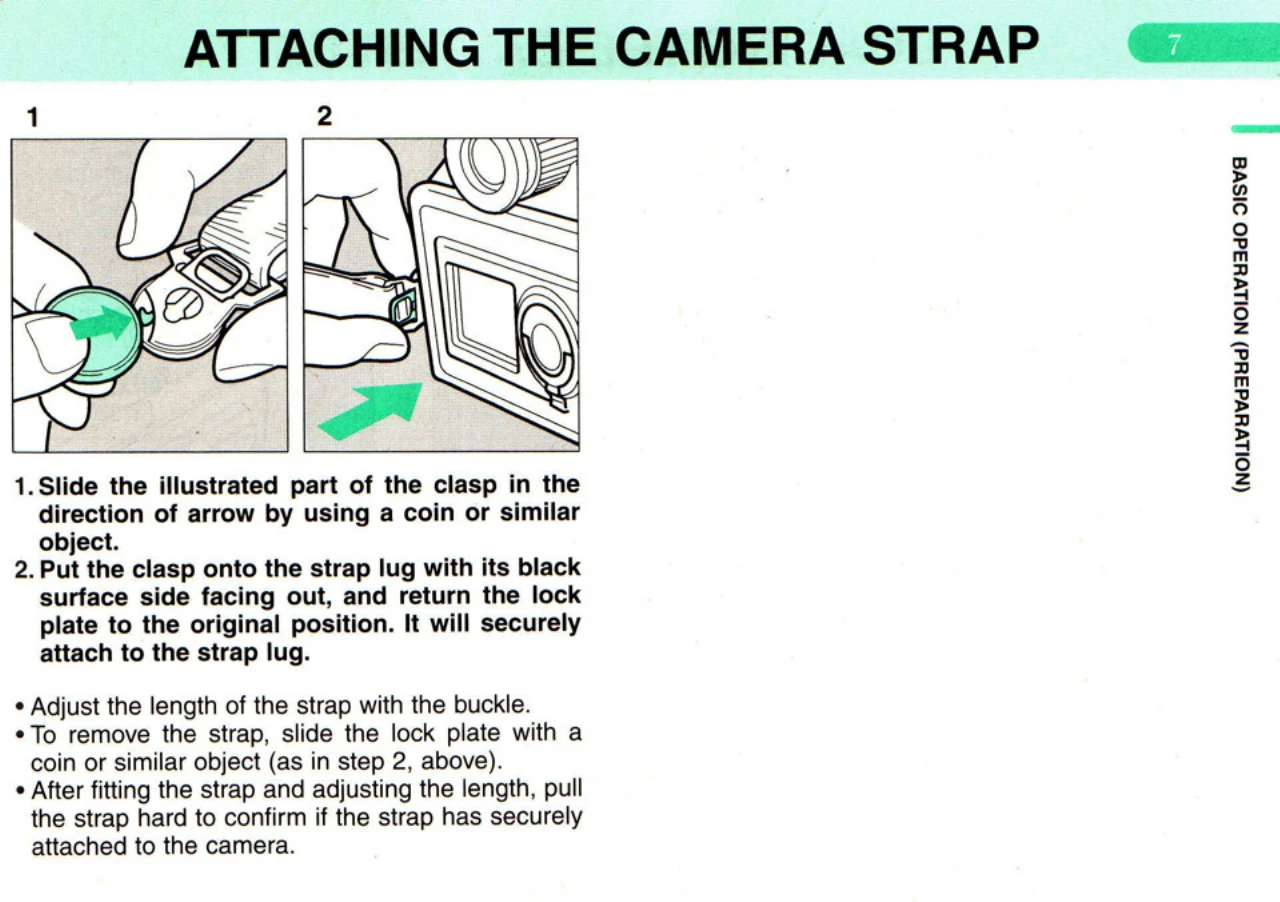
Attaching the Camera Strap: Slide the clasp into the strap lug using a coin. Secure it by returning the lock plate. Adjust length with the buckle. To remove, slide the lock plate with a coin.
Loading the Batteries: Remove the battery holder by lifting and turning the release knob. Load six 1.5V AA batteries according to the diagram. Secure the holder by turning the knob.
Turning the Power On: Set the main switch to [ON]. An audible signal confirms focus. Turn the switch OFF when not in use.
Attaching the Lens: Remove the body mount cap while depressing the lens unlock button. Align red dots on camera and lens, attach, and turn right until it clicks. To remove, turn left while depressing the unlock button.
Attaching/Detaching Film Holder: Detach by raising and turning the knob until red dots align, then continue to the end of the red line. Attach by aligning red dots, inserting into the camera chamber, and depressing both sides until a click is heard. Turn the film holder knob 90° right to secure.
| Symptoms | Causes | Remedies | Reference |
| The shutter cannot be released. | The last frame is exposed and wound onto the take-up spool. | Remove the film from the film back. | P.21 |
| The main switch is set to [ OFF ]. | Set the main switch to [ ON ]. | P.10 | |
| The battery warning ( ) ) appears. | Replace the battery. | P.8 | |
| The auto bracketing selector is set to [ISO]. | Set the auto bracketing selector to the another position. | P.20 | |
| The self-timer mode is being set. | Cancel the self-timer mode. | P.35 | |
| The exposure counter does not indicate [1]. | The shutter release button is not depressed after loading the film. | Depress the shutter release button after loading the film. | P.18 |
| Indicators do not appear on the LCD panel. | The main switch is the [OFF] position. | Turn the main switch to [ ON ]. | P.10 |
| No battery has been installed. | Install the batteries. | P.8 | |
| The batteries are improperly installed | Install the batteries properly. | P.8 | |
| The batteries are dead. | Replace the batteries. | P.8 | |
| The camera does not focus. | AF frame is not placed over the subject. | Move the camera until the AF frame [C] covers the subject. | P.32 |
| The subject is too close. | Increase the camera-to-subject distance. | P.32 | |
| The focus mode is set to [ MF ]. | Set the lens in the autofocus position. | P.28 | |
| The subject is difficult to autofocus. | Use the focus technique or focus manually using the matte field. | P.55, P.58 | |
| [ ] blinks in the viewfinder. | The subject is too close or difficult to autofocus. | Use the focus-lock technique or focus manually using the matte field. | P.55, P.58 |
| [Err] blinks on the LCD panel. | The camera may be defective. | Consult your Pentax distributor or an authorized Pentax repair shop. |