Brand: PENTAX
Category: Digital Camera
Document Type:
Language: EN
Brand: PENTAX
Category: Digital Camera
Document Type:
Language: EN
Uploaded: Aug. 9, 2025, 11:57 p.m.
All cameras are guaranteed against defects for twelve months from the date of purchase.
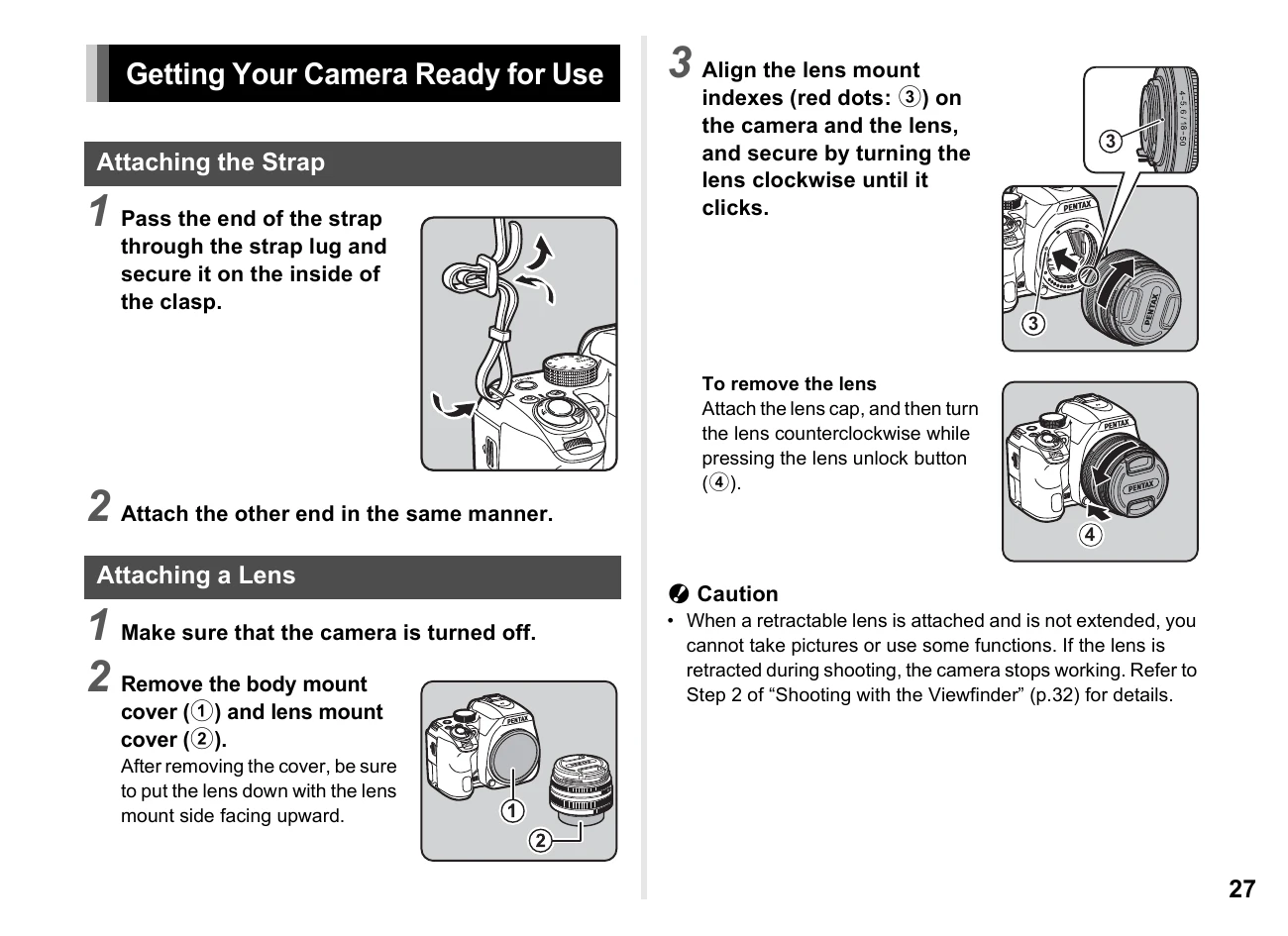
Attaching the Strap: Pass the end of the strap through the strap lug and secure it on the inside of the clasp. Attach the other end in the same manner.
Attaching a Lens: Ensure the camera is off. Remove the body mount cover and lens mount cover. Align the lens mount indexes and secure the lens by turning it clockwise until it clicks. To remove, attach the lens cap, turn counterclockwise while pressing the lens unlock button.
| Symptom | Cause | Solution |
|---|---|---|
| Camera does not turn on. | Battery is not charged. | Charge the battery. |
| Cannot take pictures. | Memory card is not inserted or is full. | Insert a memory card or replace it. |
| Blurry images. | Camera shake or incorrect focus. | Use a tripod, adjust focus, or enable Shake Reduction. |
| Photos are too dark or too light. | Incorrect exposure settings. | Adjust exposure compensation or change shooting mode. |