Brand: PETRI
Category: Camera
Document Type:
Language: EN
Brand: PETRI
Category: Camera
Document Type:
Language: EN
Uploaded: Aug. 9, 2025, 11:59 p.m.
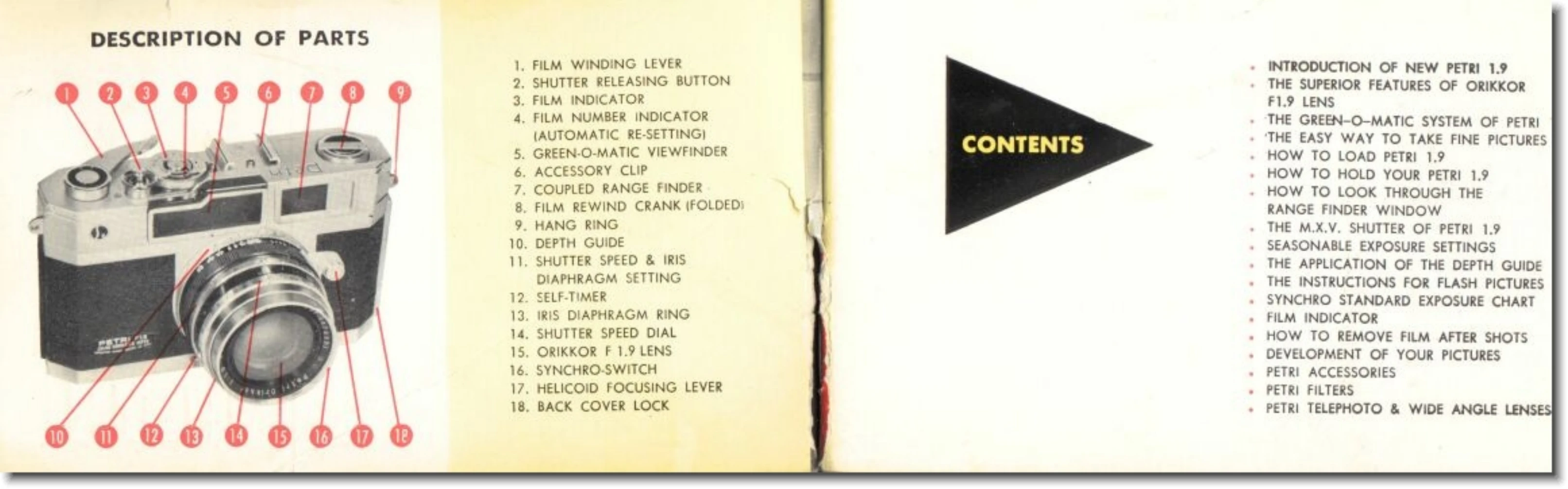
Loading Film: Open the back cover by pulling down the lever. Place the film roll in the compartment and thread the film end into the slot of the take-up spool. Close the back cover, which will automatically lock. Advance the film using the winding lever until the film is taut.
Taking Pictures: Cock the camera by turning the film winding lever and press the shutter button. Adjust shutter speed and aperture using the dials. Hold the camera steady, looking through the viewfinder to compose your shot. Focus using the rangefinder. Gently press the shutter button to take the picture.
Rewinding Film: After the last shot, press the rewind button located at the bottom of the camera. Pull out the rewind knob and turn it to rewind the film back into the magazine.
| Problem | Possible Cause | Remedy |
|---|---|---|
| Camera does not advance film | Film not loaded correctly | Re-load film |
| Shutter does not fire | Camera not cocked | Cock the camera |
| Blurry photos | Camera shake, incorrect focus | Hold camera steady, check focus |