Search
Manual for 7S
Brand:
PETRI
Category:
Camera
Document Type:
Language:
EN
Uploaded:
Aug. 9, 2025, 11:59 p.m.
Download Manual
Loading the Film
Open the camera back by pulling the lever on the side.
Slip the film end into any slit on the take-up spool and slide it down toward the bottom of the camera body.
Advance the film until the perforations on both edges engage with the camera sprockets.
Close the camera back. Return the rewind crank to its original position, ensuring the film is correctly seated.
Advance the film and release the shutter until '1' appears in the film counter.
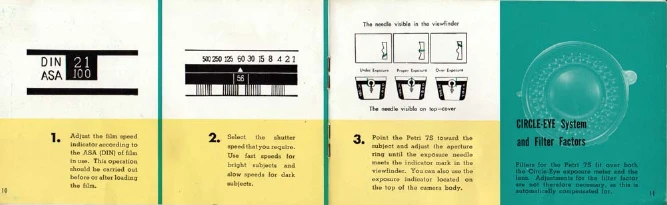
Using the Exposure Meter
Adjust the film speed indicator according to the ASA (DIN) of the film.
Select the shutter speed you require.
Point the camera at the subject and adjust the aperture ring until the exposure needle in the viewfinder meets the indicator mark.
Focusing
Look through the viewfinder. A yellow area in a diamond will be seen in the center.
Adjust the focusing lever until one clear image is shown within this area.
Taking a Picture
Select the shutter speed and set the aperture.
Adjust the focusing.
Select the picture composition within the bright line finder.
Release the shutter button.
Using the Selftimer
Pull down the selftimer lever as far as it goes.
Press the shutter button. The film will be exposed about 8 seconds later.
Unloading the Film
Press the rewind button at the bottom of the camera.
While pressing the rewind button, pull out the rewind crank and turn it in the indicated direction until you feel no resistance.
Select a place in the shade and avoid direct sunlight to remove the film.
Privacy Policy