Brand: PHILIPS
Category: Audio
Document Type: Manual
Language: EN
Brand: PHILIPS
Category: Audio
Document Type: Manual
Language: EN
Uploaded: Nov. 21, 2025, 7:41 p.m.
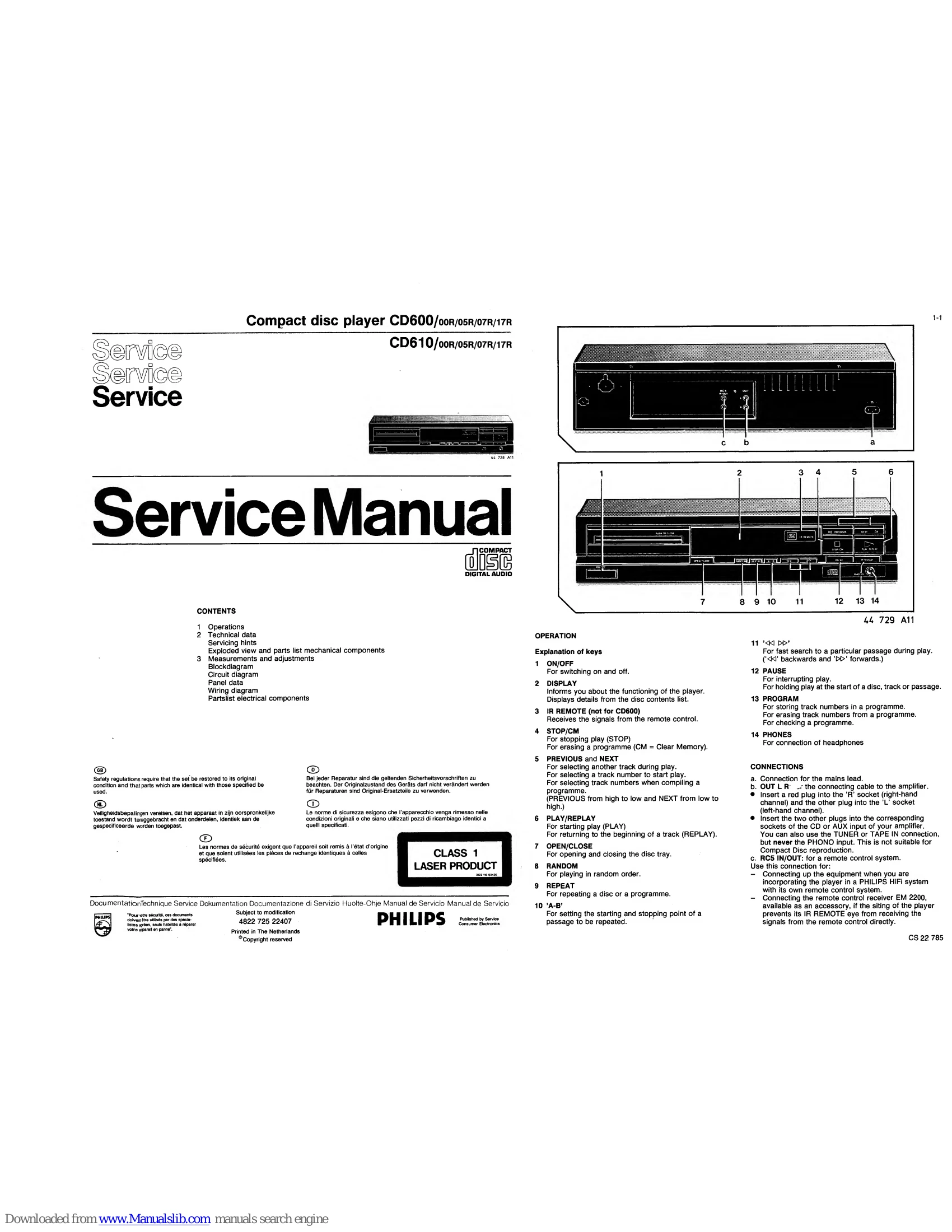
Power: Press the ON/OFF button to switch the player on or off.
Display: Provides information on the player's status and disc contents.
Disc Handling: Use OPEN/CLOSE to access the disc tray. Place the disc inside and close the tray.
Playback: Press PLAY/REPLAY to start playback. Use PREVIOUS and NEXT to select tracks or search for specific track numbers. Use 'PLAY/REPLAY' to return to the beginning of a track.
Control: PAUSE temporarily stops playback. STOP/CM stops playback or erases a program. RANDOM plays tracks in a random order. REPEAT allows for repeating a disc or a program. 'A-B' sets a specific passage for repeat playback.
Search: Use '' and '▷▷' for fast searching during playback.
Program: Use PROGRAM to store track numbers for playback sequences.
Headphones: Connect headphones to the PHONES socket.
| System Errors | Description | Error Type |
|---|---|---|
| Er 01 | RD pulse is missing. Check the start capacity Sc, the RD signal and the photodiode signal processor. | Starting_error |
| Er 02 | TL pulse is missing during start-up. Check the TL signal, the HF-signal and the Photodiode signal processor. | Starting error |
| Er 03 | Lead-in track not found. Check the disc used. Check also that the radial arm rests against the inside. Check the RE-dig signal and the Radial error processor. | Starting error |
| Er 04 | Too many TL pulses during play. Check the quality of the disc used. Check the HFD signal. | Error during PLAY |
| Er 05 | TL pulse is low for more than 50 msec. Check the disc used. Check the HF-in signal and the photodiodes. | Error during PLAY |
| Er 06 | No TL pulse received within 0.5 sec. in case of track jumping. Check the RE-lag circuit. | Error during SEARCH or NEXT/PREVIOUS |
| Er 07 | Subcode error. In case of track loss during play the information of the subcode is used to determine the place of the last information that was still well readable. In case of an interruption of HF or other signals, this will lead to Er 07. | Error during PLAY |
| Er 08 | TOC error (Table of Contents). Check the quality of the disc used. Check the initial speed of the turntable motor and the motor control. Check also that the radial arm rests against the inside. | Starting error |
| Operating errors | Description |
|---|---|
| Er 30 | NEXT when repeat is off. |
| Er 31 | PREVIOUS when repeat is off. |
| Er 32 | INDEX selected when no track selected. |
| Er 33 | Selected index does not exist on this CD. |
| Er 34 | Review error: no program. |
| Er 35 | Program memory full. |
| Er 36 | Programmed track is non existing on this CD. |
| Er 37 | Selected track is non existing on this CD. |
| Er 60 | Fast forward bound. |
| Er 61 | Fast reverse bound. |