Brand: PHILIPS
Category: Audio
Document Type: Manual
Language: EN
Brand: PHILIPS
Category: Audio
Document Type: Manual
Language: EN
Uploaded: Nov. 21, 2025, 7:14 p.m.
This manual does not contain specific warranty period information.
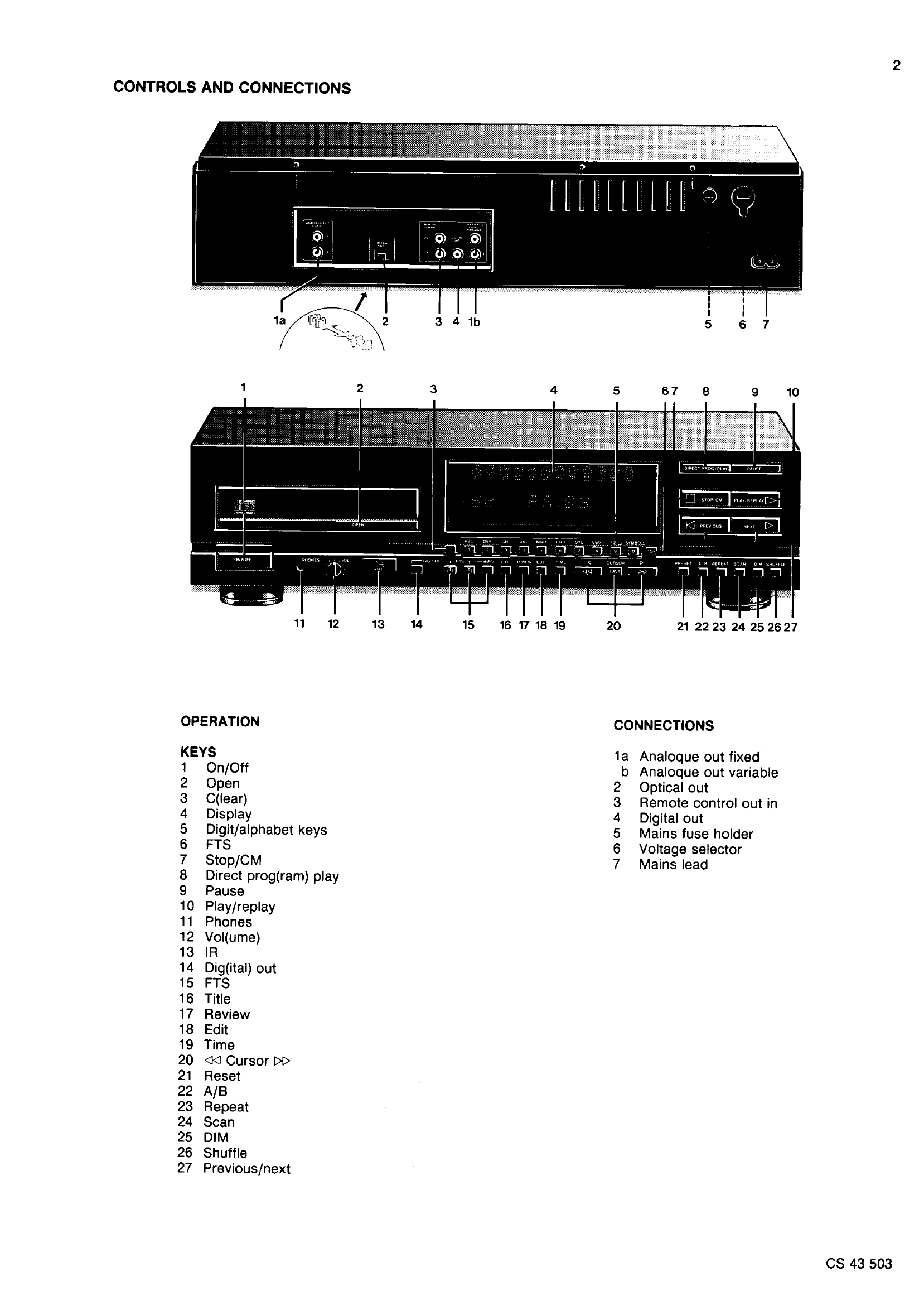
Power On/Off: Use the On/Off button.
Open/Close Tray: Use the Open button.
Play/Replay: Press the Play/Replay button to start playback.
Stop/CM: Press Stop/CM to stop playback or clear memory.
Pause: Press Pause to temporarily stop playback.
Track Selection: Use Digit/alphabet keys or Previous/next buttons for track selection.
Volume Control: Use the Volume control for headphone output.
FTS (Favorite Track Selection): Use FTS buttons for setting favorite tracks.
Direct Program Play: Use Direct Prog(ram) Play for immediate track playback.
Display: The Display button controls display functions.
Repeat/Scan/Shuffle: Use these buttons for playback modes.
Edit/Time/Review: Functions for programming and track information.
Reset: Resets the unit to its default state.
Cursor/Direct Program Play: Navigate and select tracks.
A/B Repeat: Set a specific section for repeat playback.
| SYSTEM ERRORS | OPERATING ERRORS |
|---|---|
| ERROR 01 Tray error | ERROR 10 Selected track not accessible |
| ERROR 02 Focus error | ERROR 11 Relative time not accessible |
| ERROR 03 Radial error | ERROR 12 Absolute time not accessible |
| ERROR 04 Too many TL | ERROR 30 Next operated during last track without repeat |
| ERROR 05 TL low to long | ERROR 31 Previous operated during last track without repeat |
| ERROR 06 Jump error | ERROR 42 Selected track does not exist |
| ERROR 07 Subcode error | |
| ERROR 08 TOC error |