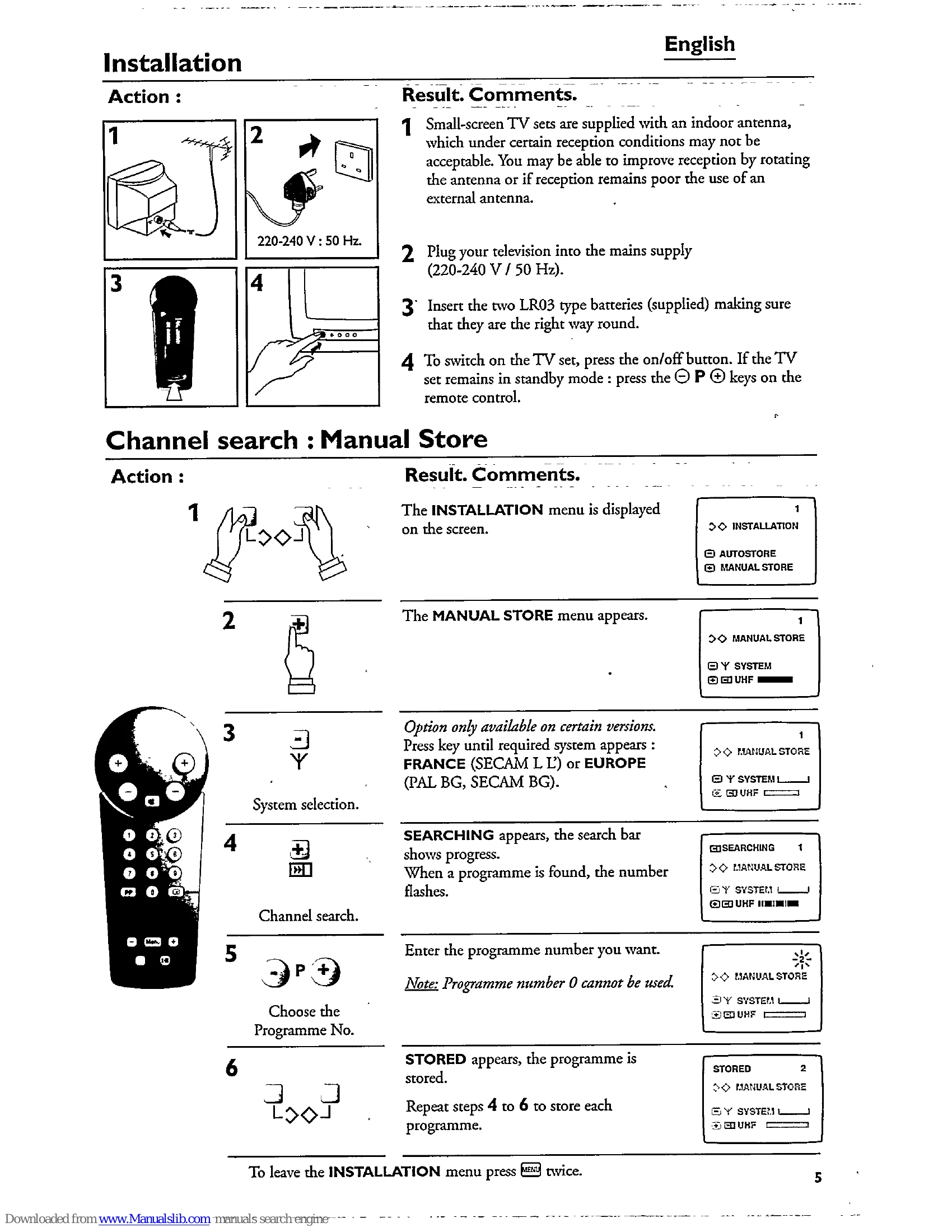
Installation: Plug TV into mains (220-240V, 50Hz). Insert two LR03 batteries into remote. Press the on/off button on the TV or remote to switch on. Channel Search: Access INSTALLATION menu. Select AUTOSTORE or MANUAL STORE. For Manual Store, select system (France/Europe), then channel search, enter program number, and store. AutoStore searches for all programs. Using Remote: Standby turns TV off (red light). P/P selects previous/next program. Number keys select programs directly. Volume adjusts sound. Mute toggles sound on/off. Menu allows adjustment of volume, brightness, contrast, color, and timer. Storing adjustments saves settings (except timer). Personal preferences recall stored settings. Screen info toggles display. Teletext: Request teletext, select pages using number keys, navigate with P/P, stop/resume sub-pages, enlarge pages, and reveal hidden info. Connecting Appliances: Use euroconnector socket. Press key for AV input. Headphones mute TV sound when connected.