Manual for CD140

Manual for CD140

Brand: PHILIPS

Category: Electronics

Document Type: Manual

Language: EN
Uploaded: Nov. 21, 2025, 8:55 p.m.

Warranty Information

Philips declares product compliance with Directive 1999/5/EC. Refer to www.p4c.philips.com for Declaration of Conformity.

  • Making a call: Predial the number, then press the talk key. Or, take the line, then enter the number and press the talk key.
  • Answering a call: Press the talk key when the phone rings.
  • Ending a call: Press the talk key or place the handset on the base station.
  • Using the phonebook: Access by pressing the phonebook key. Store up to 20 entries.
  • Call log: View up to 10 unanswered calls.
  • Settings: Adjust volume, ring melody, time, and other preferences.

Troubleshooting and error codes

Problem Possible Solution
The handset does not switch on!
  • Charge the battery.
  • Check the charger connections.
  • Use only SUPPLIED RECHARGEABLE BATTERIES.
The phone does not work at all.
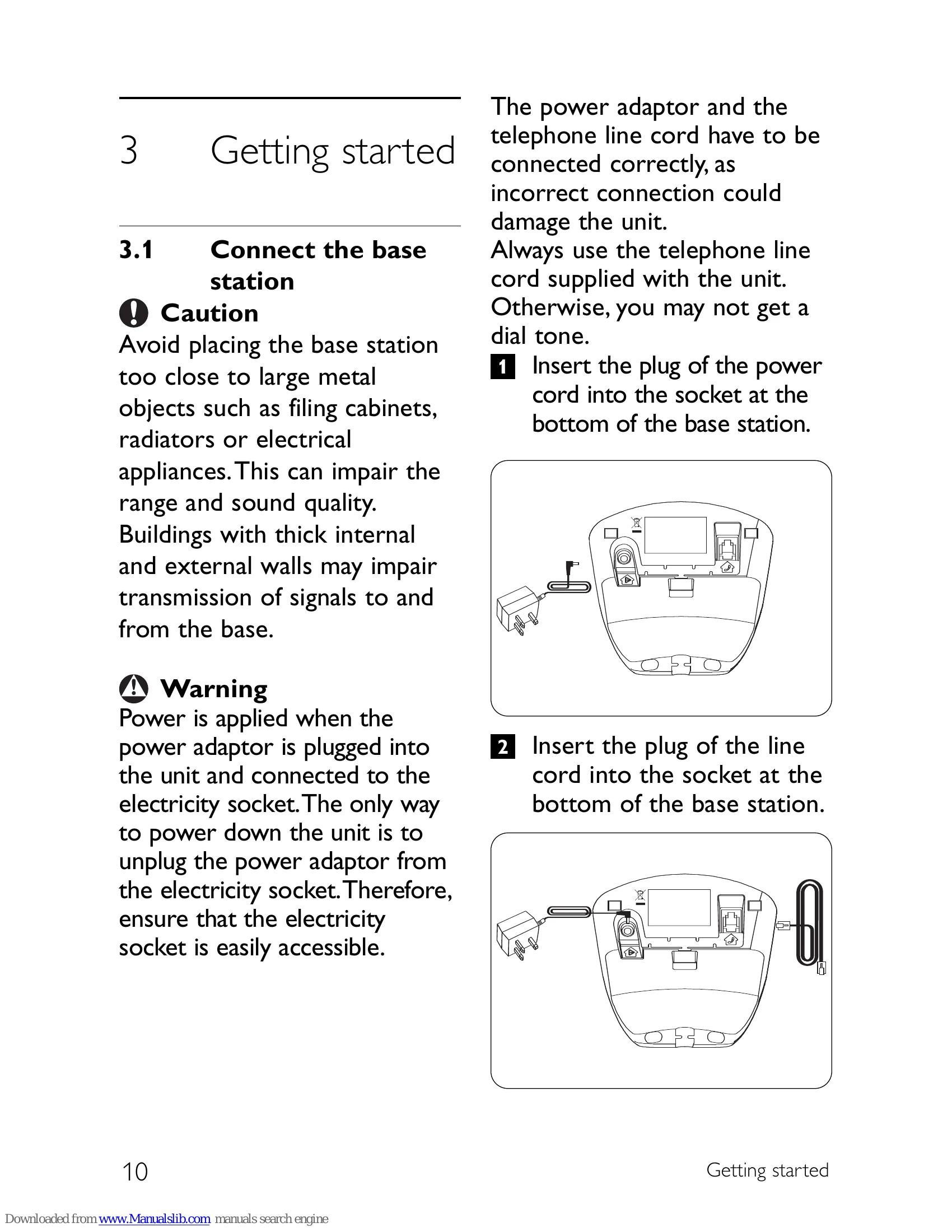
  • Ensure the adaptor and phone cord are connected properly.
  • Check that the batteries are fully charged and installed properly.
Communication is lost during a call!
  • Charge the SUPPLIED RECHARGEABLE BATTERIES.
  • Move closer to the base station.
Poor audio quality
  • Move closer to the base station.
  • Move the base station at least one metre away from any electrical appliances.
No dialling tone
  • Check the connections.
  • Reset the phone: unplug and plug back in the mains.
  • Charge the batteries for at least 24 hours.
  • Move closer to the base station.
  • Use the line cable provided and connect the line adaptor (when needed).
The Y is blinking.
  • Move closer to the base station.
  • Check battery level.
  • Register the handset to the base station.
The 🔊 appears. Replace the batteries with new ones (use only rechargeable batteries).
Caller ID does not work properly.
  • Check with your local phone company that the CID service is subscribed to.
  • Let the phone ring at least once before answering.
The Call Waiting call cannot be answered. Check with your local phone company and select the correct recall duration.
The handset displays nothing, but only the Y is blinking.
  • Try again by disconnecting and connecting the base station power supply and follow the procedure to register a handset.
  • Remove and place back the handset batteries.
Handset does not ring!
  • Increase the volume.
  • Make sure that the adaptor and the phone cord are connected properly.
  • Move the handset closer to the base unit.
  • Make sure the handset ringer is turned on.
Caller does not hear me! Microphone may be muted: During a call, press 🧣.
Noise interference on your radio or television Move the power adaptor or base station as far away as possible.
Caller Line Identification (CLI) service does not work Check your subscription with your network operator.
A phonebook entry cannot be stored Delete an entry to free memory.
The handset is unable to register
  • Make sure that 🧣 has been pressed for three seconds.
  • Each base can only register up to four handsets.
  • Each handset can only be registered to one base.
I forget my PIN
  • Press .
  • Press 0.
  • Press ##**793.
  • Your phone will reset to its default settings and you can get the default PIN of 0000. Phonebook records will not be erased.
Privacy Policy