Brand: PHILIPS
Category: Electronics
Document Type: Manual
Language: EN
Brand: PHILIPS
Category: Electronics
Document Type: Manual
Language: EN
Uploaded: Nov. 21, 2025, 6:15 p.m.
Product is manufactured by Gibson Innovations Ltd.
Overview
The Philips D140/D145 is a cordless phone with features such as a phonebook, call log, and redial list. It can be used for making and receiving calls, adjusting volume, and ending calls. The handset can be switched on or off, and the keypad can be locked or unlocked.
Connecting the Phone
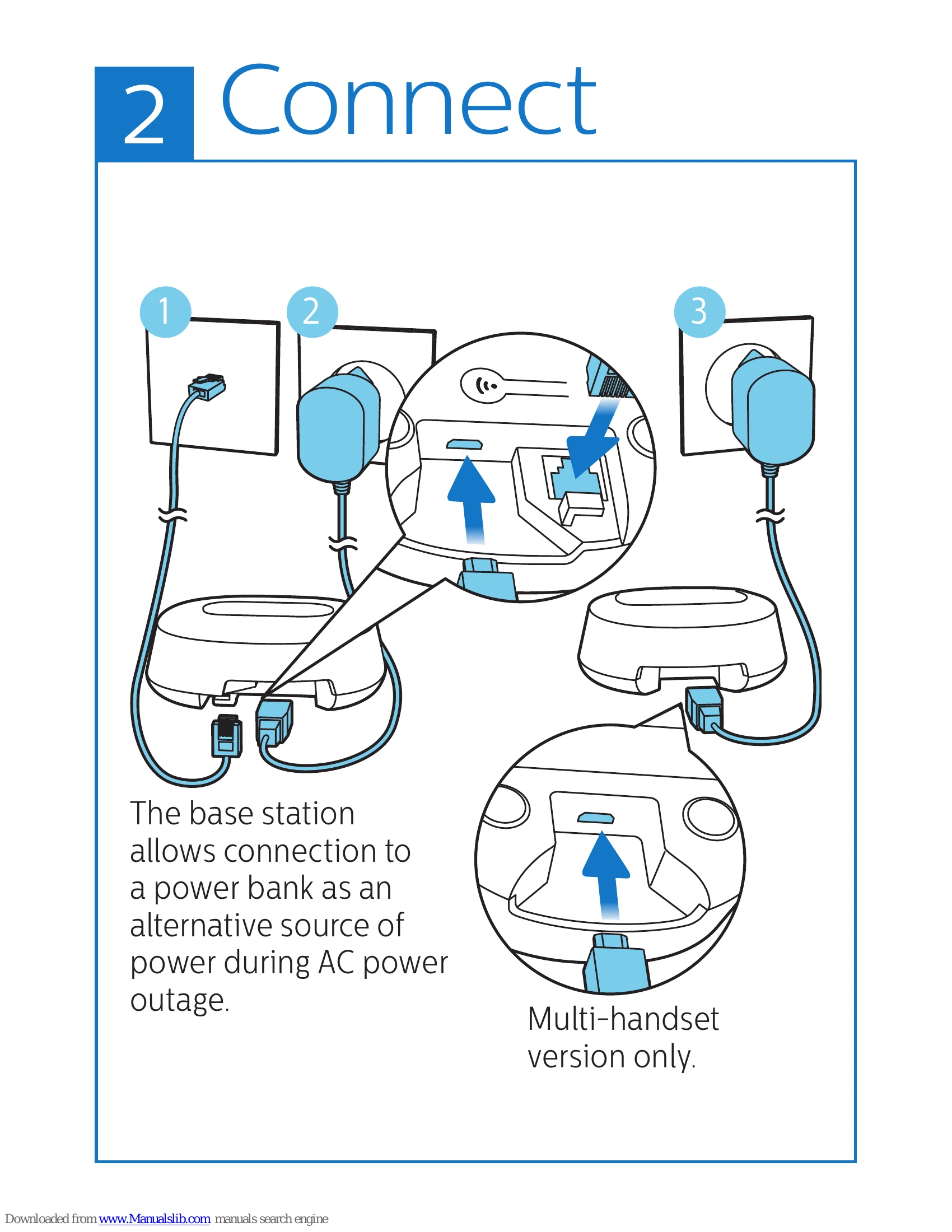
Connect the base station to the power supply using the provided adapter. The base station can also be connected to a power bank as an alternative power source during an outage.
Getting Started
To switch on the phone, ensure the handset switch is turned on. Charge the phone by placing it on the charging cradle. The phone will indicate low battery when charging is in progress. For first-time use, configure the country and language settings.
Answering Machine (D145 only)
The D145 model includes an answering machine. You can turn it on or off, set it to answer only, or record and answer calls. You can listen to and delete incoming messages.
Additional Features
The phonebook allows storing up to 50 entries, the call log stores 20 entries, and the redial list stores recent calls. The handset can be registered to the base station. Default settings can be restored.
| Issue | Solution |
| My handset displays [SEARCHING] or [UNAVAILABLE], or [UNREGISTERED], what do I do? | Make sure the base station has power supply. The handset is out of range. Move it closer to the base station. The handset is not paired with the base. Register the handset to the base station. |
| If I fail to pair (register) the additional handsets to the base station, what do I do? | Your base memory is full. Access MENU > [SERVICES] > [UNREGISTER] to unregister the unused handsets and try again. If registration fails, unplug the power adapter from the base station and plug it back. Wait for 15 seconds, and then repeat the registration procedure. |
| I have chosen a wrong language which I cannot read, what do I do? | 1 Press to go back to the standby screen. 2 Press MENU to access the main menu screen. 3 The following options will appear on the screen: [PHONE SETUP] > [LANGUAGE] [CONFIG. TÉL] > [LANGUE] [TEL.-SETUP] > [SPRACHE] [CONF. TELEF.] > [LINGUA] 4 Select them to access the language options. 5 Select your own language. |
| My handset is in searching or unavailable status, what do I do? | Make sure that the base station has power supply. Register the handset to the base station. Move the handset closer to the base station. |
| No display | Make sure the batteries are charged. Make sure there are power and phone connections. |
| The battery discharges too fast. | The battery is not fully recharged. Leave the handset on the charging cradle for at least 8 hours or until the battery icon on the handset stops scrolling and indicates full bar. |
| Bad audio (crackles, echo, etc.) | The handset is nearly out of range. Move it closer to the base station. The phone receives interference from the nearby electrical appliances. Move the base station away from them. The phone is at a location with thick walls. Move the base away from them. The phone receives interference from the DSL (digital subscriber line) connection. Install a DSL filter to prevent the noise. Contact your service provider for the DSL filter. |
| The handset does not ring. | Make sure the handset ringtone is turned on. |
| The caller ID does not display. | The service is not activated. Check with your service provider. The caller's information is withheld or unavailable. |