Brand: PIONEER
Category: Audio Player
Document Type: Manual
Language: EN
Brand: PIONEER
Category: Audio Player
Document Type: Manual
Language: EN
Uploaded: Nov. 21, 2025, 6:48 p.m.
This manual does not contain specific warranty period information.
| Symptom | Cause | Remedy |
|---|---|---|
| Power switch is on but power does not turn on. | AC cord is unplugged. | Plug power cord into wall socket. |
| No sound from speakers. | Volume is turned all the way down. | Raise volume knob setting. |
| Speaker cords are disconnected. | Connect speaker cords correctly. | |
| Speaker cords are connected with vinyl insulation still on. | Strip vinyl insulation from speaker wire tips before connecting. | |
| Input selector is not set to your desired listening source. | Select correct input selector. | |
| Sound from only one speaker. | Connection cords are not connected or are damaged. | Connect correctly or replace with good quality cords. |
| One of the speaker cords is disconnected or damaged. | Connect correctly or replace with good quality cord. | |
| Screeching or howling sound heard during mic mixing. | Microphone angle is bad. | Change microphone angle. |
| Microphone is too close to speaker. | Move microphone further away from speakers. | |
| Volume is too loud. | Reduce volume. | |
| Tape does not move. | Deck is in pause mode. | Press PAUSE or PLAY button. |
| Cassette inserted incorrectly. | Put cassette properly in holder. | |
| No sound heard from tape. | Input selector not set to TAPE. | Set to TAPE. |
| Playing unrecorded tape. | Play a recorded tape. | |
| Tape sounds unclear, not loud enough. | Dirty head. | Clean head. |
| Can not record. | Erasure prevention tabs are broken off. | Apply adhesive tape over tab holes. |
| Dirty head. | Clean head. | |
| Can not copy tape. | One deck has no tape loaded. | Load tapes in both decks. |
| Tape in Deck II has erasure prevention tabs broken off. | Use cassettes that can be recorded on. | |
| Treble tones unclear. | Dirty head. | Clean head. |
| DOLBY NR system is ON when listening to a tape recorded without DOLBY NR. | Use same noise reduction system for playback as for recording. (Do not play tapes recorded with different NR systems.) | |
| Treble tones too strong. | Tape recorded with DOLBY NR but played without. | Play in same condition as recording. (Turn on DOLBY NR switch for recorded tapes with DOLBY NR.) |
| Strange sounds heard (or recorded from) tape, CD, or radio. | TV is on. | Turn off TV. |
| This unit is too close to TV. | Move TV away until interference stops. | |
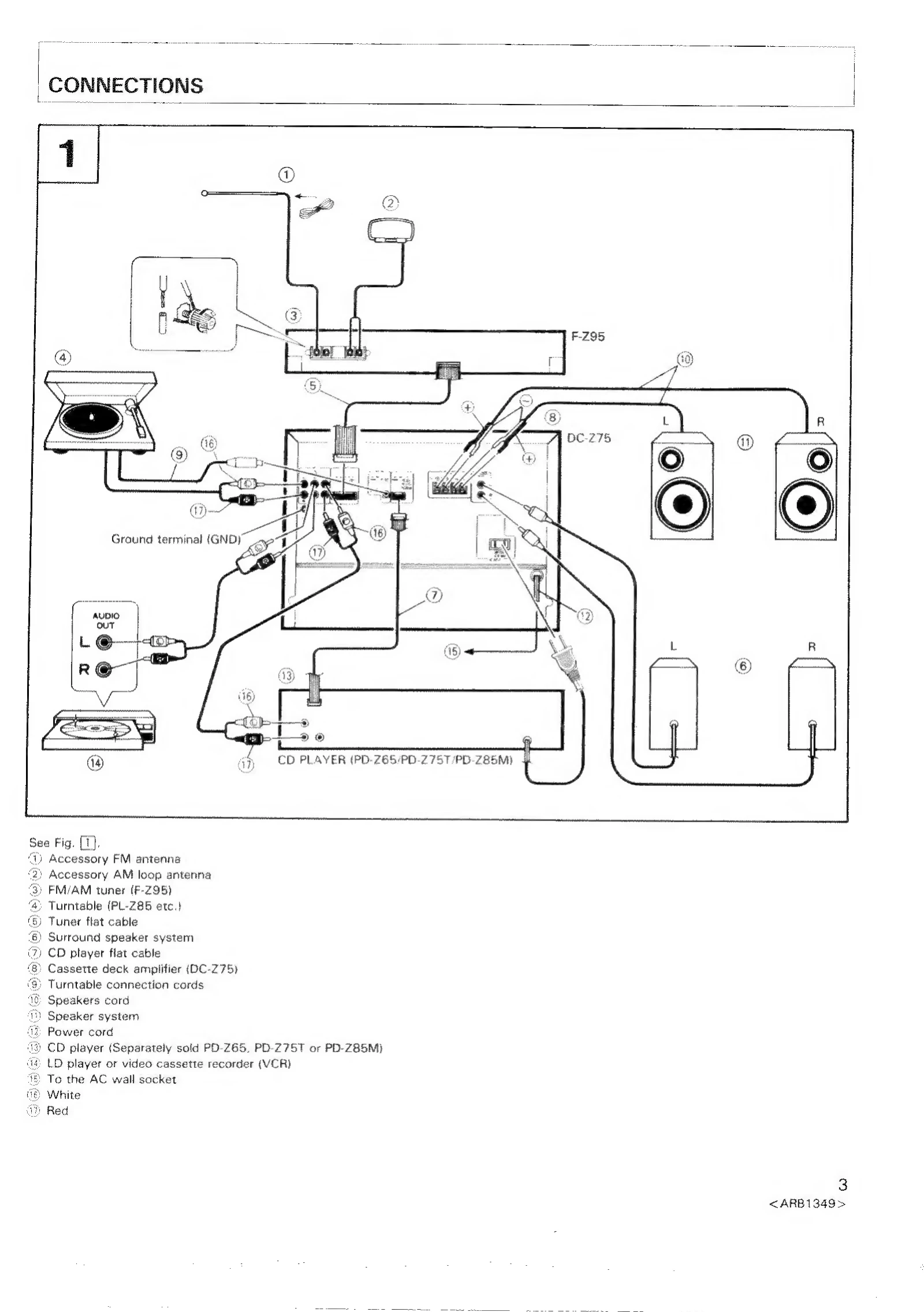
| CD Auto Function does not work. | Flat cable not connected. | Securely connect flat cable and audio cord. |
| Symptom | Cause | Remedy |
|---|---|---|
| No reception. | Antenna not connected. | Connect antenna correctly. |
| Wrong radio band. | Set to desired radio band. | |
| Station not tuned in. | Tune in station. | |
| Input selector not set to TUNER. | Set to TUNER. | |
| Beat noise heard. | TV is on. | Turn off TV or move TV away. |
| Loop antenna position bad. | Change loop antenna position. | |
| Noise heard. | Interference from nearby fluorescent light, hair dryer, or other electrical appliance. | Stop using device causing interference. |
| Not tuned in correctly. | Use tuner controls to tune in station. | |
| Sound is distorted. | Antenna in poor position. | Change antenna position. |
| Broadcast is weak. | Use external antenna. | |
| Interference from other electrical devices or multipath reception. | Change antenna position. |
| Symptom | Cause | Remedy |
|---|---|---|
| Remote control does not work. | Batteries are dead or no batteries in remote control unit. | Insert new batteries. |
| Poor angle or too great a distance from the remote sensor window. | Use within seven meters and within a 30 degree angle of the remote sensor window. | |
| There is an obstacle between you and the remote sensor window. | Change your position or move the obstacle. | |
| For CD player, the flat cable is not connected. | Correctly connect the flat cable. | |
| A fluorescent light is shining on the remote sensor window. | Turn off the light. |
| Symptom | Cause | Remedy |
|---|---|---|
| No time indication. | There was a power blackout. | Set time again. |
| AC plug was pulled. | Set time again. | |
| Timer does not work. | Current time is not set. | Set current time. |
| Start time is not set. | Set ON times. | |
| Timer is not on. | To use timer, press the timer selector button so that the timer display lights. |
| Symptom | Cause | Remedy |
|---|---|---|
| Platter does not turn. | Belt is off. | Put belt correctly on platter. |
| No sound. | Input selector not set to PHONO. | Set to PHONO. |
| Noise or scratchy sounds. | Dust on record. | Clean record. |
| Scratch on record. | Use good record. |