Brand: PIONEER
Category: Audio Player
Document Type: Manual
Language: EN
Brand: PIONEER
Category: Audio Player
Document Type: Manual
Language: EN
Uploaded: Nov. 21, 2025, 8:28 p.m.
Refer to the enclosed warranty card for security. Write the serial number on the card and keep it in a secure area.
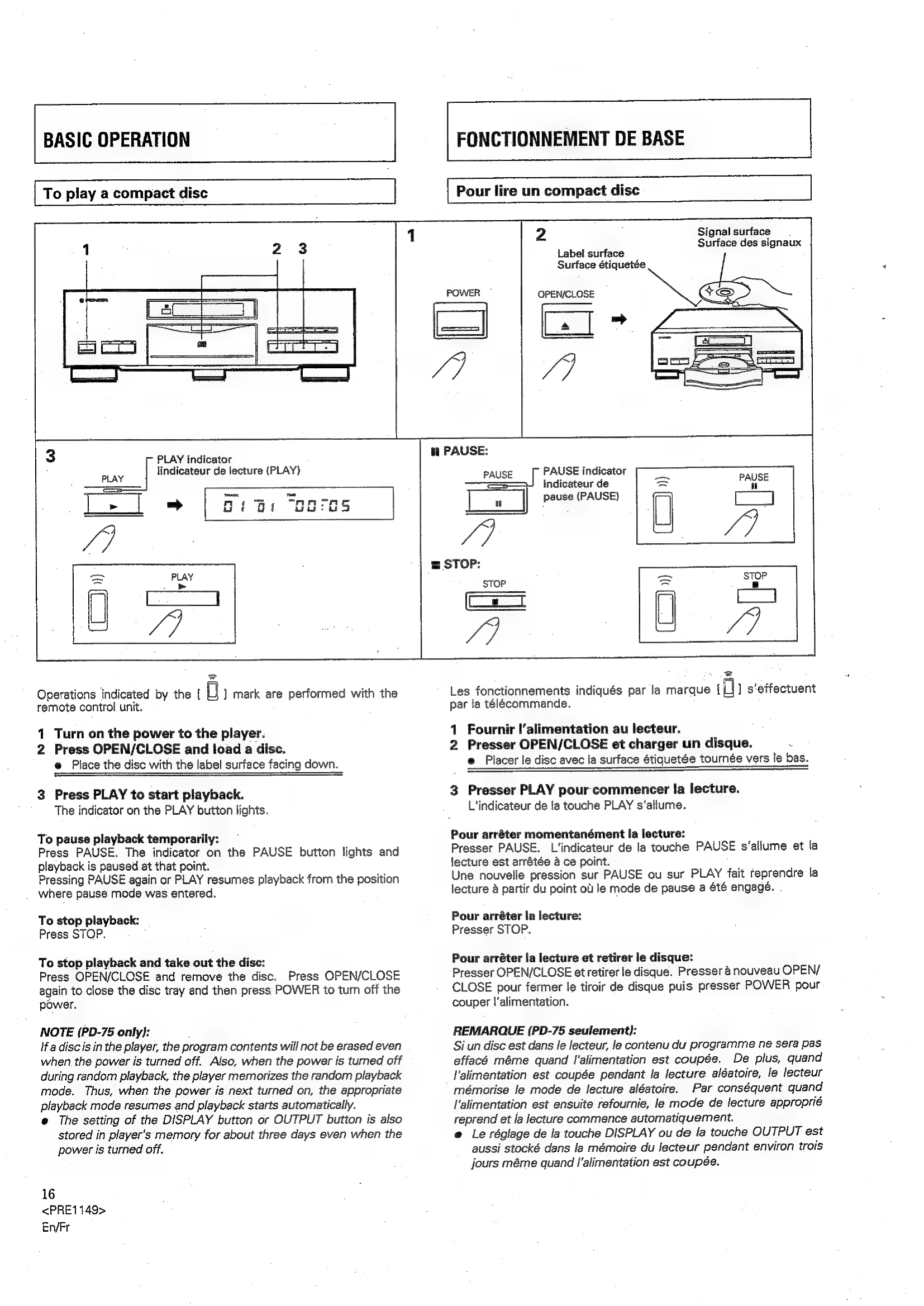
Press PAUSE. The indicator on the PAUSE button lights and playback is paused at that point. Pressing PAUSE again or PLAY resumes playback from the position where pause mode was entered.
Press STOP.
Press OPEN/CLOSE and remove the disc. Press OPEN/CLOSE again to close the disc tray and then press POWER to turn off the power.
Ensure all components are turned off before making connections.
Connect the CD DECK SYNCHRO jacks of the CD player and cassette deck for synchro recording.
Connect CONTROL IN jack on the CD player to CONTROL OUT jack of the amplifier for remote control of the CD player via the amplifier's remote.
Connect the power cord to a household AC wall outlet or an AC outlet on your amplifier.
| Symptom | Cause | Remedy |
|---|---|---|
| Disc tray is not expelled when OPEN/CLOSE is pressed. | Power plug is disconnected from outlet. | Connect plug to amplifier or wall outlet. |
| When playback is started, it stops immediately. Pauses or stops during playback. | Disc is loaded upside down. Smudged on the disc, etc. |
Load the disc correctly with the label side DOWN. Clean the smudges from the disc and then play it again. |
| No sound | Output cords are connected incorrectly or loosely. Incorrect operation of stereo amplifier. The OUTPUT button is set incorrectly. |
Connect properly. Check the settings of amplifier switches and sound volume controls. Set the OUTPUT button according to the connection (DIGITAL or ANALOG). |
| Sound is distorted, noise is output. | Pin plugs and/or amplifier terminals are dirty. Player is in pause mode. |
Clean away dirt. Press the PLAY button. |
| With certain discs, loud noise is produced, or play stops. | Disc has bad scratch or warp. Disc is extremely dirty. |
Replace the disc. Clean disc. |
| Remote control will not function. | Dead batteries. Too far from player or wrong angle. Obstruction between player and remote control unit. |
Replace batteries. Maintain distance of 7 meters and angle of 30 degrees. Remove obstruction. |
| The picture of the TV screen is fluctuated or FM broadcast is interfered with noise. | Interference is being picked up from the CD player. | Turn off the player's power or move it away from the TV or tuner. |