Manual for SE-MJ561BT-T

Manual for SE-MJ561BT-T

Brand: PIONEER

Category: Audio Player

Document Type: Manual

Language: EN
Uploaded: Nov. 21, 2025, 7:02 p.m.

Warranty Information

The manual does not contain specific warranty period information.

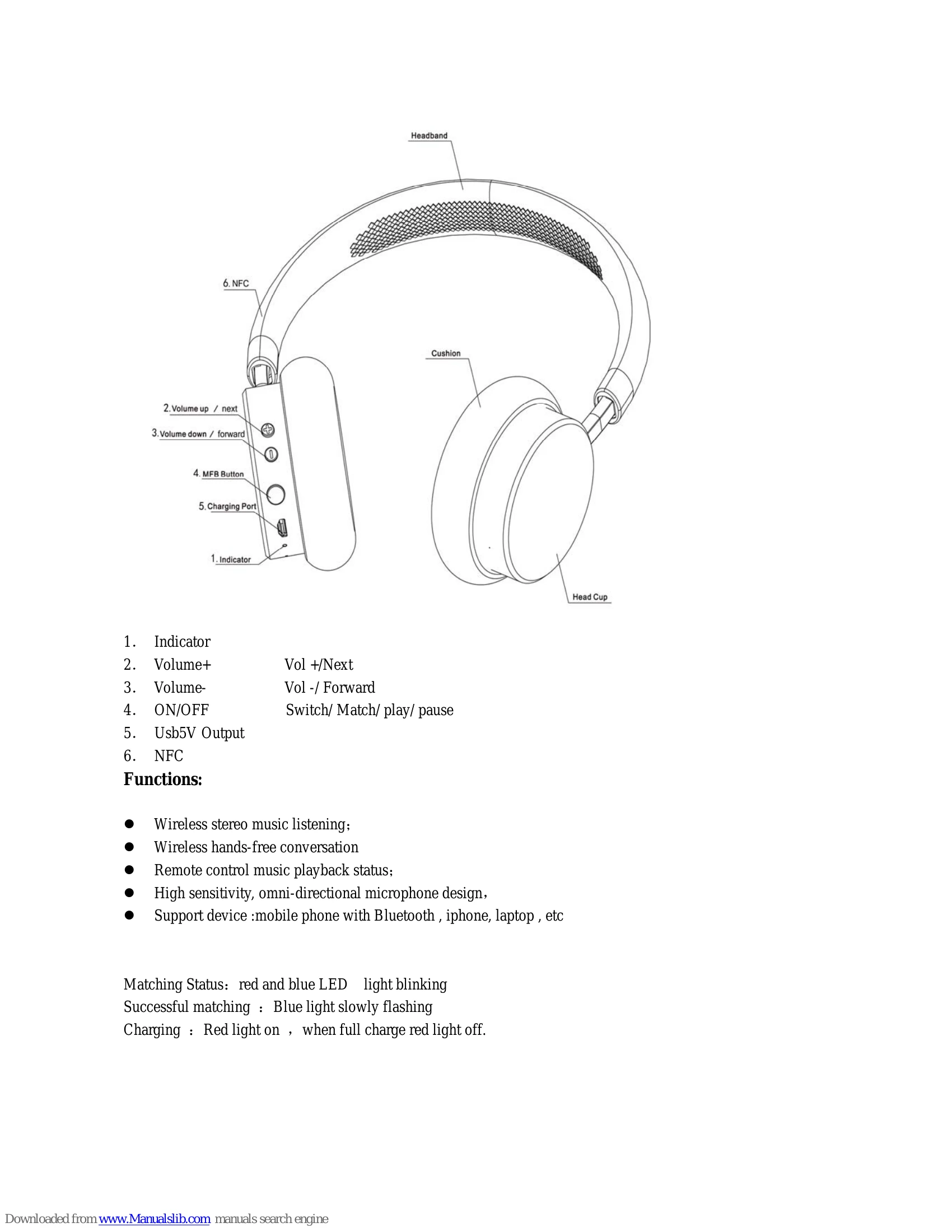
  • Power On/Off: Press and hold the MFB button for 3 seconds to turn the headphones on. Press and hold for 3 seconds to turn them off.
  • Pairing: Turn on the headphones. They will enter pairing mode automatically (red and blue lights blinking). On your device, scan for Bluetooth devices and select "SE-MJ561BT".
  • Answering Calls: Short press the MFB button to answer an incoming call.
  • Rejecting Calls: Press and hold the MFB button for 2 seconds to reject an incoming call.
  • Ending Calls: Short press the MFB button during a call to end it.
  • Music Playback: Short press the MFB button to play or pause music.
  • Volume Control: Long press the Volume Up (+) button for the next song, or Volume Down (-) button for the previous song. Short press Volume Up (+) or Volume Down (-) to adjust the volume.
  • NFC Pairing: Ensure NFC is enabled on your mobile device. Bring the NFC-enabled device close to the NFC zone on the headphones. Follow the prompts on your mobile device to pair.
  • Charging: Connect the USB cable to the charging port and a power source. The red indicator light is on during charging and turns off when fully charged.

Troubleshooting and error codes

Problem Solution
Cannot switch on headphone If could not switch on headphone, maybe power is low, please fully charge before use!
Headphones not charging Use original USB cable while charging. Check connections.
Cannot connect to Bluetooth device Ensure headphones are in pairing mode. Ensure Bluetooth is enabled on your device. Move devices closer. Restart both devices.
Sound issues (low volume, distortion) Check volume levels on both headphones and connected device. Ensure correct Bluetooth profile is selected. Avoid excessive sound pressure to prevent hearing loss.
Interference Reorient or relocate the receiving antenna. Increase the separation between the equipment and receiver. Connect to a different outlet. Consult dealer or technician.
Privacy Policy