Brand: PIONEER
Category: Car Audio
Document Type: Manual
Language: EN
Brand: PIONEER
Category: Car Audio
Document Type: Manual
Language: EN
Uploaded: Nov. 21, 2025, 9:02 p.m.
The warranty period for this product is one year from the date of purchase.
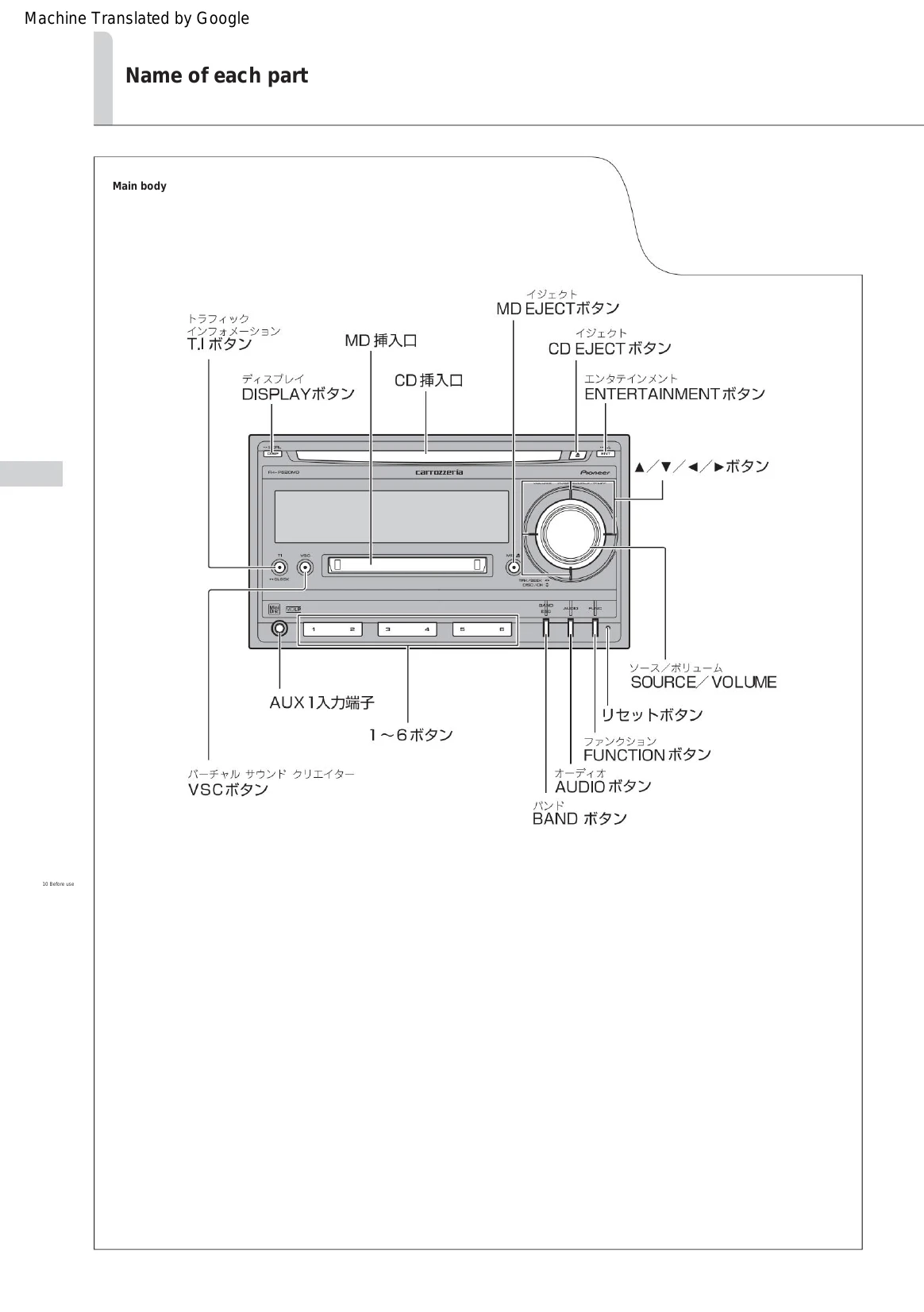
This section explains the basic operations of this machine from turning on the power to turning it off. It can be operated using only SOURCE/VOLUME.
What is a source? This refers to a sound source such as a built-in CD or radio that can be switched by pressing SOURCE.
| Is it malfunctioning? | If the problem persists even after checking | If it still doesn't fix it |
| Please check the following table before requesting repair. | Please reset the unit (page 18). | Please read "Warranty and After-Sales Service" (page 80) before requesting repair. |
| Symptoms | Cause | Remedy |
|---|---|---|
| can not turn on. Do not work. | Each lead wire or connector is not connected correctly. | Check again that the connection is correct and secure (Installation manual). Solve the cause of the blown fuse and replace it with one of the same capacity as the blown fuse (Installation manual). |
| The fuse is blown. | Please increase the volume (page 22). | |
| There is no sound. The sound is small. | I'm turning down the volume. | Release the attenuator (page 58). |
| There is no sound from the front or rear speakers. | The attenuator is turned on. The front/rear volume balance is not adjusted properly. The | Adjust correctly (page 48). Adjust correctly (page 48). |
| There is no sound from the left or right speaker. | front/rear volume balance is not adjusted properly. The left and right volume balance is not adjusted properly. | Adjust correctly (page 48). |
| Symptoms | Cause | Action: |
|---|---|---|
| A loud noise is heard while playing a CD. CD playback stops midway. | There are large scratches or warps on the CD. The CD is extremely dirty. The CD is cloudy. There are water droplets on the CD. The CD is loaded upside down. | Replace with another CD. If it gets better, the CD is defective. Wipe dirt off the CD (page 69). Wipe off any fog or water droplets from the CD (page 69). Insert the CD with the title side facing up (page 24). |
| I can't play CDs. I can't take out the CD. | This unit does not recognize the disc. | Press EJECT for more than 2 seconds to eject the disc. Please try again. |
| Symptoms | Cause | Treatment |
|---|---|---|
| There is a loud noise while playing an MD. Get out. MD playback stops midway. | The MD is extremely dirty. MD is cloudy. There are water droplets on the MD. I inserted an MD with no recordings. Is the MD inserted in the correct direction? do not have. | Please replace the MD. Remove the MD and insert it in the correct direction (page 24). |
| Symptoms | Cause | Treatment |
|---|---|---|
| While receiving radio There is a lot of noise. | The frequency of the broadcasting station does not match. Broadcasting station signal is weak. The reception condition may be affected by obstacles, etc. is not good. Broadcasting station signal is weak. | Please tune the frequency correctly (page 28). Please try selecting another station. Yes (page 28). The better the reception condition, the less noise there will be. It will be. Please select the channel manually (page 28) J). |