Manual for PRO-141FD

Manual for PRO-141FD

Brand: PIONEER

Category: Plasma Display

Document Type: Manual

Language: EN
Uploaded: Nov. 21, 2025, 6:16 p.m.

Warranty Information

Write the serial number on your enclosed warranty card and keep it in a secure area.

Turn ON the Flat Panel Display

  1. Plug the flat panel display's power cord in to a properly grounded outlet.
  2. Press any of the following buttons to turn the flat panel display On:
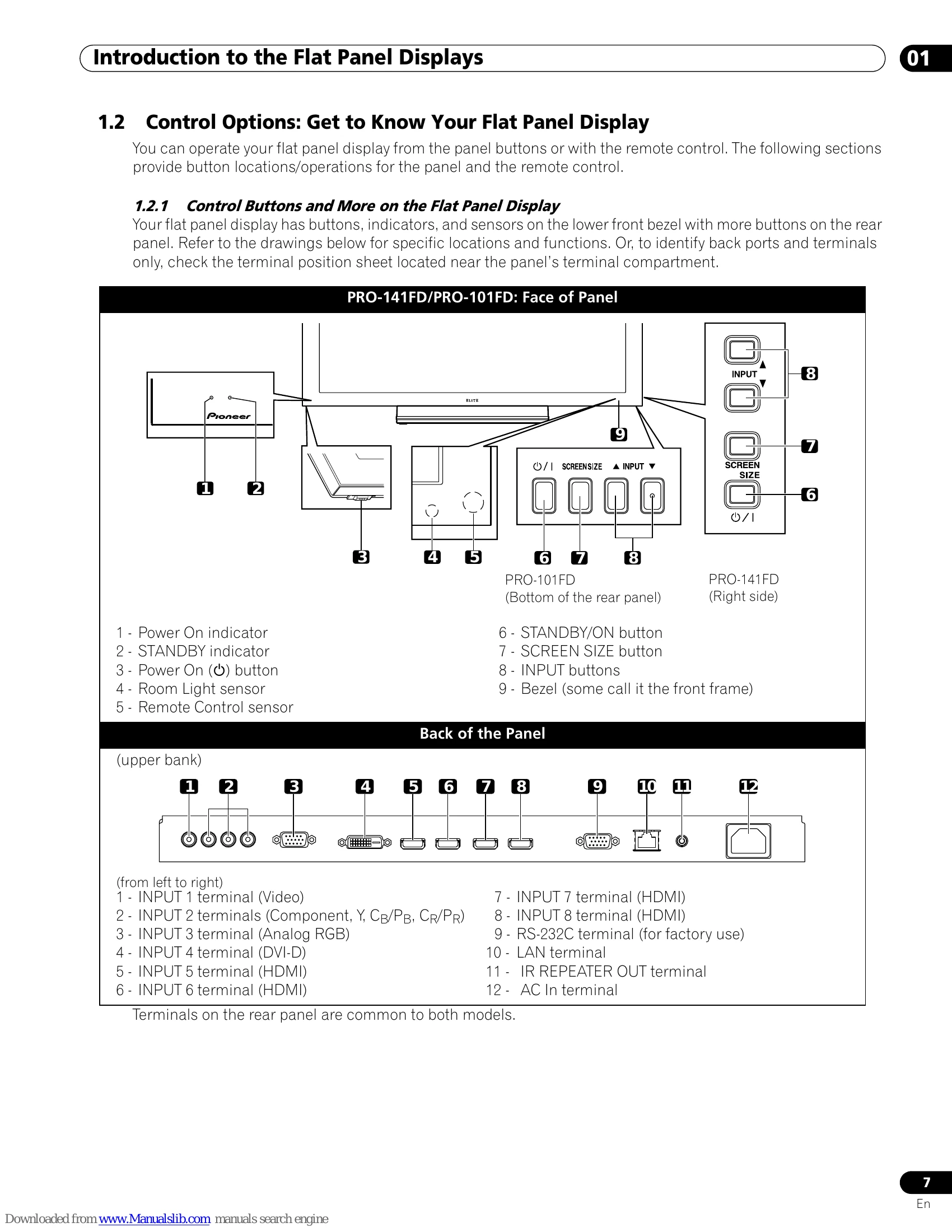
    - Power On button on the panel's back in lower-left section
    - STANDBY/ON button on the side or rear of the panel
    - Remote control's MONITOR button
  3. Confirm that the Power On indicator lights blue.

Turn OFF the Flat Panel Display

  1. Press the remote control's MONITOR button.
  2. Confirm that the Standby indicator lights red.

Program Your Flat Panel Display

  • Choose an Input Source: Press INPUT (buttons 1 through 8) on the remote control.
  • Explore the Home Menu: Press HOME MENU on the remote to access the main menu. Use arrow buttons to navigate and ENTER to select.

Troubleshooting and error codes

Power Indicator Standby Indicator Flat Panel Display Status
Panel's power cord is disconnected or the power cord is connected but the flat panel display's Power On button (⏏) is off
Power is on but waiting for activation
Panel is in Standby
Privacy Policy