Brand: PIONEER
Category: Stereo Receiver
Document Type: Manual
Language: EN
Brand: PIONEER
Category: Stereo Receiver
Document Type: Manual
Language: EN
Uploaded: Nov. 21, 2025, 6:09 p.m.
No specific warranty period is mentioned in the provided text.
| Problem | Possible Cause | Solution |
|---|---|---|
| No sound, or degraded sound | Improper connection or poor contact | Insert plugs fully; check connections. |
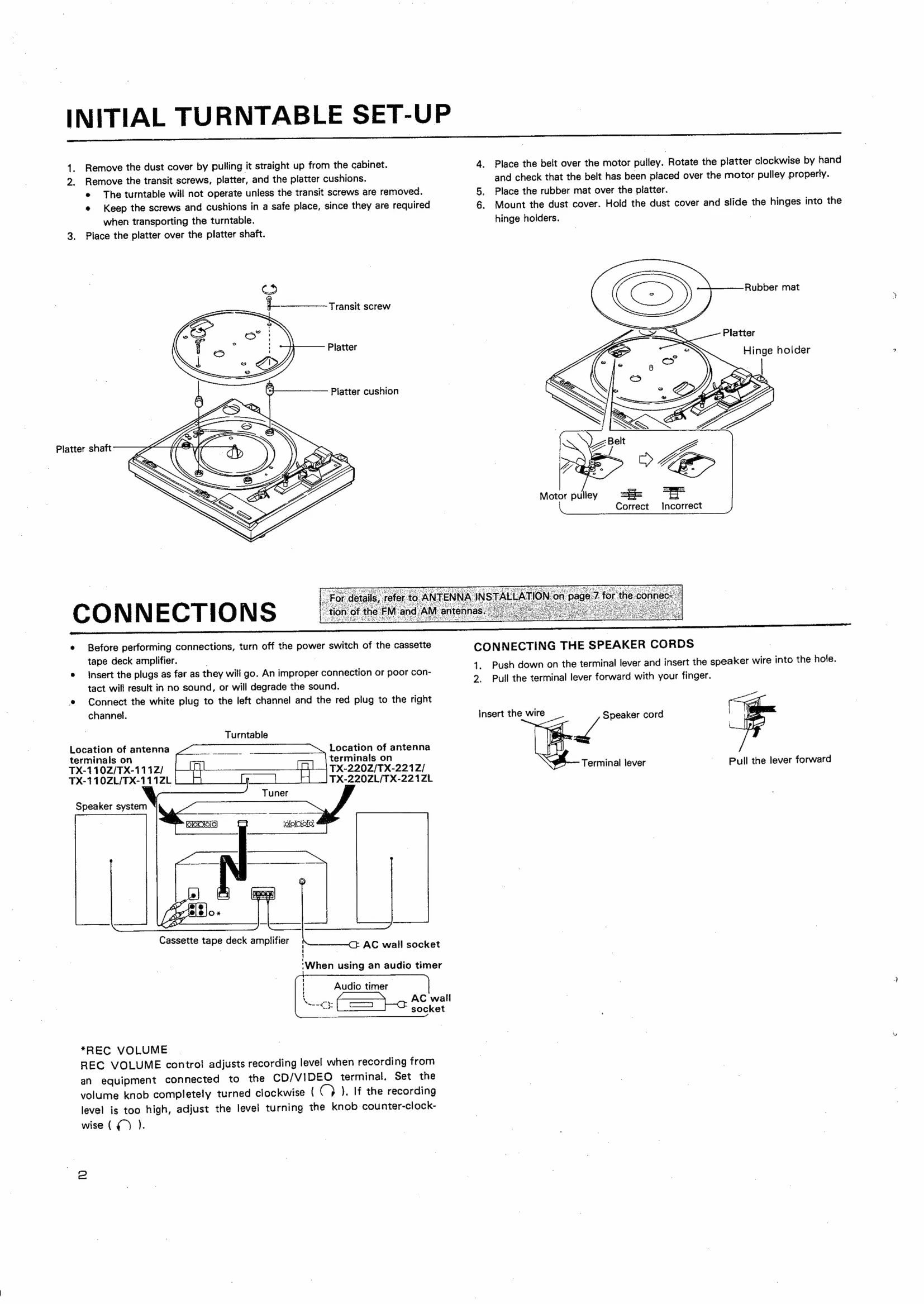
| Turntable will not operate | Transit screws not removed | Remove transit screws (Page 2). |
| Incorrect tuning | Incorrect channel step switch position (TX-220Z/TX-221Z models) | Set the AM/FM channel step switch correctly (Page 5). |
| Tape playback issues (e.g., poor high frequency) | Dirty heads, capstan, or pinch roller | Clean the head section regularly (Page 8). |
| Noise generated, treble drop during recording/playback | Rec/playback head magnetized | Demagnetize the head regularly with a head demagnetizer (Page 8). |
| Tape slack or protruding | Improper tape loading or slack tape | Take up slack with a pencil; ensure tape is properly seated (Page 8). |