Quick Start Guide for RoadRunner

Quick Start Guide for RoadRunner

Brand: Prestigio

Category: Car Video Recorder

Document Type: Quick Start Guide

Language: EN
Uploaded: Aug. 10, 2025, 12:47 a.m.

Manual Publish Date: 2014/8/1

Power On/Power Off

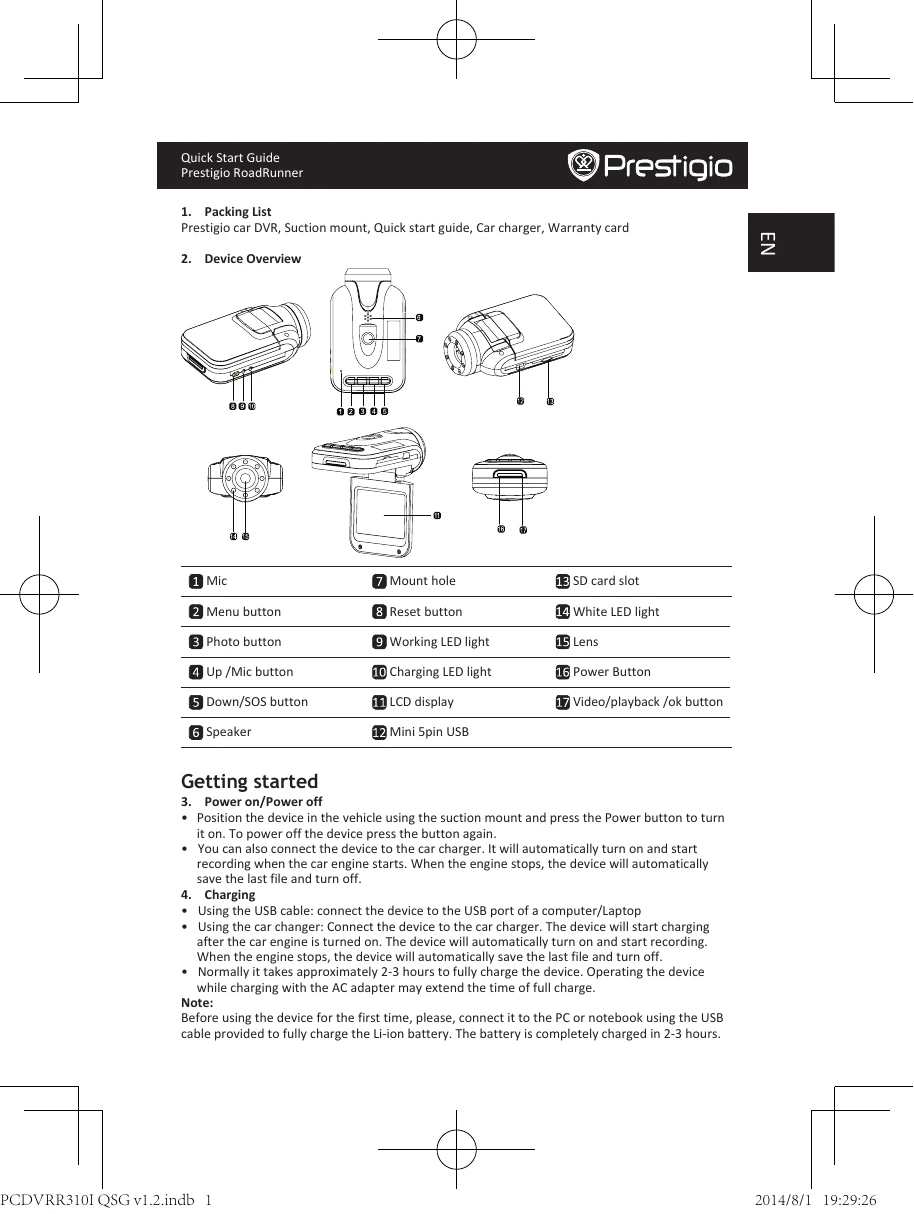
Position the device in the vehicle using the suction mount and press the Power button to turn it on. To power off the device press the button again.

You can also connect the device to the car charger. It will automatically turn on and start recording when the car engine starts. When the engine stops, the device will automatically save the last file and turn off.

Charging

  • Using the USB cable: connect the device to the USB port of a computer/Laptop
  • Using the car charger: Connect the device to the car charger. The device will start charging after the car engine is turned on. The device will automatically turn on and start recording. When the engine stops, the device will automatically save the last file and turn off.
  • Normally it takes approximately 2-3 hours to fully charge the device. Operating the device while charging with the AC adapter may extend the time of full charge.

Inserting the Micro SD-card

  • Before starting video recording, please, insert an Micro SD card (not included) into the Micro SD card slot in the device
  • To extract the SD card slightly push it inside the device, and remove.

Recording

  • Connect the device to car charger, when the car engine launched after 5 seconds, the device will start loop video recording. When shut off the car engine, the device will save file and switch off after 15 seconds

Taking pictures

  • Press the Mode button to choose the photo mode
  • Press it again to take photos, Taken photos are saved on SD Card.
  • Press the MENU button in the photo mode, then press DOWN/UP button to setting of the size, time stamp and shutter sound.
Privacy Policy