Manual for RoadRunner 585GPS

Manual for RoadRunner 585GPS

Brand: Prestigio

Category: Car Video Recorder

Document Type: Manual

Language: EN

Uploaded: Aug. 10, 2025, 12:46 a.m.

Manual Publish Date: 2018
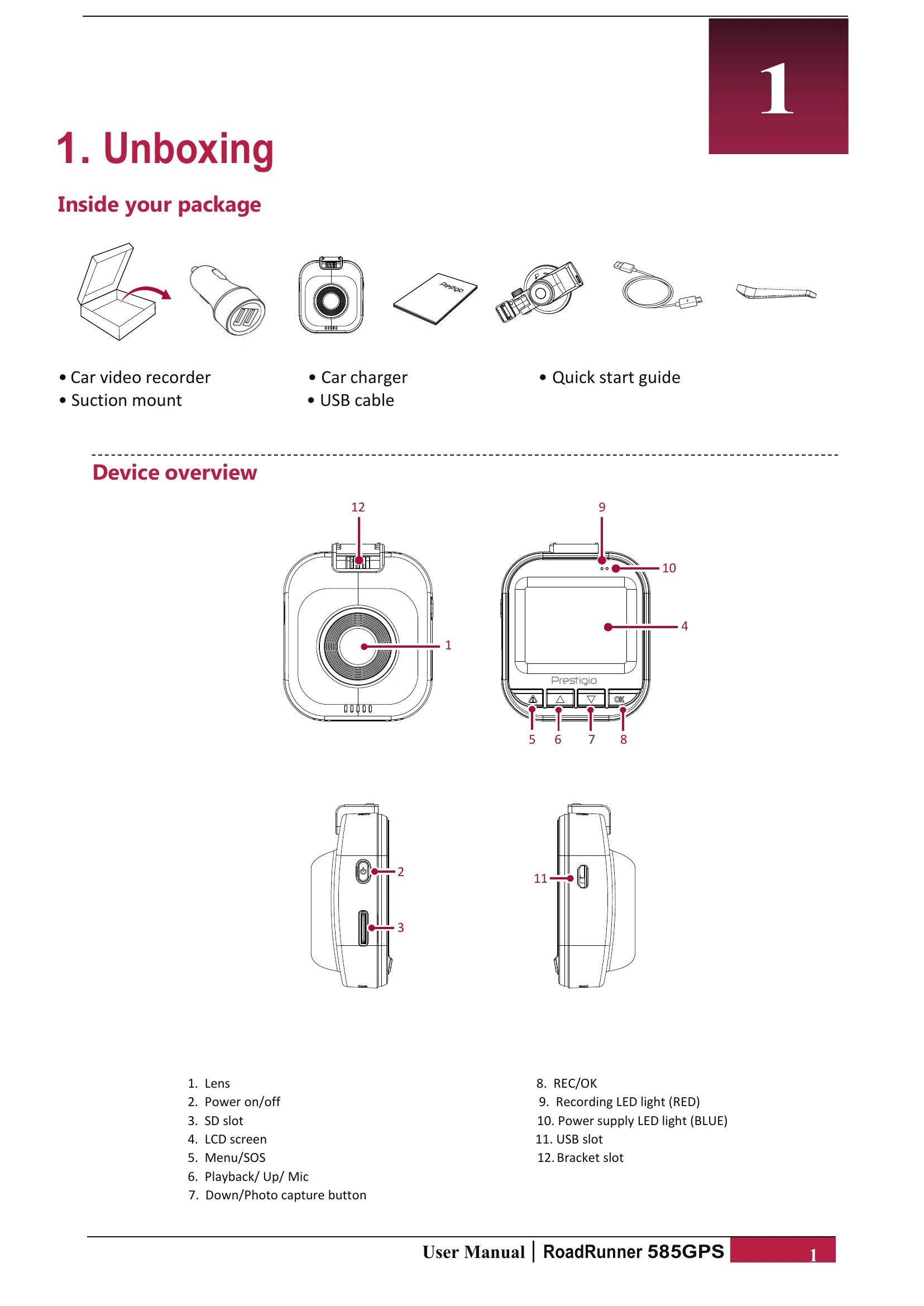
Getting Started

  • Insert a microSD card.
  • Install the suction mount.
  • Charge the battery.

Recording

  • Auto video recording: Connect to car charger for automatic start/stop.
  • Manual video recording: Press [OK] to start/stop.
  • Take a picture: Press [▼].

File Management

  • Browse files: Enter playback mode and use [▲]/[▼] to scroll.
  • Delete a file: Navigate to delete menu and confirm.
  • Lock/unlock a file: Press [MENU]/[▲] during recording.

Playback

  • On DVR: Press [▼] to enter, [OK] to play/pause, [MENU]/[▲] to exit.
  • On PC: Remove SD card or connect via USB.
  • On GPS Video Player: Install player, connect DVR, select file.
Privacy Policy