Manual for RDC-i700

Manual for RDC-i700

Brand: RICOH

Category: Digital Camera

Document Type:

Language: EN
Uploaded: Aug. 9, 2025, 11:56 p.m.

Warranty Information

This product is backed by a one-year limited warranty for defective parts.

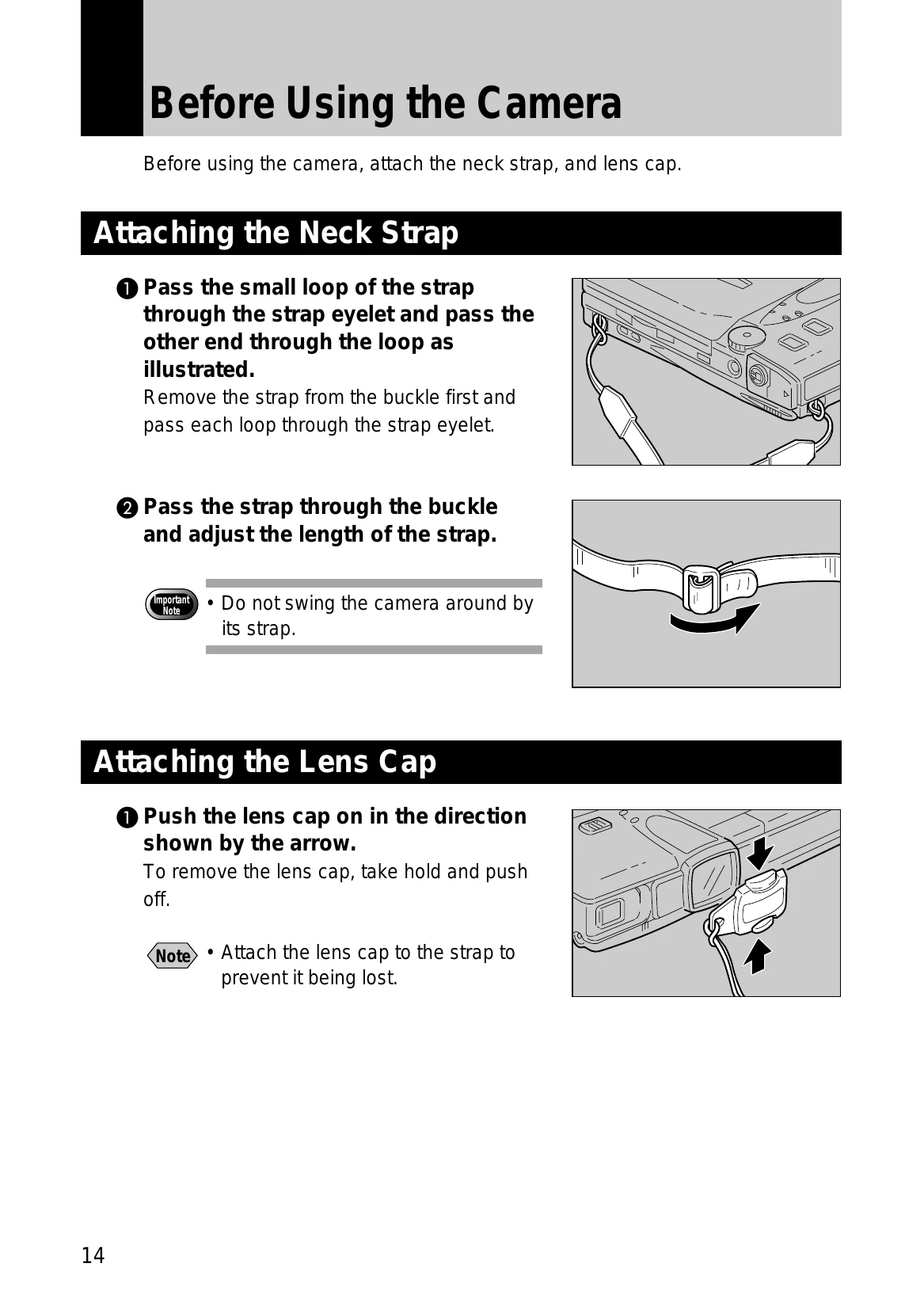
  • Before Using the Camera: Attach the neck strap and lens cap (page 14).
  • Powering the Camera: Charge the battery fully before first use (page 17). Load the battery into the camera (page 18). Connect the AC adapter for extended use (page 20).
  • Storage Memory: Insert a CF card or PC card into the appropriate slot after turning off the camera (page 22). Ensure cards are formatted before first use (page 21).
  • Basic Operations: Learn to turn the camera on/off, use the mode dial, and adjust the LCD monitor (pages 24-29). Select items using the stylus pen or on-screen keypad (pages 31, 35).
  • Shooting: Follow basic shooting procedures, including selecting modes, memory, quality, and setting zoom (pages 48-54). Explore special shooting functions like self-timer, macro mode, and white balance (pages 58-73).
  • Playback/Deleting: Play back various file types, use thumbnail playback, zoom playback, and manage files by copying, moving, and editing (pages 84-94).
Privacy Policy