Manual for Toshiba Gigabeat F Series

Manual for Toshiba Gigabeat F Series

Brand: Rockbox

Category: Portable Media Player

Document Type: Manual

Language: EN
Uploaded: Nov. 21, 2025, 7:07 p.m.

Manual Publish Date: 2008-12-23

Warranty Information

Warranty information is provided in Appendix G, covering GNU Free Documentation License and GNU General Public License.

Basic Controls

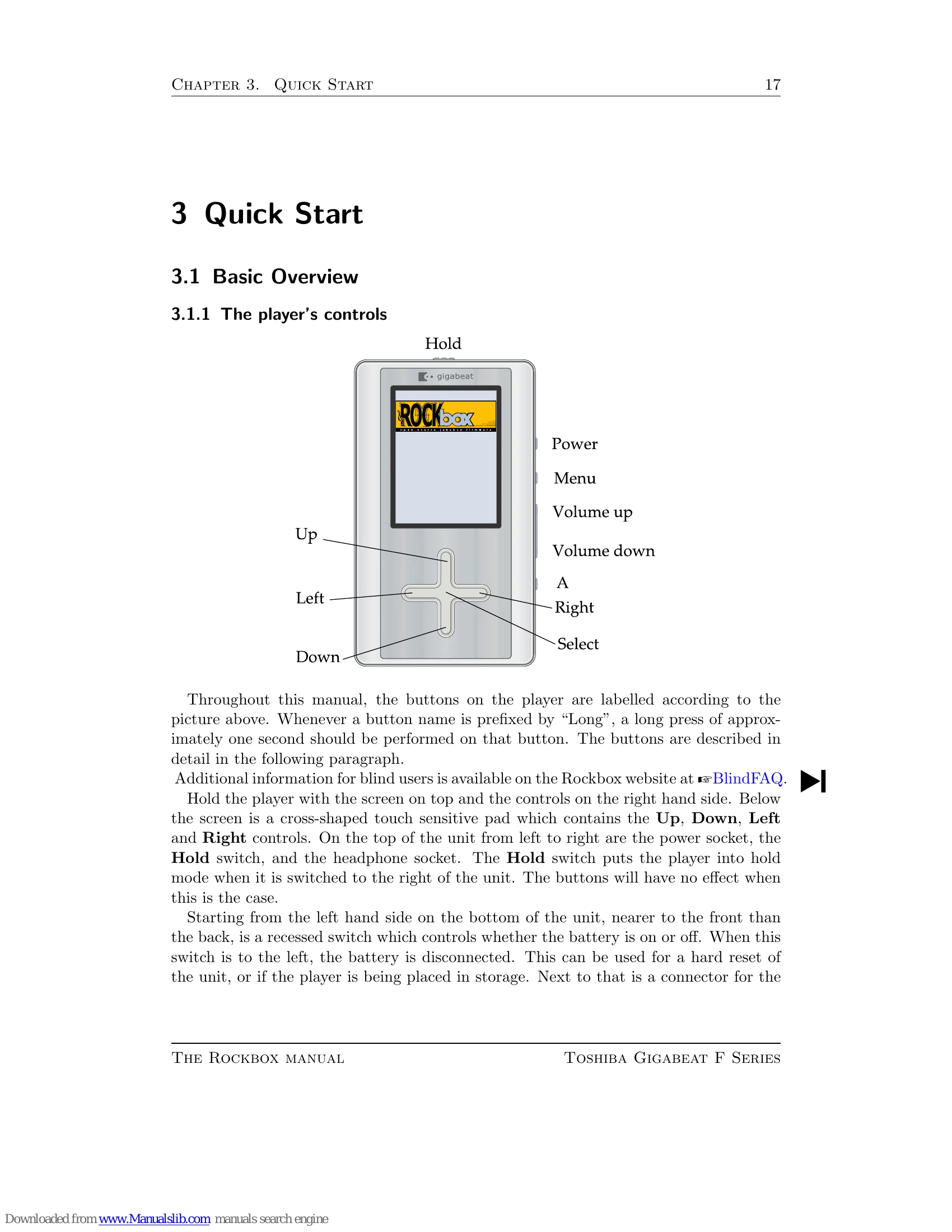
  • Up/Down: Navigate lists.
  • Left: Go to parent directory or step back.
  • Select/Right: Select item, play file, or enter directory.
  • A: Return to While Playing Screen (WPS).
  • Power: Stop playback.
  • Long Select: Enter Context Menu.
  • Menu: Enter Main Menu.
  • Long Menu: Switch to Quick Screen.

Turning On/Off

  • Power: Start Rockbox.
  • Long Power: Shutdown Rockbox.

Music Management

  • Connect player via USB (MSC/UMS) to transfer music files.
  • Default directory structure for Artist/Album names is based on folder hierarchy.

Navigation

  • Main Menu: Access all functions.
  • FILES: Browse file system.
  • DATABASE: Browse music by metadata (album, artist, genre).
Privacy Policy