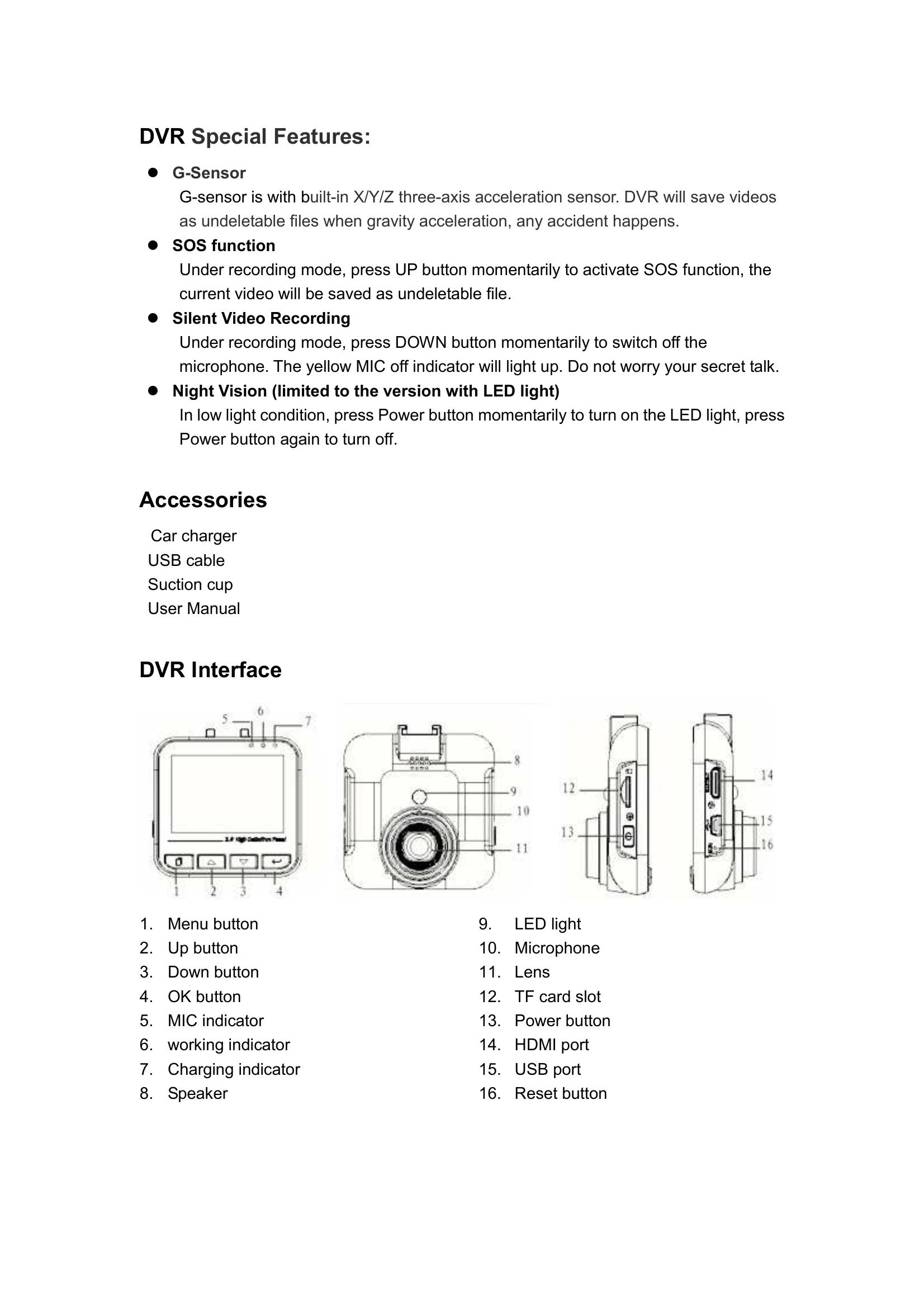
Powering On/Off: Long press the Power button. The DVR will also turn on/off automatically when connected to the car charger and the car ignites/stalls.
Video Recording:
- Normal Recording: In standby mode, press OK to start recording. Press OK again to stop. The recording icon is in the top left corner.
- Loop Recording: In standby mode, press OK to start recording. The DVR saves footage automatically at set intervals (e.g., 3 or 5 minutes) and overwrites old footage when the TF card is full.
Picture Mode: Long press Menu to enter picture mode. Aim and press OK to take a picture.
Playback Mode: Long press Menu twice to enter playback mode. Use Up/Down to select files and OK to play. Use Up/Down to fast forward/reverse during playback.
Menu Settings: Short press Menu to enter the respective mode's menu. Use Up/Down to navigate settings and OK to confirm. Short press Menu again to exit.
Connecting to HDTV/PC:
- HDMI: Connect to TV via HDMI cable. The DVR screen will turn off.
- PC: Connect via USB cable. Access the "100MEDIA" folder in DCIM to view and download files.