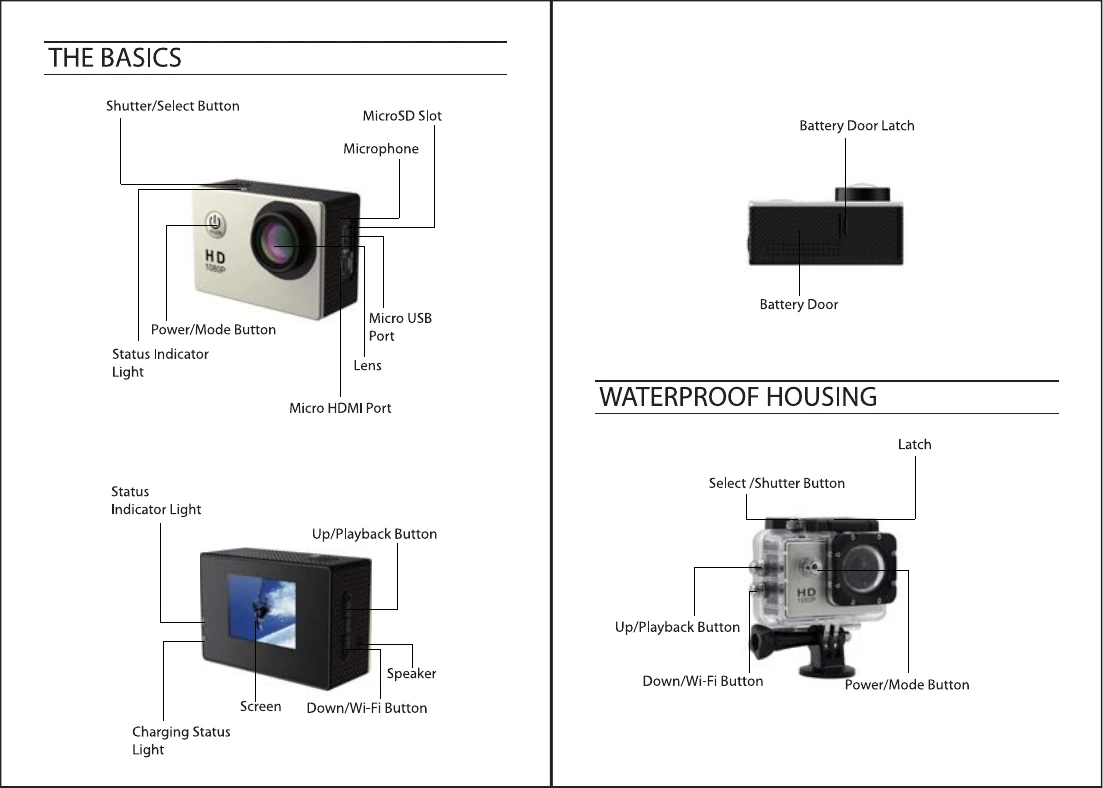
To power ON: Press the Power/Mode Button.
To power OFF: Press and hold the Power/Mode Button.
Overview:
Turn camera ON and repeatedly press the Power/Mode Button to cycle through camera modes and settings. The modes will appear in the following order: Video, Photo, Burst Photo, Time Lapse, Settings.
Video Mode:
To record Video, verify the camera is in Video mode. To start recording, press the Shutter/Select Button. To stop recording, press the Shutter/Select Button again.
Photo Mode:
To capture a Photo, verify the camera is in Photo mode. Press the Shutter/Select Button to take a photo.
Burst Photo Mode:
To capture a Burst Photo series, verify the camera is in Burst Photo mode. Press the Shutter/Select Button to take 3 photos in 1.5 seconds.
Time Lapse Mode:
To capture a Time Lapse series, verify the camera is in Time Lapse mode. Press the Shutter/Select Button to capture photos at set intervals.
Playback:
To enter the Playback menu, verify the camera is in Camera modes, then press the Up/Playback Button. Cycle through Video and Photo using the Power/Mode Button, and select with the Shutter/Select Button. Use Up/Playback or Down/Wi-Fi buttons to cycle through options.