Manual for Actioncam 372

Manual for Actioncam 372

Brand: Rollei

Category: Camera

Document Type: Manual

Language: EN
Uploaded: Aug. 10, 2025, 12:32 a.m.

Warranty Information

Refer to the warranty card for detailed warranty information.

  • Inserting MicroSD Card: Use brand MicroSD cards and format on a computer before use.
  • Installing/Removing Battery: Open compartment, insert battery correctly, or remove by opening compartment.
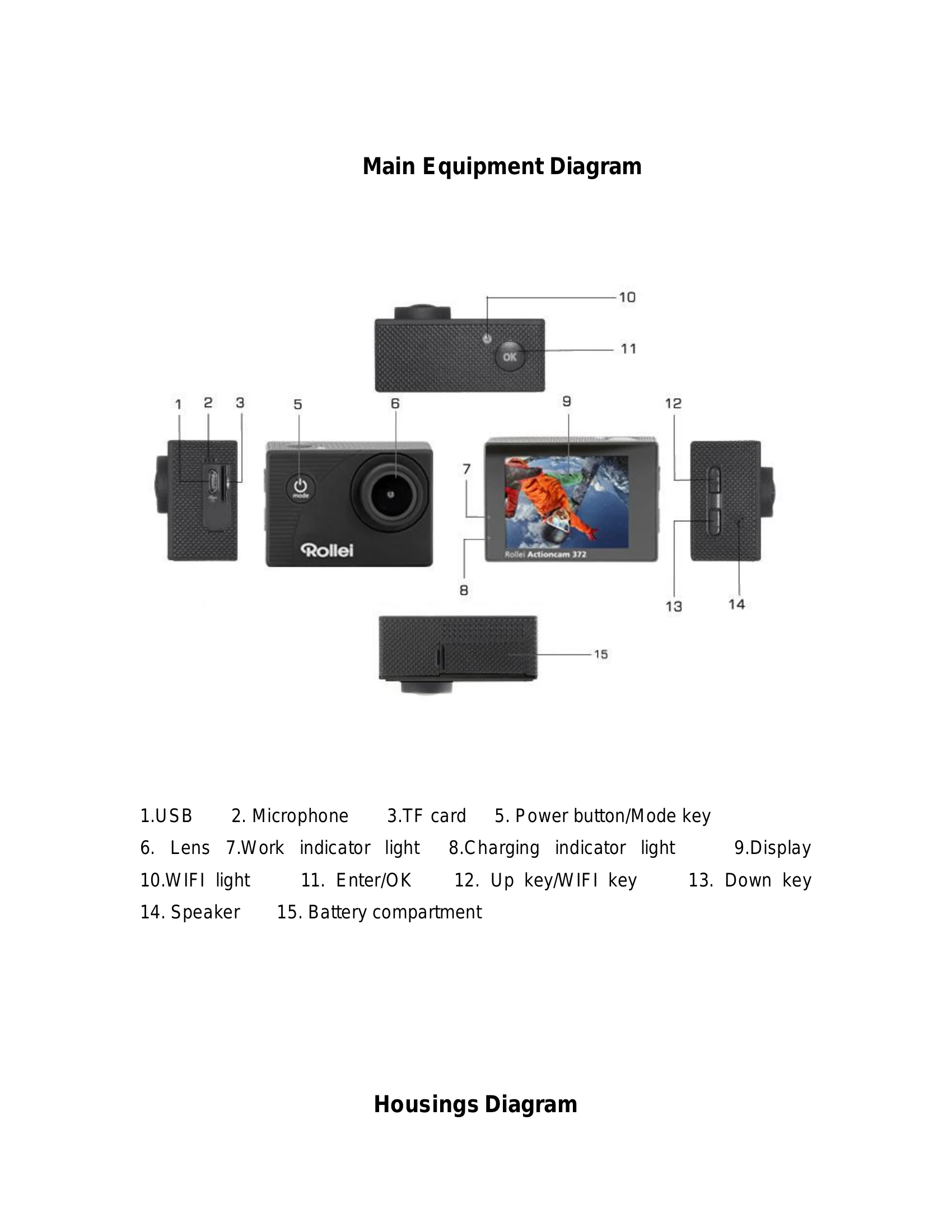
  • Charging Battery: Connect to computer USB or power adapter. Red light indicates charging, turns off when full.
  • Turning Camera On/Off: Press and hold "Power button/Mode key" for 3 seconds to turn on (blue light, display), or 3-5 seconds to turn off.
  • Mode Switch: Press "Mode key" to cycle through Video, Photo, Playback, and Setup modes. Icons indicate current mode.
  • Video Recording: Insert memory card, turn on camera, press "Enter/OK key" to start/stop recording. Blue light and yellow circle flash during recording.
  • Taking Photos: Turn on camera, switch to photo mode, press "Enter/OK key" to take a picture.
  • Playback Mode: Switch to Playback mode, use up/down keys to select image, press OK to view.
  • Menu Settings: Switch to menu settings, use up/down keys to select, Enter to enter sub-menu, OK to confirm.
  • USB Connection: Connect to computer via USB. Select "Mass Storage" (removable disk), "PC Camera" (video communication), or "Charge battery".
  • WiFi Connection: Install "Goplus Cam" app. Turn on camera's WiFi (up key). Connect smartphone/tablet to camera's WiFi (SSID: AC372_XXXXXXXX, PW: 12345). Yellow indicator flashes during connection, stays lit when connected. Start app to view live picture, record, take photos, download.

Troubleshooting and error codes

Problem Solution
Crash, black and white phenomenon If camera freezes, remove and re-install the battery. Turn on again.
Camera will not turn on or operate Check if the battery is fully charged. Otherwise, pull out and reinsert the battery and turn the camera on.
Machine heating phenomenon This is normal due to the precision digital design and sealing.
Video without sound, or play video with lower sound Ensure the device is not inside the waterproof case. Check if sound is turned off in the menu.
Video not running smooth, red and green blocks Format the memory card with a computer. Use a genuine high-speed memory card.
WiFi signal instability Ensure no barriers around the unit. Keep smartphone not too far from the camera.
WIFI Unable to connect Check if WiFi is turned on the camera. Re-connect the camera and smartphone/tablet.
Privacy Policy