Manual for Actioncam 40s Pro

Manual for Actioncam 40s Pro

Brand: Rollei

Category: Camera

Document Type: Manual

Language: EN
Uploaded: Aug. 10, 2025, 12:32 a.m.

Warranty Information

None

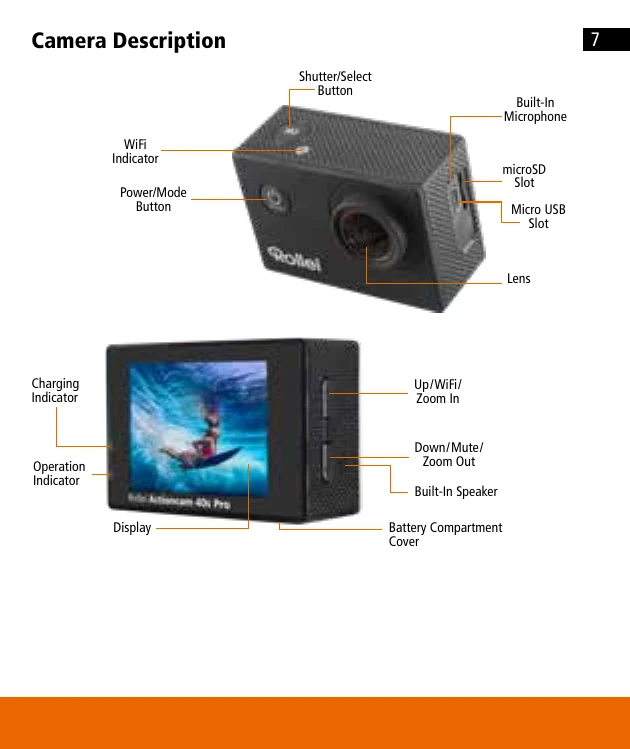
  • Turn On/Off: Press and hold the Power/Mode Button for 3 seconds.
  • Switch Modes: Repeatedly press the Power/Mode Button to cycle through modes: Video, Photo, Slow Motion Video, Playback, Settings.
  • Video Recording: Press Shutter/Select Button to start/stop recording. Use Down Button to toggle sound.
  • Photo Capturing: Press Shutter/Select Button to take a picture. Use Up Button to zoom in, Down Button to zoom out.
  • Playback: In Video/Photo Playback menu, use Up/Down Button to cycle, Shutter/Select Button to play/pause. Press Power/Mode Button to go back.
  • Delete Files: Press and hold Shutter/Select Button to delete.
  • Settings: Access via Power/Mode Button, navigate with Up/Down, select with Shutter/Select.
  • WiFi Setup: Access WiFi option in menu, connect smartphone to "Action Cam" network using password "1234567890". Download "Rollei 4s Plus" app.
  • Firmware Update: Download update file (.FEX), copy to microSD card via card reader, insert into camera, turn on, confirm update.

Troubleshooting and error codes

ProblemPossible CauseSolution
Camera does not turn onBattery is emptyCharge the battery
Battery is not inserted correctlyInsert the battery correctly
No recording possiblemicroSD card is fullFormat the microSD card or insert a new one
microSD card is not insertedInsert the microSD card
microSD card is write-protectedRemove write protection
Video/photos are jerky or distortedmicroSD card is too slowUse a microSD card with CLASS 10 (80M/S) speed rating
WiFi connection not possibleDevice not in WiFi modeEnable WiFi on the camera
Incorrect WiFi passwordCheck the password
Smartphone not connected to "Action Cam"Connect smartphone to "Action Cam" WiFi network
Privacy Policy