Manual for CarDVR-310

Manual for CarDVR-310

Brand: Rollei

Category: Camera

Document Type: Manual

Language: EN
Uploaded: Aug. 10, 2025, 12:31 a.m.

Warranty Information

The program comes with ABSOLUTELY NO WARRANTY.

  • Insert a Class 10 or higher Micro SD card (up to 32GB) and format it before initial use.
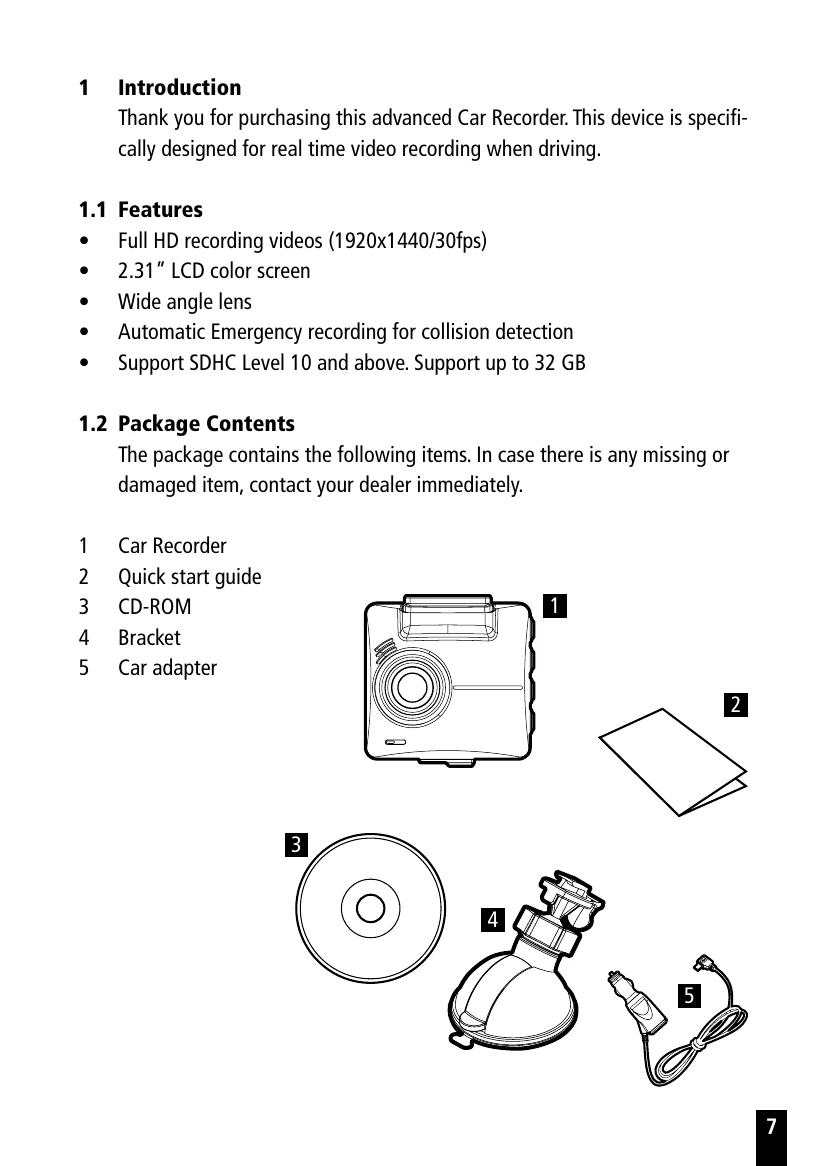
  • Mount the device to the windshield using the suction cup bracket, ensuring it's within wiper range.
  • Connect the device to the car's cigarette lighter socket using the provided car adapter for power.
  • The device turns on automatically when the engine starts and turns off when the engine is switched off.
  • To power on/off manually, push and hold the power switch until it locks or releases.
  • The device can be reset by pushing and holding the power switch for 7 seconds.
  • Initial settings include setting the Date/Time and enabling/disabling Automatic Record.
  • Recordings can be started/stopped manually, and emergency recordings can be initiated by pressing the OK button.
  • Parking Mode can be activated for Motion Detection or Vibration Detection.
  • Playback allows viewing videos and photos, and deleting files.
  • Settings can be adjusted via the on-screen display (OSD) menu.
  • The SuperCar software allows for video playback with GPS and G-Sensor data.

Troubleshooting and error codes

Item Description
Motion Detection If disconnected from power when the device is powered on, the system alert message "Wait for 10 seconds to enter Motion Detection, or press OK key to power off.” This means the system will be displayed on the screen. This means the system will enter Motion Detection automatically in 10 seconds, when the device detects any motion in front of lens or detects any external vibration, Video Record will be 10 seconds, if the screen detects any vibration, the device will keep recording next 10 seconds until the vibration stops. If press OK within 10 seconds, the device will be powered off instead of entering Motion Detection mode.
Off No parking monitoring activated.
Privacy Policy