Brand: Rollei
Category: Camera
Document Type: Manual
Language: EN
Brand: Rollei
Category: Camera
Document Type: Manual
Language: EN
Uploaded: Aug. 10, 2025, 12:32 a.m.
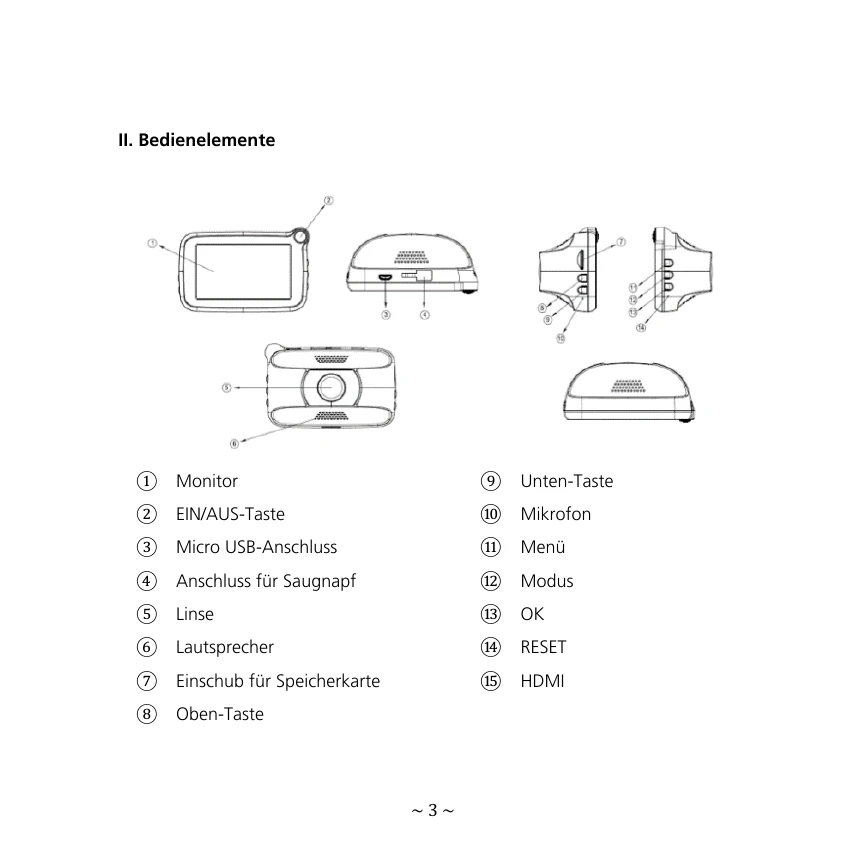
Powering On/Off: Automatically powers on/off with the car's ignition. For manual operation, short press the POWER button to start and long press to shut down.
Recording: Automatically starts recording when the car starts. Loop recording time is set to 1 minute. The device automatically displays the recording interface upon startup.
Emergency Recording: Manually triggered by pressing the emergency button (•). This locks the current, previous, and next videos as emergency files. Automatic emergency recording is initiated by vehicle impact detected by the G-sensor.
Playback: Use the MODE button to select playback mode. Press OK to access file listings and view emergency videos.
Menu Settings: Navigate menus using UP/DOWN buttons and confirm with OK. Options include sound recording, volume, file deletion, beep-tone settings, date/time adjustment, language selection, flicker frequency, auto LCD off, parking monitor, motion detection, GPS status, time zone selection, default reset, and formatting.