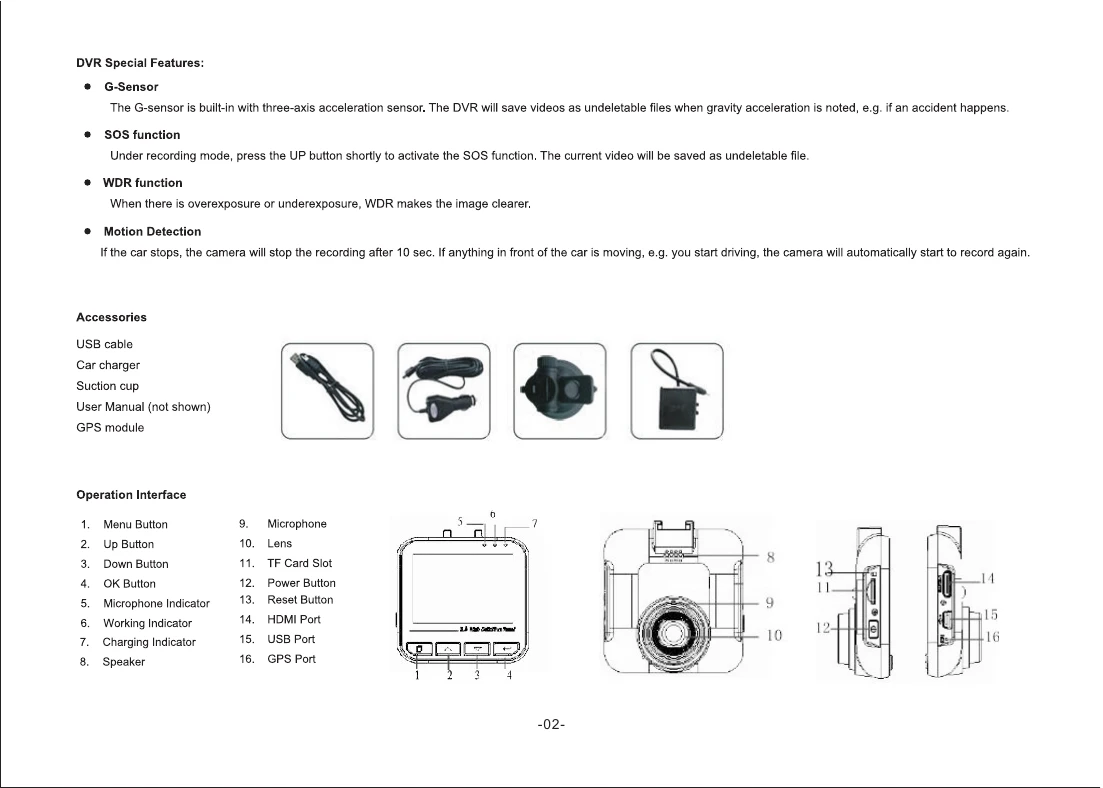
Power ON/OFF: Briefly press the power button to turn the camera on. A beep will sound, and the blue indicator will light up. Long press the power button to turn it off. The camera will automatically turn on/off with the car's ignition when connected to the car charger.
Video Mode: In standby, press OK to start recording. The blue indicator flashes, and a red recording icon appears. Press OK again to stop. Loop recording can be configured in the menu (1, 3, or 5 minutes). The camera overwrites the oldest files when the TF card is full.
Picture Mode: In standby, press the menu button for 3 seconds to enter picture mode. Aim and press OK to take a photo.
Playback Mode: In standby, press the menu button twice to enter playback mode. Use Up/Down buttons to select files and OK to play.
Delete and Protect Files: In playback mode, press menu to enter delete mode. Select Delete or Protect, confirm with OK, then select the file(s) and confirm.
Menu Setting: Press menu for 3 seconds to switch modes (video, picture, playback). Short press menu to enter the respective menu. Use Up/Down to adjust settings and OK to confirm. Press menu to exit.